
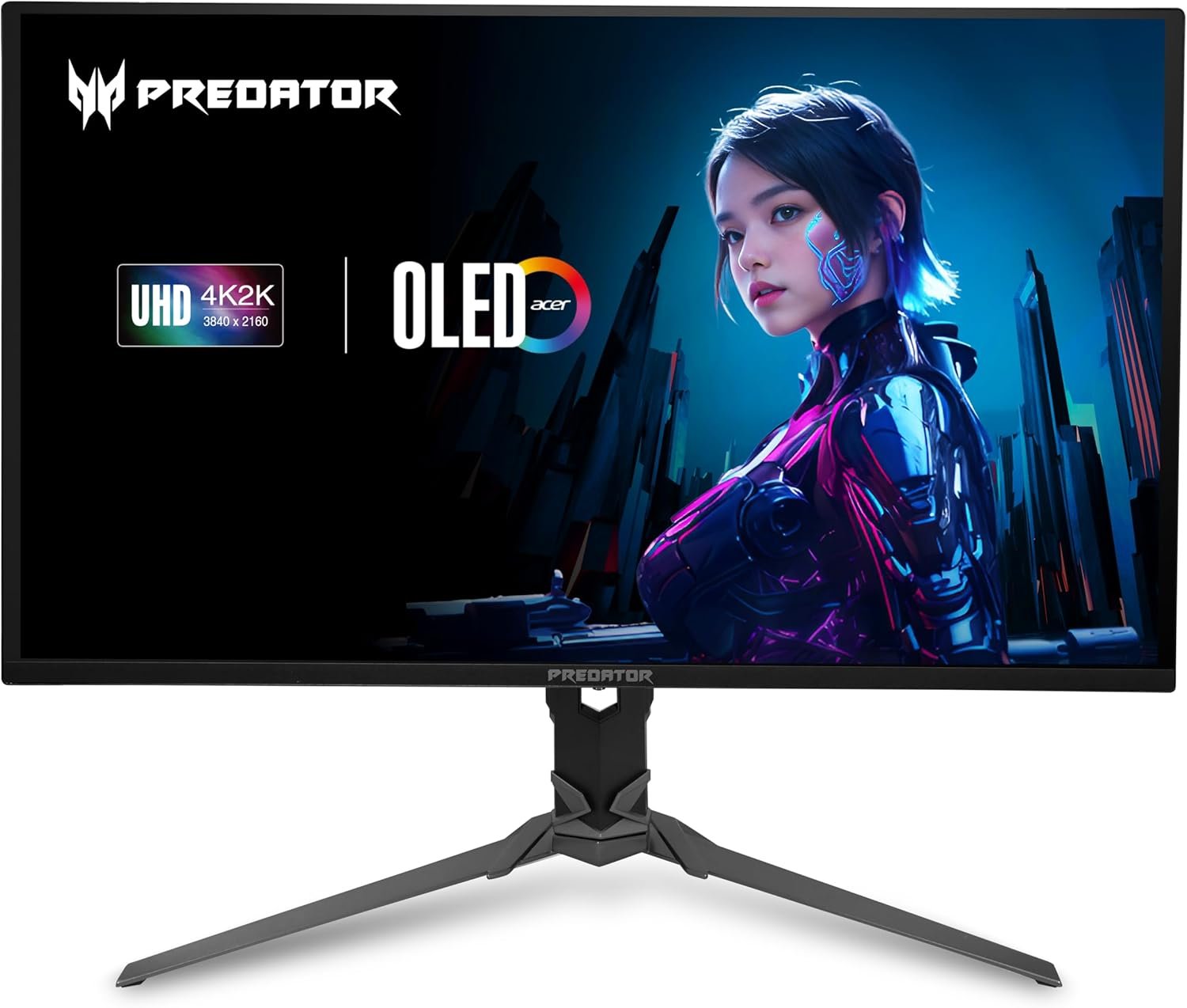
acer Predator Gaming Monitor | 31.5″ UHD 3840 x 2160 OLED | AMD FreeSync Premium Pro | 240Hz | 0.03ms | VESA DisplayHDR True Black 400 | DCI-P3 99% | Display Port 1.4 & 2 x HDMI 2.1 | X32 X2bmiiphx
$104.99
Related Products




OLED IN FULL FORCE: Enjoy gaming at its finest with an OLED gaming monitor boasting 4K UHD (3840 x 2160) resolution and 240Hz refresh rate with 0.03ms (G to G) response time. Equipped with Display Port and HDMI, the X32 X2 is the perfect gaming companion. This AMD FreeSync Premium Pro monitor takes gameplay to the next level of smooth. Enjoy exceptional color purity and more realistic natural images thanks to an expanded contrast ratio and color palette using VESA DisplayHDR True Black 400–all housed in a ZeroFrame design that makes for a near-seamless look! (UM.JXXAA.202)
OLED Makes All The Difference: With a display of these mammoth-like proportions, everything must look good. The 4K UHD OLED display with true 10Bit is obligated to offer stunning contrast, cinematic color. Image retention keeps the images from sticking.
AMD FreeSync Premium Pro Technology: Get in the game with the AMD FreeSync Premium Pro display. Each display is validated by AMD to bring you a smooth, variable refresh rate (VRR) gaming experience that eliminates tearing, stuttering, artifacts, and flicker.
Fast and Furious: If you want seamless gameplay at ridiculous levels of speed, you’ve come to the right place. With an 240Hz refresh rate and 0.03ms (G to G) response time, your sessions will be fluid, unbroken and unmatched – with little to no ghosting.
Brilliant Colors: Boasting a DCI-P3 99% color gamut and VESA DisplayHDR True Black 400 (Min. 0.0005 nits), vibrant colors leap from the screen. Revel in the finest visuals your games can deliver!
Be Flexible: The Acer monitor allows user to tilt, swivel and height adjust with flexibility to meet every using environment, finding the best viewing angle.
Center of Vision: At 31.5-inches, the Predator X32 is directly in your field of view. Considered a hallmark of eSports tournaments, this is the perfect size to gain an edge over your opponents. The addition of a ZeroFrame design also removes the bezels – giving you have even more visibly over every match and every movement your rivals make.
Designed for the Triathlon: Predator X32 has a bonanza of features that both improve your viewing experience and help reduce eye strain during long, drawn-out gaming sessions. The flicker-less display has a blue light filter and glare reduction that significantly improve viewing comfort while enhancing eye protection. Game longer, and in comfort.
31.5″ UHD (3840 x 2160) Widescreen QD-OLED Display | AMD FreeSync Premium Pro | Refresh Rate: 240Hz | Response Time: 0.03ms (GTG)
VESA mounting compliant (75 x 75mm) | Brightness: Typ. 250nits, Peak 1000nits @ HDR 3% | High Brightness and Contrast with VESA DisplayHDR True Black 400 | DCI-P3 99% Wide Color Gamut | Delta E<2 | 2 Speakers, 2 Watts Per Speaker
Ergostand with Tilt, Swivel and Height Adjustment | Ports: 1 x Display Port 1.4, 2 x HDMI 2.1 & 1 x Audio Out| Display Port and HDMI Cables Included
9 reviews for acer Predator Gaming Monitor | 31.5″ UHD 3840 x 2160 OLED | AMD FreeSync Premium Pro | 240Hz | 0.03ms | VESA DisplayHDR True Black 400 | DCI-P3 99% | Display Port 1.4 & 2 x HDMI 2.1 | X32 X2bmiiphx
Add a review

$104.99
MasterBladesman –
Probably best in its class/price range.
Upgraded to this beasty from a 27” 1440p RoG Swift from a few years ago. It was dual-purpose upgrade: increased horizontal desktop real estate for coding IDE work and more immersive gaming. Delivery from Amazon was brisk, and the box was in perfect order. This monitor is packed very well, and the box wasn’t as huge as I expected. Here’s a breakdown of the “pros” and “cons”:+ Received with no dead pixels or any other obvious defects.+ Comes assembled and ready to use AND is calibrated from the factory – just remove the plastic connect and play!+ The factory calibrated settings look as good as what I was able to achieve on my ROG Swift after a lot of careful research and tweaking.+ Overall solid and attractive hardware design, with a very sturdy base which allows you to clamp the monitor down to the back of your desk.+ The image quality is a bit better than on the aforementioned 27” RoG Swift. That 10-bit wide color gamut really makes things pop.+ The HDR implementation is actually decent. You do get most of the desired effect when streaming HDR videos and playing HDR-enabled games. The best-in-class 550 nit brightness and the wide color gamut make the standard baseline DisplayHDR 400 implementation better than on the previous generations of such monitors. I mean, it’s not even close to my LG OLED TV, but not bad! I wasn’t expecting much and was pleasantly surprised. Played Doom Eternal and Gears 5 and they both felt enhanced by the HDR.+ The G-Sync implementation works perfectly, with not even a hint of screen tearing anywhere.+ TWO (x2) DisplayPort 1.4 inputs! This is actually the feature than made this monitor standout from the competition for me. I wanted both my gaming and work boxes connected via DP (for a change) and this monitor delivered!+ It really is a dual-monitor setup replacer and is great for codding IDE use, with lots of horizontal desktop real estate.+ No issues with the built-in USB hub.+ No “Acer” logo anywhere; just the kewler “Predator”!+ Elegant and conservative aesthetic, with no LED lights or brightly colored plastic anywhere. This might be a con for some!+ Easy height and angle adjustments that stay put.and as far as the “cons”…- The base is a bit too deep if you’re like me and have a narrow desk. One of the legs was interfering with my mouse pad. My solution was to move the monitor further back, which left the back of the base extruding off the desk. I then clamped it down, so that it doesn’t try to move further off the desk. Worked out ok, but it is bit annoying.- Backlight bleed. I know that it’s an issue inherent to all IPS panels – certainly all the ones I’ve ever owned. However, this monitor has it a bit more pronounced than my old RoG Swift. On the bright side (pun?), it’s only really noticeable when the screen is all black and doesn’t particularly bother me.- This is a 10-bit panel but only up to 144 Hz refresh rate! If you set your refresh rate any higher, it becomes an 8-bit panel. Not a big deal to me, since 144 Hz is plenty for my needs. I prefer the 10-bit gamut to higher refresh rates.- The input positioning and access is atrocious! Hooking everything up too way longer than it should, with me basically having to feel my way around like a blind person. My ROG Swift had the same issue, but it’s even worse here. Luckily, once everything is hooked up, you no longer have to worry about it, and it does make the cabling less conspicuous.- The OSD is pretty “basic bitch” and switching inputs takes too many clicks.All these “cons” are minor, are not enough to knock off a star from the rating and are grossly outweighed by the positive aspects.By the way, a lot of people seem to be confused as far how to set things up in order to consume HDR content. You have to select the HDR Color Mode in the monitor’s OSD and then also enable “Use HDR” under Windows 10’s Display Settings. Then, to get any benefit from it, you have view HDR content, such as HDR enhanced streaming videos or games with HDR support built in and turned on (in the games’ options). Windows 10’s HDR integration used to be pretty crappy, but they seem to have worked out the issues and I’ve had zero problems. Overall, outside of some nitpicks, this is a great monitor and I do recommend it for either work or games. I agree with another reviewer that this is the best 34” UWQHD monitor under $1000.
Momma’s Prime Picks –
Hoping some updates via firmware are coming soon
I like getting good value for my money without spending on features with diminishing returns, and I feel this monitor fits the bill nicely. It includes the features that matter most while skipping some less important but still useful ones. For example, the stand offers decent adjustments—good enough for my needs—but it’s not the best, which likely helps keep the cost down. I really like the monitor’s design. It doesn’t have that typical ‘gaming’ look; instead, it’s sleek and high-end, which I appreciate.That said, I’d love a few more options in the menu, like the ability to turn off the joystick LED. It’s located under the monitor, so it’s not a huge issue, but it’d be nice to have control over it. Another minor annoyance is the warning message about ‘turning off the LED’ that pops up. They should add a way to adjust its timing. Fortunately, these are things that could be addressed in a software update. If that happens, I’d happily bump this review to five stars. Overall, I’m very satisfied with the monitor—the picture quality is fantastic for both gaming and watching movies.
Poster134233 –
amazing monitor
I had the pervious 32 inch Acer Predator, which cost me 1000$, so this at 800 was a deal. This picture is amazing, especially in HDR. Be careful with it though, it is a very thin monitor. This thin cannot handle much pressure if you lift it the wrong way, or put any pressure on its edges.
XD45c –
Annoying but beautiful display
Annoying monitor prompts on screen require intervention every couple of hours. But clarity and Brightness are phenomenal. You don’t see the curve.
Gregory Discher –
Great OLED monitor
Fantastic monitor for the price. The difference between the OLED panel and my other VA panel monitor is night and day. Colors are so crisp and vibrant. Would definitely buy again.
Scott York –
Run from ACER FAST and don’t look back!
This was a big spend for me. $1000 for a monitor. As soon as I hooked it up it started to blink (black screen) for a few seconds. But it doesn’t stop, it just keeps going and it gets faster. The only fix was dropping the refresh rate to 100hz. As the blinking got faster in duration, if I didn’t move fast enough between blinks I couldn’t get to the refresh screen to change/stop it. But that’s not the refresh rate I was looking for when I purchased it. Amazon was great! They immediately agreed to send another. I got the replacement monitor and again it blinks but not nearly as often as the previous. Just try playing a FPS games and it blinks as your stalking a bad guy. 😞. So call ACER you say? Good idea! Or is it? NOPE!So I call ACER 5x! Your calling a Columbian (South America) call center. The ladies were all very nice and trying to assist but they are just reading a script. The first 2x the call center they told me I needed to call back when the Texas facility it open to speak with a technician. The 3rd call they said I couldnt speak with the call center and as painful as it was, I answered again the questions. She had me on so long when I insist on speaking with a technician in TX (and the call center calls themselves technicians) ha!, She says they are closed. What are the hours of operation? 8a-5p central timeI say it’s open, it’s only 4p in TX. She insists they are closed and I should call back the next day. I immediately call back and get the call center who tried to ask the same old questions. I instructed them to review the notes. Again she said TX was closed and call back. The next day I call. The call center says “no you can’t speak with a supervisor” and “she can’t transfer me to a TX technician” but she was willing to send me a label to send the monitor to the warehouse for repairs. What about a firmware update you ask? Great idea! Or is it? There is no firmware update. Digging deep into the reviews, this is a known issue that ACER hasn’t fixed since 2020!! No solution. SHAME ON ACER!This is horrible customer service! Their is no way to get with someone in the know! Now if I worked remote, what would I do if I had no monitor? Bad news! There is no guarantee of a quick turn around.And all of that overshadows that the picture is actually quite nice.AMAZON….if you know that this is a long standing issue, you need to take a look at your policies and what products/companies you support.
Dario –
El producto llego en buenas condiciones y funciona perfectamente según las especificaciones indicadas. Quizá el único punto negativo que le pondría es que molesta el botón de encendido debajo de la mitad de la pantalla y se siente algo endeble.
Trololol –
The x34 gs is probably the best monitor I’ve used so far. With its 180hz framerate and G-Sync compatible support. Gaming is really smooth. Screen quality is great, I didn’t get any dead pixels on purchase.It also has a few extra features that I was surprised about. I really like how it included 4 used port for extended hub. I have a lot of usb devices attached to my computer and this actually allows me to have more.What I feel like it lacks is in the OSD. I connect my PS5 and PC in the monitor but with Adaptive sync on, the image looks stretched to full screen when using the PS5. I hope they had the option to change the setting per source.
Amazon Customer –
I have a love hate relationship with this monitor. The colors are fantastic. The screen is decently bright. And the motion on it is really good.My only issue with it is its panel quality control. Im now on my third one that ive tried to buy with out pixel problems. The First one had a stuck bright green pixel in the center area of the screen. I wasn’t able to reset the pixel by color cycling so I tried to buy a second one. The second one didn’t have any stuck pixels. But had 3 dead pixels. Two on the right of the screen and one in the upper center of the screen. UGH! So I decided to try buy a 3rd monitor. Figured I cant get 3 bad ones in a row. Well I was wrong. This one has a stuck pixel like the first one! The stuck bright pixel is more a greyish color but very visible and noticed it right away upon turning the monitor on and seeing it on acer splash screen.This really sucks cause other then that these monitors are great and I really really wanted one..So this is a warning. If bright or dead pixels right out of the box will be a issue for you. You might want to try a different monitor. Cause im 0 for 3 in getting one that doesnt have any.