
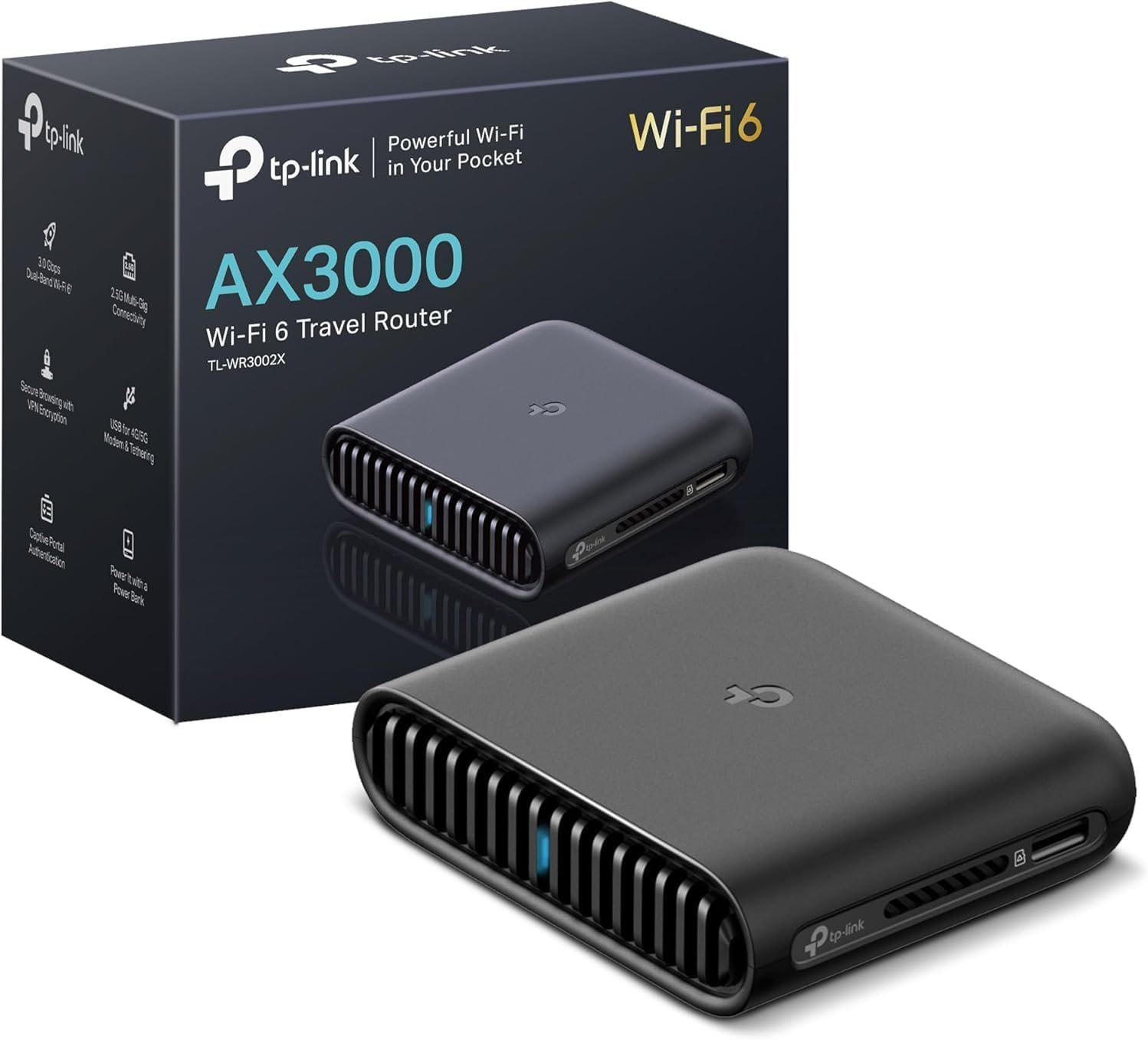
TP-Link Dual-Band Wi-Fi 6 AX3000 Travel Router TL-WR3002X | Multi-Gig Portable | OpenVPN, WireGuard | Easy Public WiFi Sharing | Hotel/Cruise/Travel Approved | Phone WiFi Tether | USB 3.0 | Multi-Mode
$9.99
Related Products

![[Upgraded] BigBlue 3 USB Ports 28W Solar Charger(5V/4.8A Max), Portable Foldable Solar Panel for Camping, IP44 Waterproof, Compatible with iPhone 11/XS/XS Max/XR/X/8/7, iPad, Samsung Galaxy LG etc.](https://simplysystems.co/wp-content/uploads/2025/11/81YnxzTVGL._AC_SL1500_.jpg)

![Reborn HDMI to USB C Cable Adapter [10FT 4K@60Hz], Uni-Directional HDMI (Source) to USB-C (Monitor) with USB Power for AR Glasses XREAL One、Air 2 Pro/VITURE Pro/RayNeo Air 2s,PS5,Portable Monitors](https://simplysystems.co/wp-content/uploads/2025/11/61Lajv4JMpL._AC_SL1500_.jpg)


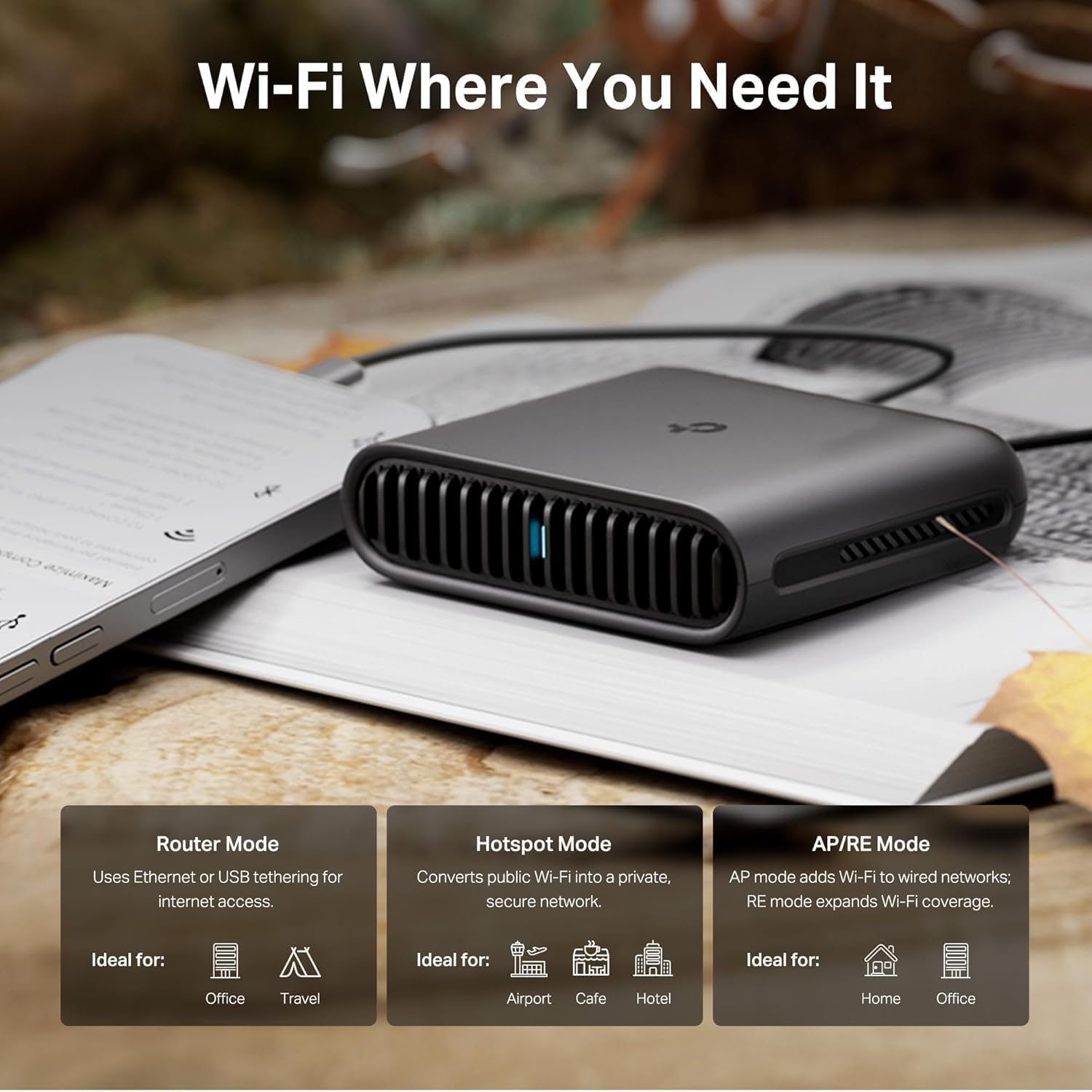


Powerful Wi-Fi in Your Pocket
The compact and powerful TL-WR3002X Travel Router lets you create a personal, secure Wi-Fi network anywhere. With Wi-Fi 6 technology, you can enjoy more capacity for connected devices and faster wireless speed. TL-WR3002Xprovides encryption and authentication with OpenVPN & WireGuard. Our travel router offers versatile network modes to adapt to any scenario, including acting as a repeater for public Wi-Fi. Whether you’re traveling for work or leisure, attending conferences, or joining virtual meetings on Zoom or Microsoft Teams, our portable wifi router has got you covered.
The TL-WR3002X travel router features an MTK dual-core 1.3 GHz CPU. Its compact dimensions (4.1 x 3.5 x 1.1 inches) make it easy to carry anywhere. Included with the purchase is the TL-WR3002X router, an RJ45 Ethernet cable, a power adapter, a USB cable, and a quick installation guide. It supports 2×2 streams on both the 5 GHz and 2.4 GHz bands and offers advanced features such as beamforming, MU-MIMO, OFDMA, Target Wake Time (TWT), DFS,HT160, AP mode, and QoS (Quality of Service). Other advanced features include access control, IPv6, guest networks, LED control, port forwarding, SPI firewall, dual factor authentication (2FA), RE mode, dynamic DNS, and VPN pass-through.
The router also includes key features through the Tether App, such as parental controls like URL content filtering and the ability to block specific websites. It is compatible with Alexa and Google Assistant and provides cloud services for automatic firmware updates. Designed to function in temperatures ranging from 32°F to 104°F and humidity levels between 10% and 90%(non-condensing), it is ideal for a wide range of environments.
For security, the router includes DoS protection, an SPI firewall, IP address filtering, MAC address filtering, domain filtering, and IP/MAC address binding. It also holds regulatory certifications from FCC/CE for safety and reliability.
𝐀𝐗𝟑𝟎𝟎𝟎 𝐃𝐮𝐚𝐥-𝐁𝐚𝐧𝐝 𝐖𝐢-𝐅𝐢 𝟔 𝐓𝐫𝐚𝐯𝐞𝐥 𝐑𝐨𝐮𝐭𝐞𝐫 – TP-Link’s fastest Wi-Fi 6 travel router, with wireless speeds of up to 2402 Mbps on 5 GHz and 574 Mbps on 2.4 GHz. Enjoy uninterrupted video streaming, downloads, and gaming across up to 80 devices.◇§
𝐒𝐭𝐚𝐲 𝐂𝐨𝐧𝐧𝐞𝐜𝐭𝐞𝐝 𝐀𝐧𝐲𝐰𝐡𝐞𝐫𝐞 – Our travel router offers (1) Router Mode for Ethernet or USB (phone) tethering connections, (2) Hotspot Mode for accessing public Wi-Fi securely, and (3) AP/RE Mode for expanding Wi-Fi coverage or adding Wi-Fi to wired networks
𝐌𝐮𝐥𝐭𝐢-𝐆𝐢𝐠𝐚𝐛𝐢𝐭 𝐂𝐨𝐧𝐧𝐞𝐜𝐭𝐢𝐯𝐢𝐭𝐲 – 1x 2.5 Gbps WAN/LAN and 1x 1 Gbps LAN ports along with Wi-Fi 6 speed enables fast wired and wireless data transmissions
𝐎𝐮𝐫 𝐂𝐲𝐛𝐞𝐫𝐬𝐞𝐜𝐮𝐫𝐢𝐭𝐲 𝐂𝐨𝐦𝐦𝐢𝐭𝐦𝐞𝐧𝐭 – TP-Link is a signatory of the U.S. Cybersecurity and Infrastructure Security Agency’s (CISA) Secure-by-Design pledge. This device is designed, built, and maintained, with advanced security as a core requirement
𝟐𝟒/𝟕 𝐒𝐞𝐜𝐮𝐫𝐞 𝐒𝐮𝐫𝐟𝐢𝐧𝐠 𝐰𝐢𝐭𝐡 𝐕𝐏𝐍 𝐄𝐧𝐜𝐫𝐲𝐩𝐭𝐢𝐨𝐧 – Protect your network with OpenVPN and WireGuard support for both VPN client and server. Enjoy private, secure browsing on public Wi-Fi, with PPTP and L2TP protocols also supported
𝐎𝐧𝐞-𝐒𝐭𝐞𝐩 𝐂𝐚𝐩𝐭𝐢𝐯𝐞 𝐏𝐨𝐫𝐭𝐚𝐥 𝐀𝐮𝐭𝐡𝐞𝐧𝐭𝐢𝐜𝐚𝐭𝐢𝐨𝐧 – Log in once on the Tether App to easily create a secure private network from public W-Fi for all your devices. No repeated logins needed
𝐌𝐮𝐥𝐭𝐢𝐩𝐥𝐞 𝐖𝐚𝐲𝐬 𝐭𝐨 𝐏𝐨𝐰𝐞𝐫 𝐘𝐨𝐮𝐫 𝐑𝐨𝐮𝐭𝐞𝐫 – Power the TL-WR3002X via its USB-C port using the included adapter or any 5V PD power source like a power bank.
9 reviews for TP-Link Dual-Band Wi-Fi 6 AX3000 Travel Router TL-WR3002X | Multi-Gig Portable | OpenVPN, WireGuard | Easy Public WiFi Sharing | Hotel/Cruise/Travel Approved | Phone WiFi Tether | USB 3.0 | Multi-Mode
Add a review

$9.99
Curt –
Very fast, secure, easy setup, and easily handles multiple devices at a very affordable price.
This is my second TP Link router, my first router being wi-fi 5. Wanting to take advantage of the increased speed with Spectrum, I decided I buy a wi- fi 6 router. My previous TP router had given me a great internet experience, so it was an easy choice to buy another router from TP Link.Setting it up was simple using the TP Link app, and the performance had exceeded my expectations. I’m getting Ethernet speeds wirelessly. I currently have 14 devices connected to my router and haven’t had any performance issues, every device is running perfectly.With this router, I know that I’m getting the internet speed I’m paying for.I’d highly recommend this, or any other router that TP Link manufacturers. It’s a quality company that makes high quality products.
trs –
Solid performer
[updated]I updated from a TP-Link Archer C7. I have an Arris SB8200 modem. Here are a few notes.The AX55 signal strength seems a little better, especially in the 5 GHz band. It also adds 802.11ax and WPA3 security as well as “Smart Connect” which allows you to combine 2.4G and 5G bands under a single SSID and have the router decide which to use with each client. You could just give the separate bands the same SSID with any router. In that case each client would decide which band to use. The router login no longer uses a username, only a password.I have now tried “Smart Connect” with 2 TP-Link routers in 2 different houses and I am not impressed. On both I eventually had to separate the 2 bands. It was especially dysfunctional on mobile devices (phones, laptops, etc.). It doesn’t seem to switch bands very easily as you move around. Even stationarydevices seem to bounce inexplicably between the two bands, which can have very different signal strengths.The wi-fi encryption settings can be a problem depending on your equipment. The options are:NoneWPA2-PSK[AES]WPA2-PSK[AES]+WPA-PSK[TKIP]WPA3-PersonalWPA3-Personal+WPA2-PSK[AES]WPA2-EnterpriseWPA/WPA2-EnterpriseI wouldn’t touch either WPA or TKIP. Previously I used only WPA2-PSK[AES]. I would have liked to have used WPA3-Personal+WPA2-PSK[AES] here, but I have an older 2.4G printer with WPA/WPA2[AES or TKIP]. It would not connect unless the router was set to WPA2-PSK[AES] or WPA2-PSK[AES]+WPA-PSK[TKIP]. In the end, I set the 2.4G band to WPA2 (only) and the 5G band to WPA2+WPA3.Configuration and Installation———————————–Installing the router was pretty straightforward. I turned off wi-fi on my laptop, wired it (DHCP) to one of the router’s client ports, browsed to 192.168.0.1, and logged in (password is on the bottom of the router). Alternatively, you could leave your wi-fi enabled and connect to the router’s default SSID, also on the bottom. Doing it over wi-fi is just a bit more risky.I configured it entirely through the web interface using the Advanced menus. I changed the password and IPv4 address and left it with a temporary SSID while walking through all the other settings. After that was done, I shut down my old router, changed the temporary SSID and passcode on the new router to the permanent ones, shut down the new router, and connected it to my modem.I have not as yet found anything I can do with the Tether app that I can’t do, and more easily, with the web interface.The router would not connect to the internet when I powered it on until I remembered that the modem has to be rebooted to pick up the router’s MAC address. It won’t connect to a new router until then. I powered off both, powered up the modem, waited until it was fully up, and then powered up the router. It connected immediately and has been running fine since then.Once connected, I reviewed the internet (IPv4 and IPv6) status and settings. For Comcast, at least in this area, the IPv6 WAN connection type is Dynamic IP(SLAAC/DHCPv6) with DHCPv6 and prefix delegation selected. The LAN type is SLAAC+Stateless DHCP. I prefer to use Google’s public DNS servers (8.8.8.8, 8.8.4.4, 2001:4860:4860::8888, and 2001:4860:4860::8844), I’ve set those to override the Comcast-provided defaults.Performance—————I have 400 Mbps Comcast service with an Arris SB8200 modem. The modem indicates DOCSIS 3.1 service on the downstream side, but not on the upstream side. My laptop wireless NIC is an Intel AC7265 dual-band b/g/n/ac adapter.On a wired connection to the router, I get download speeds of 475+ Mbps. 480 would be the most I would expect given Comcast’s typical practice of over-provisioning by 20%.On 5G wi-fi with 40 MHz channels, I get 475 Mbps next to the router and about 20′ away in the same room. I get 355 Mbps in the next room, which is 73% faster than with the Archer C7.On 2.4G wi-fi with 20 MHz channels, I get 100 Mbs in the next room and 45 Mbs 2 floors up on the opposite side of the house. That’s 25% and 80% faster than with my Archer C7.Those who have unexpectedly slow wi-fi performance and who have “Smart Connect” enabled may be connected via the 2.4 GHz band without realizing it. Another reason not to use that feature.I live in a crowded wi-fi neighborhood with people who think it’s a good idea to use 40 or 80 MHzchannels in the 2.4 GHz band. Don’t do that. It makes all your neighbors’ performance worse anddoesn’t really help yours.
Jedi –
Best router ever! No more xfinity woes!
This router is no joke. IYKYKTplink really changed the game. Couple years ago a router this nice cost hundreds of dollars.I love clean design. Signal is strong! Setup is super simple. Seriously. The people complaining that it’s complicated – if they couldn’t figure this out idk how they figured out how to write a review on Amazon.I also love the web interface to setup the router. The design is clean and intuitive and very pleasant to use. Also the performance is quite fast compared to all the routers out there with slow as heck web interface!The reason I got this router is because xfinity gave me a gateway that kept dropping the WiFi on my pc. I tried every trick I found online, but nothing worked. Xfinity support was completely clueless!So I decided to try my own router. I threw the xfinity gateway into bridge mode, connected it to this router and set it up – now my internet is really nice!Another thing I really like about using your own router is being able to use the best dns servers rather than the crap your IsP throws at you!10/10 – best router ever!As for coverage I hear this router is good enough for a 3000 square feet house and you want to put it in the middle of the house as much as possible so the whole house gets even coverage. I don’t like using mesh systems because at each node your internet gets 50% slower! So this is the best way to go!
Neuroscientist –
Works well but with set up quirks
This will not be an in-depth review but will cover some highlights.Pros: This is small and light, which makes it easy to pack for trips. It also has decent speed and range. Now, it’s range isn’t very far — on the 5GHz band I was down a bar in strength about 20 feet away, but the range is sufficient for travel use unless you are staying in a massive room or house. It was generally easy to use and set up was straightforward if you know what you’re doing. If not, I can see it being a challenge to many people because there are no clear instructions included with it.Cons: Set up was not as easy as it could be. The Tether app helped but pulling up the captive portal never worked from within the app. I generally had to plug the router in, connect to it, add the hotel/public WiFi as the network, and then go on a different device to pull up the captive portal. If you’ve been dealing with routers and computers for some time, you’ll figure it out, but otherwise, the process is much too convoluted.Overall, the router is good. I’m hoping it lasts some years. It really should be priced lower though as a WiFi 6 device. I know competition is scarce but at the ‘normal’ price there is a better option for a travel router. At the discounted price of around $50-$60 after credits and coupons that was available recently, it’s fairly priced for the performance. I think $50 would be much more reasonable as a target price for this.
Amir Ansari –
Really fast and furious does wonders for so less price , im able to stream 4k , 8k videos without any lag and smooth gaming on ps5. Much recommended for streamers and gamers. Speedtest results is astonishingly remarkable
Glen from South Australia –
An exceptionally good and easy to use travel modem. However it does not have a kill switch which is the basic point of having it for its vpn capability. Disappointing as I said it’s very easy to set up and seems reliable otherwise.
Mudassar –
I’ve been using the TP-Link AX3000 WiFi 6 Router (Archer AX55) for a while now, and I’m really impressed with its performance. The WiFi coverage is strong and stable throughout my home — even in areas where my old router struggled.The WiFi 6 technology makes a big difference — faster speeds, smoother streaming, and no lag even when multiple devices are connected. The setup was super easy using the TP-Link Tether app, and it supports OneMesh, which means I can easily extend coverage in the future if needed.I also like the built-in VPN support and the robust security features, which give me peace of mind. The router looks sleek, runs cool, and has been very reliable with no drops or restarts needed.Overall, it’s a fantastic router for the price — perfect for gaming, streaming, and work-from-home use. Highly recommended!
ibrahim Fahad –
الراوتر ممتاز واداءه جدا مناسب للاجهزه متعدده وتقنياته ممتازه
Jeramie –
This router is the end of my long journey down a rabbit hole of trying to find a solution of “adding” more storage to an Android device that I felt does not have enough free space. My router before this in terms of wireless coverage wasn’t bad, and its internet speed tests were usually ‘fine’. However, the issue I realize it had was when I began to set up networked storage in my home and its local file transfer speeds over Wi-Fi were abysmal.After dealing with numerous settings on that router, going through two TP-Link extenders that ultimately did not resolve the issue, I ended up just getting this router instead. And I have to say, this fully solved my issue and easily surpassed all expectations that I had. For starters, my previous Wi-Fi 6 router only managed around 30Mbps when doing a wireless-to-wireless local file transfer between two devices. Whether doing a local speed test or deploying an SMB share. This router? Easily managed between 750-850Mbps, entirely over wireless. It was such an unbelievable increase in performance that that alone makes this worth it for me.Setup is as simple as any other router can be, possibly even easier with the ability to set it up with the mobile app that guides you through the entire process if you don’t want to set it up via a computer with a web browser. Giving it the same SSID and password as my prior network allowed all of my devices to reconnect to the network as if nothing happened.Wi-Fi 6, 160MHz channel support, QoS, built in SMB, VPN, Access Control, ability to set it up as an AP, IoT isolation, this router has SO many features for its price, it’s insane. The mobile app is great but you do need to go into the gateway on a browser to access its full host of features. There are new features being added to the router still in the form of firmware updates, that the router is still seemingly frequently receiving.This completely solved my goal of wanting to add networked storage in my home. It’s so nice to be able to transfer files between all of my devices without ever needing to physically connect them again. Transferring files completely saturates the 1GbE NIC whether wireless or wired on all of my devices, and still leaves plenty of bandwidth on the router itself to allow other devices to function normally.There’s not even much to say about its internet performance, it’s great, of course. If you have a gigabit internet plan, you will have nothing to complain about whether wired or wireless utilizing this router. There are no less than a combination of 15 wired/wireless devices connected to this router and none of them experiencing any issues. I am very happy with this router!