
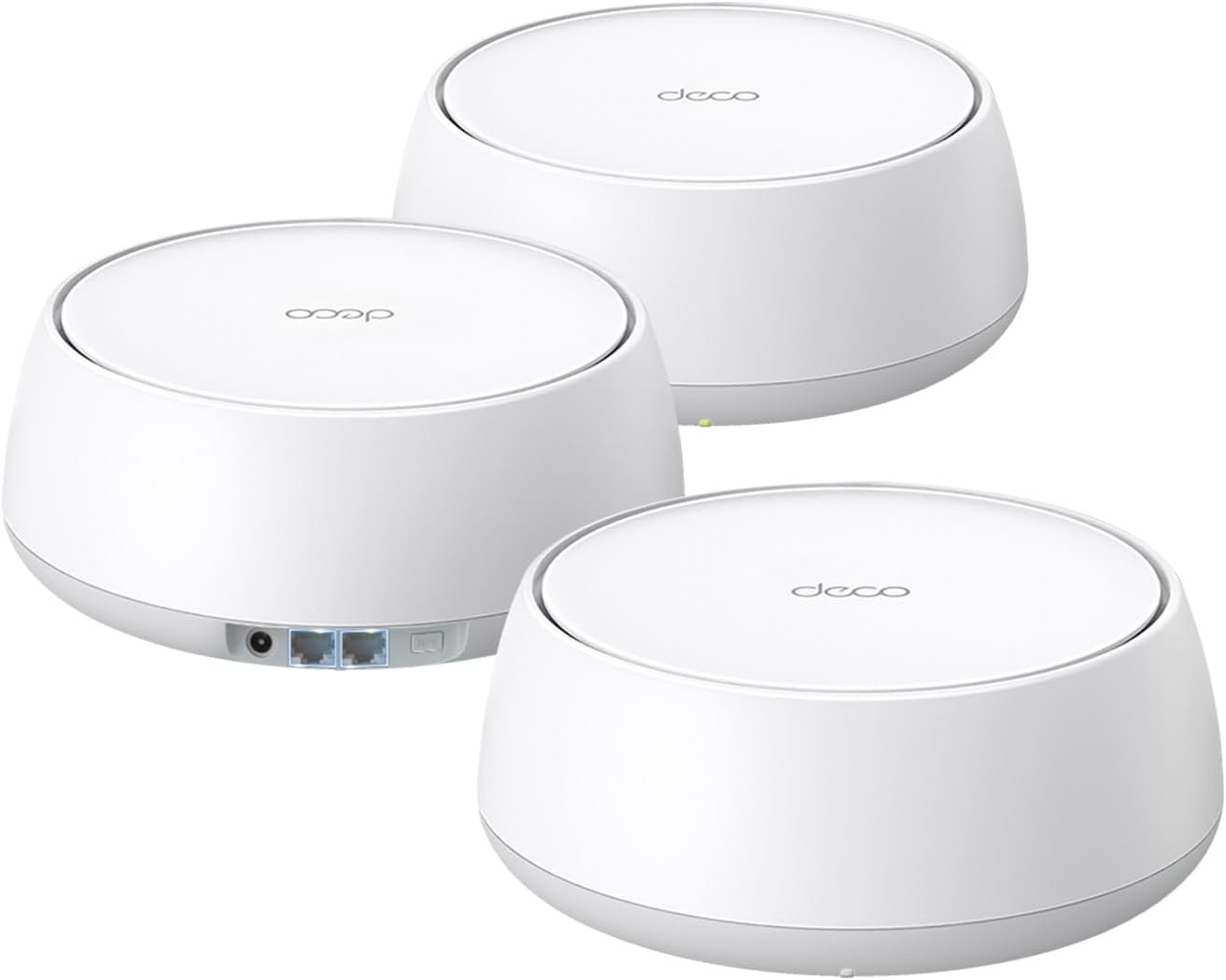
TP-Link Deco BE25 Dual-Band BE5000 WiFi 7 Mesh Wi-Fi System | 4-Stream 5 Gbps, 240 Mhz | Covers up to 6,600 Sq.Ft | 2X 2.5G Ports Wired Backhaul | VPN,MLO, AI-Roaming, HomeShield, 3-Pack
$28.99
Related Products




Fast, Reliable WiFi 7—Everywhere You Need It.
Future-proof your home with the Deco BE25, a 3-pack Wi-Fi 7 BE5000 mesh system that delivers fast, reliable coverage throughout your entire home—up to 6,600 sq. ft. With cutting-edge Wi-Fi 7 Multi-Link Operation (MLO) technology, 240 MHz channels, 4K-QAM, and support for over 150 connected devices, the Deco BE25 provides exceptional dual-band Wi-Fi speeds of up to 5Gbps.†△
This means you can enjoy seamless streaming, lag-free gaming, and smooth connections for all your smart home devices. Experience warp-speed connectivity with two ultra-fast 2.5 Gbps WAN/LAN ports in each Deco unit. AI-Roaming adapts to your needs using advanced algorithms, ensuring seamless connections even in hard-to-reach corners of your home. Upgrade to the Deco BE25 and embrace the future of Wi-Fi!
𝐒𝐮𝐩𝐞𝐫𝐜𝐡𝐚𝐫𝐠𝐞𝐝 𝐰𝐢𝐭𝐡 𝟒-𝐒𝐭𝐫𝐞𝐚𝐦 𝐃𝐮𝐚𝐥-𝐁𝐚𝐧𝐝 𝐖𝐢𝐅𝐢 𝟕 𝐮𝐩 𝐭𝐨 𝟓 𝐆𝐛𝐩𝐬 – Achieve full speeds of up to 4324 Mbps on the 5GHz band and 688 Mbps on the 2.4GHz band with 4 streams. Experience incredible performance⌂△ with Multi-Link Operation (MLO), 4K-QAM and Multi-RUs. Ideal for maximizing the capabilities of your latest WiFi 7 devices, including the 𝙣𝙚𝙬𝙚𝙨𝙩 𝙞𝙋𝙝𝙤𝙣𝙚 and gaming consoles.
𝐒𝐭𝐫𝐨𝐧𝐠 𝐌𝐞𝐬𝐡 𝐂𝐨𝐯𝐞𝐫𝐚𝐠𝐞 𝐃𝐞𝐯𝐢𝐜𝐞 𝐂𝐚𝐩𝐚𝐜𝐢𝐭𝐲 – Cover seamless WiFi coverage up to 6,600 sq. ft. With 4 high-gain antennas and 4 high-power FEMs as well as support over 150 devices without compromising performance, the Deco BE25 provides far-reaching, reliable signals for stronger connections.
𝟐 𝐱 𝟐.𝟓𝐆 𝐖𝐀𝐍/𝐋𝐀𝐍 𝐏𝐨𝐫𝐭𝐬 𝐰/ 𝐖𝐢𝐫𝐞𝐝 𝐁𝐚𝐜𝐤𝐡𝐚𝐮𝐥 – Each Deco unit is equipped with two 2.5 Gbps WAN/LAN ports, offering warp-speed connectivity for high-performance wired devices and multi-gig internet services.§ Through TP-Link’s self-developed technology, the Deco BE25 supports simultaneous wireless and wired backhaul, combined with Wi-Fi 7 MLO resulting in broader, more stable connections.
𝐎𝐮𝐫 𝐂𝐲𝐛𝐞𝐫𝐬𝐞𝐜𝐮𝐫𝐢𝐭𝐲 𝐂𝐨𝐦𝐦𝐢𝐭𝐦𝐞𝐧𝐭 – TP-Link is a signatory of the U.S. Cybersecurity and Infrastructure Security Agency’s (CISA) Secure-by-Design pledge. This device is designed, built, and maintained, with advanced security as a core requirement.
𝐀𝐈-𝐃𝐫𝐢𝐯𝐞𝐧 𝐒𝐞𝐚𝐦𝐥𝐞𝐬𝐬 𝐑𝐨𝐚𝐦𝐢𝐧𝐠 – The Deco Mesh creates a unified network with a single network name. Uses AI-Roaming technology for seamless streaming and optimal speeds, adapting through advanced algorithms and self-learning as you move throughout your home.
𝐓𝐏-𝐋𝐢𝐧𝐤 𝐇𝐨𝐦𝐞𝐒𝐡𝐢𝐞𝐥𝐝 – TP-Link’s premium security service keeps your home network safe with cutting-edge network and IoT protection. Free features: 1. Basic Network Security including Security Scan and IoT Device Identification 2. Basic Parental Controls 3. Quality of Service 4. Basic Weekly/Monthly Reports. Visit TP-Link website for more information.
𝐕𝐏𝐍 𝐂𝐥𝐢𝐞𝐧𝐭𝐬 𝐚𝐧𝐝 𝐒𝐞𝐫𝐯𝐞𝐫 𝐒𝐮𝐩𝐩𝐨𝐫𝐭𝐞𝐝 – Enables home devices to access remote VPN servers without installing VPN software on each device. Supports simultaneous VPN and regular internet connections for enhanced security and flexibility.
𝐄𝐱𝐭𝐞𝐧𝐬𝐢𝐯𝐞 𝐂𝐨𝐦𝐩𝐚𝐭𝐢𝐛𝐢𝐥𝐢𝐭𝐲 – TP-Link Deco products are extensively compatible and can work together to form a Mesh Wi-Fi network. It is also backward compatible with all WiFi generations and works with any internet service provider (a modem is required for most internet service providers).
𝐕𝐨𝐢𝐜𝐞 𝐂𝐨𝐧𝐭𝐫𝐨𝐥 – Control Deco BE25 using voice commands with Amazon Alexa or Google Assistant-enabled devices.
7 reviews for TP-Link Deco BE25 Dual-Band BE5000 WiFi 7 Mesh Wi-Fi System | 4-Stream 5 Gbps, 240 Mhz | Covers up to 6,600 Sq.Ft | 2X 2.5G Ports Wired Backhaul | VPN,MLO, AI-Roaming, HomeShield, 3-Pack
Add a review

$28.99
Amazon Customer –
Very powerful Outdoor Wifi
UPDATED REVIEW: I have used and tested three different TP-Link outdoor units, the EAP 225 outdoor, EAP 650 Outdoor, and finally this unit the X50 Outdoor. I mounted it approximately 8 feet off the ground. The mount for the 650 will work with the X50 but not the other way around. The first two are made for business use and take a little more steps to setup and do not work seamlessly with existing mesh like the XE70 Pro’s I am using. First and foremost, clear line of sight is very important. Don’t expect any of these to go through a metal shed wall or a thick cover of trees. No wifi will. However, with a medium tree area that you can still see the hotspot from it will work pretty good! I used the 225 for over a year and it would achieve around 150-200 mbps download out to around 100-150 yards. The 650 was another story and I used it for about 6 months now and it will give you around 200-300mbps out 250 yards and even got 50 mbps downloads out at 400 yards. These are plenty for say a wifi camera like Reolink or yes even a battery powered Ring that I tested for several months at 250 yards while only getting around 40 mbps downloads due to shrubs and limbs partially in the way. I decided to pull the trigger on the X50 outdoor as I heard it was about the same strength as the 650 outdoor according to Tplink. There isn’t much info out there comparing the two. I understand the 650 has 4 antennas and the X50 only two which made me hesitate but I really wanted a seamless mesh system inside and out so I bought an X50…lets just say I was shocked. I can easily get 300 mbps out at 300 yards and even got a mere 10 mbps at 600 yards which was through a thicket of trees but I could see the hotspot barely. Once again, line of sight is important so don’t mount a camera or stand inline with a bunch of trees/tree trunks and expect to get great signal. I did get 100-150 out at 400 yards through some light tree branches though. If mounting a camera, I found the camera better have a good antenna on it because while the S24 Ultra can get great signal at say 400 yards, the new battery power Wyze V3 cannot. I haven’t tested the other cameras at that distance but I’m willing to bet the old Reolink Go Plus with external antenna probably will be fine.So if considering any of the three outdoor units above…don’t hesitate on the X50 outdoor! Great price at $119, now $99. I do have all my units hardwired and is the only way to go in my opinion. I tried using the 225 and 650 to send wifi signals to the other where one was wired and the other about 100 yards away and the drop in download speeds were very poor. I was hoping to boost the signal even farther across property but the signal loss to the hotspot 100 yards away was so bad it was useless to use and I acheived much better speeds from the wired one. You can assign devices to each unit or allow them to roam. If its a static device like a camera/TV/laptop that is not wired then I will assign it to the unit it’s closest too or gets the best signal from. Most of the time the TPlink software does a pretty good job itself though.UPDATED INFO:Since my original review I now have 4 X50 outdoor units that are all in AP mode and a 5th that is 100 yards from another connected via wifi mesh. The 5th one has a clear line of sight with no obstructions and at same height as hard wired one. You loose a lot of bandwidth linking two X50 through wifi. Instead of seeing 1 gbps plus from the hardwired I only see around 100-150 mbps standing near the remote one. I wanted this one so I could send a signal down a long driveway to the gate entering the property. The driveway has thick tree cover on both sides so no line of sight from house to gate. The gate is around 150 -175 yards away and standing at it I can get around 40-70 mbps downloads. You may say that is unacceptable but for a remote camera or remote gate via wifi it is plenty. I can now open and close the gate remotely within a few seconds of activating it via the app for it. I placed a battery powered ring camera down at the gate and while it may have a slight lag I can open it and view it live so it works. The point is, don’t expect these units to put out extremely fast speeds if connected wirelessly to each other.TECH SUPPORT and INSTALL: I found out like others, the instructions for setting up a mesh system with the DECO units aren’t very clear and it took a lot of searching to get the answer I needed. I did chat with tech support who told me what I needed to know, which was different than most forum post. In summary, pick a DECO inside the home and set it as the ‘main deco’ and then set all you other decos to be in AP or Access Point mode. My home is prewired for networking and I have a central closet that houses patch panels and a 48-port TPLINK switch. I simply placed the 4 different XE70 pro Decos in different rooms across the house and plugged them into the network port on the wall and I get full downloads coming from each as advertised by my ISP. The outdoor units are all plugged into an 8 port POE switch, TP-Link TL-SG1210P instead of using the standalone POE power supply that comes with each X50 outdoor unit.COVERAGE OBSERVATIONS: I have a large home and yes I used to have one Netgear wifi router upstairs that gave me decent coverage throughout house and even into the yard say 100 yards from house. Certain areas weren’t as good as others and yes the farther away you got the slower the speeds got. The purpose of the mesh system was to get strong speeds throughout the house and it works…but at the expense of buying more units. What I’ve realized is walls, concrete, furniture, ect. all affect the signals. Stick a wifi security camera up and you will find out if your coverage is great or you have a dead spot. I’ve played with all the app settings and found some work better being turned off. Also you will find some appliances or other items that have wifi controls simply have terrible onboard wifi built into them and that is not TPLINK’s fault but that manufacturer.STABILITY: For the most part I haven’t had any issues with disconnects on a regular basis. I have had on a few occasions where I had a red light on a Deco unit but was still getting wifi signal from it. Resarted it and it went back green. The other issue I have seen is if the main deco goes down or is restarted then the other Decos go red and stay red even after the main deco is back up. After choosing ‘resart the network’ option they all returned green. Not sure what causes it to go red but it does on occasion but still seems to be working. A few times since I have owned the units in the last 6 months did I actually loose wifi on one or two of them but a restart fixed it. The app also has an auto restart option for setting a schedule to restart them whenever you choose so maybe its to clear out the cache or like most computers, just helps to restart them on occasion.APP AND SETTINGS:With the amount of coverage I have around the house, and yes running the ‘network optimization’ option in the app I was having terrible access to some of my wifi cameras that were in clear line of sight of one of the outdoor units to the point I couldn’t even view them live at all. I found that turning ‘Beamforming’ OFF, fixed the issue for almost all cameras but one. This was an immediate fix after I restarted the network for good measure after the setting change. I have the Smart DHCP setting off. Since my Xfinity Modem is still my main router (wifi turned off in it of which may require Xfinity support to update some modems to not keep turning it back on each day by itself) I allow it to assign the IP address for each item connected to the network. When it was enabled in the app I was noticing some items that would have two different IP addresses, one in the app for that item and one in the Deco app. Turning this off fixed that issue. I still have ‘fast roaming’ turned on and have n issues with my Samsung Galaxy S24 Ultra switching over to the stronger Deco. ‘Smart antennas’ option is set to Auto. I haven’t played around with the vertical only or horizontal only options as Auto seems to be working fine. This leads me to the app.APP THOUGHTS UPDATES: The app is basic but will work for most people. I haven’t had any experience with it regarding if my main deco was also my router so I can’t comment on that aspect. I will say reading a bunch of reviews and articles…I’m not sure why TPLINK doesn’t have one of their main routers such that it can be part of the DECO mesh system. In other words if you go buy a top of the line $500 TPLINK wifi router to replace your XFINITY modem/router it will not mesh with the DECO system and you will have two different Wifi Networks. My understanding is the DECO router option is lacking in a lot of options a good router can do or even what the XFINITY router can do once you log into it. As far as the DECO app with a total of 9 deco units in my system, it works for a majority of people and even a lot of those users won’t use it’s full potential. I use it fully and wish it had a little more options. The big plus I like is being able to assign different items to a certain deco unit and not allowing it to roam to another. In other words if I have a camera in direct line of sight of one deco and much closer than any other deco then I assign it to that deco and no more issues with it switching between that one and another that may provide a weaker signal. Appliances or other fixed in place items, I do the same thing with. You can name each item in the app so it is obvous what is is since the manufacturer of that item may give it some wierd name that makes you scratch your head trying to figure out what is connected to your network. Friends or family come over…name the device that connected for future reference. You can block devices all together so this is where the naming comes in handy, especially if you live in a big neighborhood with lots of close neighbors.WIFI BANDS: I turned off my 6ghz band in the app as I found that unless you are very close to a deco and your phone connects to it, I see no benefit from it. Even in the same room, my phone is over 1 gbps on 5 ghz. So, I turned if off to eliminate any extra uneccessary wifi signals. None of my Decos are wifi 7 so no comments on that.NETWORK OPTIMIZATION: I do question how well the network optimaization works and at what point is a DECO unit too close to another. I can run this and it tell me everything is perfect or may find one channel that needed optimizing so not sure about this too much. I ran an app called ‘WIFI Analyzer’ that shows the different channels and overlapping bands…as well as hidden SSID’s that do not show up in the deco app. Looking at this tool, it makes me question how well the Decos are working together. Wifi speeds and coverage are really good, especially once the outdoor units were added. The hidden SSID’s make me question them for security reasons and wish TPLINK’s app had a little more refining. This starts getting out of my area of knowledge but figured I would mention it for someone reading this that may have knowledge in analyzing networks with better tools and knowledge…kmowing that the app may limit their ability to refine the network fully.OVERALL THOUGHTS: TPLINK mesh is working great. Do I wonder how a Netgear Nighthawk mesh would work if they were able to be put into AP mode…could I use less of them for same coverage? Yes, but at at least 5x the cost, I’m not going to find out unless someone wants to donate them to me. I did read an article the week of 5/27/25 that stated TPLINK is under investigation for their cheap prices in an attempt to push out the competition which may explain the cheaper prices but honestly, everything is so overpriced, like the Netgear nighthawk units, that I think they are just making it more competitive as it should be. Yes they are also under investigation security wise since they are not US based so keep that in mind. There are numerous articles over the years about their units as well as vulnerabilities they faced before updates were done. One reviewer mentioned the EULA you are agreeing to when you install these. All in all, I’m happy at the moment.Hope this helps as there wasn’t much info on comparisons between these units.
Its8up –
Great signal throughout the house and beyond
Got this set of 3 to replace the single rental EERO that the service provider put in when my mom got fiber. My biggest issue with the EERO was that the service provider set it up, meaning I had no way to control the device. Specifically, my mom is old and apt to click on scam ads or to call the number when a scam popup freezes her keyboard (thanks a lot, Zuckerberg). The only layer of protection I can give her is an adblock DNS, and to do so I need control. Also, I could not get her living room TV to connect to WiFi and signal was starting to drop off a bit in rooms farthest from that single device.At the time of purchase, this was the most economical 3 mesh device WiFi 7 system from a well established brand. The devices are a bit bulky, but are not eye sores and seem to be very well made. The available wall mount brackets for this style router appear to be more secure than the ones for the cylindrical models, and they won’t look as goofy hanging on the wall which is another plus. Mounting brackets are sold separately.Her TV still does not connect to WiFi, so placed one of these near the TV and connected it via ethernet cable. The third is in one of the rooms farthest from the main base. The range is quite acceptable, with my phone getting full signal strength in the yard @ >50′ from the house in some places.During setup, was given the option to set up MLO WiFi, aka Multi-Link Operation, which creates a second WiFi network that may provide higher throughput than the basic WiFi connection. It is not compatible with all devices, so likely best practice to connect lower need or ‘potato quality’ devices to the lower throughput base network (phones, TVs, tablets, guests, etc.). The fiber speed is around 300mbps. After extensive Speed Test usage to the point that they stopped allowing me to run Speed Test, both the Base WiFi and MLO WiFi performed similarly with possibly 10-20mbps higher average via MLO. My guess is that MLO may only be truly useful for gigabit connections.Going straight WiFi with these things doesn’t add any significant latency or noticeable drop in throughput in my situation, but could be a concern in larger homes and/or when more walls/junk/metal is between mesh devices. Each of these has 2 ethernet ports, and hardwiring them together with ethernet cable will provide the strongest/fastest connection between mesh devices. The theoretical maximum reliable length is 328′ (100 meters) for ethernet cable, so quality Cat6 cable could really put some distance between the main base and the 3rd mesh station (possibly with some WiFi dead spots in between). This is not unique to this system, as most mesh devices have 2 or more ethernet ports.
abdulkareem alsaeefan –
Keeps disconnecting from the . unstable operation. I returned 2 of them, got stuck with one because I lost the box.
Andy –
Much better than my BT extenders!! Was easy to set up and install and the network is much more stable now. Was recommended by a friend and can’t fault the mesh network!!
Mohamed –
كنت بعاني من ضعف اشارة الوايفاي بالمنزل لما اكون بعيد من الراوتر، ومنتج الـDeco X55 حل هذه المشكلة بكل جدارة. المنزل بالكامل الان اصبحت اشارة الوايفاي 2.4G/5G تغطيه وبسرعات ممتازة بل حتى خارج المنزل صارت توصل اشارة الوايفاي! يستحق كل ريال.
Alejandro –
Estaba dudando si usar o no una red mesh, pero realmente fue una gran decisión, el x55 me sirvió perfecto compré el nodo en buena oferta y me solucionó mis problemas de conexión, automáticamente se habilitó el protocolo wifi 6 y ahora lo puedo usar tanto para mi computadora de trabajo como para la de jugar, celulares, Alexa, cualquier cosaEs una maravilla la app, lo recomiendo para México, si tienen Telmex con fibra óptica, les va a cambiar mucho la conexión
Harry –
Great product, i have used Linksys for the last 5 years and switched to TP Link for my new place. Love the size and style, very discreet. Most important of all, the app works fast, easy to setup and configure and the signal strength seems decent. I have 3 in a 3 bed apartment and it does the job.