
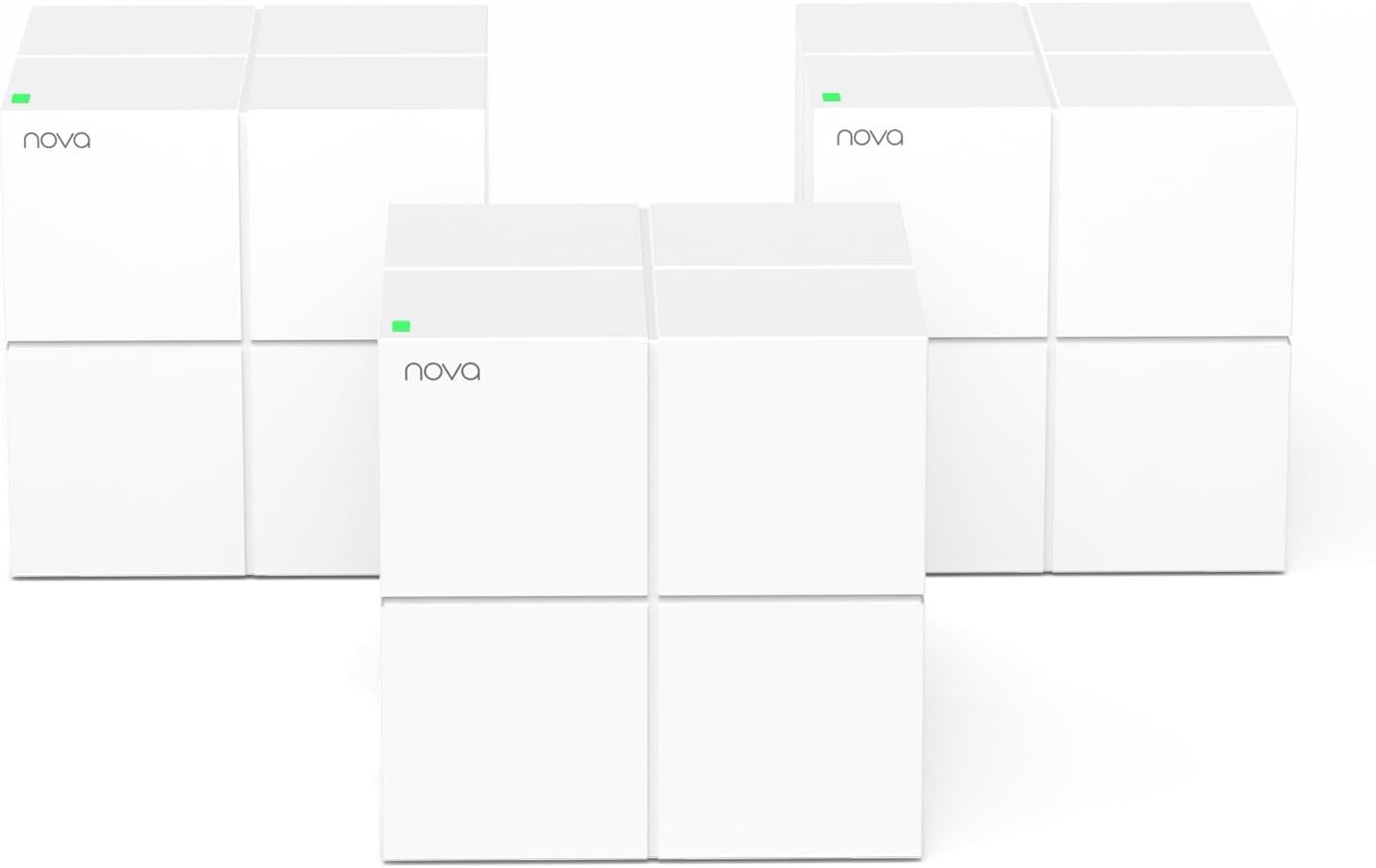
Tenda Nova Mesh WiFi System MW6 – Covers up to 4-6 Bedroom Houses- AC1200 Whole Home WiFi Mesh System – Gigabit Dual-Band Mesh Network – Replaces Wireless Router and WiFi Extender – 3-Pack
$9.99
Related Products



Product description


1 High Capacity
2 Easy Setup and Management
3 Works with Amazon Alexa
4 Wi-Fi Setting
5 Security


1 Parental Controls
2 Guest Network
3 Works with Wi-Fi 5 Nova
Tenda Nova Series – Get The Most Suitable Mesh Wifi Solution
Add to Cart
Add to Cart
Add to Cart
Add to Cart
Add to Cart
Customer Reviews
4.2 out of 5 stars 5,565
4.1 out of 5 stars 4,317
4.3 out of 5 stars 991
4.3 out of 5 stars 687
4.2 out of 5 stars 3,486
Price
$79.99$79.99
$72.99$72.99
$129.99$129.99
$179.99$179.99
$99.99$99.99
Band Type
Dual-Band AC1200
Dual-Band AC1200
Dual-Band AX3000
Dual-Band BE3600
Dual-Band AX1500
Band Speeds
5 GHz:867Mbps, 2.4 GHz:300Mbps
5 GHz:867Mbps, 2.4 GHz:300Mbps
5GHz:2402Mbps, 2.4 GHz:574Mbps
5GHz:2882Mbps, 2.4 GHz:688Mbps
5GHz:1201Mbps, 2.4 GHz:300Mbps
Compatible Broadband Speed
≥200 Mbps
100 Mbps
≥900 Mbps
≥ 900 Mbps
≥200 Mbps
Ports
2*GE WAN/LAN
2*FE WAN/LAN
3*GE WAN/LAN
3*GE WAN/LAN
2*GE WAN/LAN
Wi-Fi Coverage
up to 3500 sq.ft
up to 3000 sq.ft
up to 7000 sq.ft
up to 3800 sq.ft
up to 3500 sq.ft
Max. No. of Connected Devices
90 devices
40 devices
160 devices
160 devices
80 devices
Max. Mesh nodes (Qty./Size)
9 ( 10800 sq.ft )
5 ( 5000 sq.ft )
9 ( 17000 sq.ft )
9 ( 17000 sq.ft )
6 ( 6000 sq.ft )
WPS
✔
✘
✔
✔
✔
Works with Alexa
✔
✔
✔
✔
✔
Parental Controls
✔
✔
✔
✔
✔
Guest Network
✔
✔
✔
✔
✔
Work with Tenda Product
WiFi 5 Product(MW Series)
WiFi 5 Product(MW Series)
WiFi 6 Product(MX Series)
WiFi 6 Product(MX Series)
WiFi 6 Product(MX Series)
What to do if network drops often with too many nodes?
Split nodes into 2 networks. Connect main nodes of both sets via Ethernet cable, set diff SSIDs & passwords. Link Set B’s main node to Set A’s or modem. 2 MW6 networks will show in app. Connect other box nodes to relevant networks.
How do I complete the basic installation and setup steps for my product?
Please scan the Scannable code on the product box for relevant text and video instructions.
How do I perform the initial product setup?
You can search for the setup guide on the TENDA official website, or scan the code on the product packaging to find the corresponding initial setup instructions.
What should I do if a malfunction occurs?
You can find troubleshooting videos on our official website, or contact our online service on the official website or Amazon for assistance.
Enjoy the Best Signal in any corner of the house — Ideal for replacing traditional Wi-Fi extenders & routers solutions, provides up to 6,000 sq.ft. Whole Home Coverage with faster and more stable Wi-Fi mesh network. Get rid of Wi-Fi dead zones
Seamless Roaming for all — Every unit works together for a truly seamless online experience with a single network name and password. Most Wi-Fi enabled devices automatically connect to the strongest AP node when moving around your home
High Capacity & complete flexibility — Powered by MU-MIMO and Beamforming technology, fast AC1200 Dual Band Nova Mesh Wi-Fi system provides high speed Wi-Fi network for all your devices and brings lag-free experience for up to 90 devices
Secure Wi-Fi mesh network — Use WPA2-PSK to encrypt the WiFi password to protect your network and connected devices from hacker attacks. Welcome your visitors and friends with a guest network in isolated network zone, and guards your privacy and smart home access
Easy Setup in minutes — The Tenda Wi-Fi APP helps you to setup, monitor, & manage your home Wi-Fi mesh network easily & quickly. A new node can be added to existing Nova networks with 3 simple steps
8 reviews for Tenda Nova Mesh WiFi System MW6 – Covers up to 4-6 Bedroom Houses- AC1200 Whole Home WiFi Mesh System – Gigabit Dual-Band Mesh Network – Replaces Wireless Router and WiFi Extender – 3-Pack
Add a review

$9.99
MsBreezy –
Easy, Reliable, Affordable.
Ok so, this may sound strong but, the Tenda Nova mesh wifi system is one of the absolute best decisions I’ve ever made. 10 mins to setup all 3, no issues, no need to call Tech Spt. The app is clear and easy to understand, there was nothing to it except creating a password. I was worried about coverage because my home is split level, nothing ever worked covering the entire house. A computer company and 2 cable companies told me many years ago that split levels are notoriously difficult for wifi and I’d never have full coverage. I previously had a nighthawk router (which cost more than this system when I purchased it!) and extenders but still barely signal upstairs. No fault to them, I don’t know if mesh was even around back then and if it was I wasn’t aware. This system has 0 problems providing a strong and consistent signal all over. I walked to my back fence, carport, front yard, furthest room on each level and across the street to my mailbox…the signal didn’t even flicker. I wish every dollar I spent was this worth it. We’ll see how it holds up, I’ll update if any issues.Almoat a year update: One box is not working even though the blue light is on. The system shows it as disconnected and I have unplugged it several times and dis what i could do, so, gotta buy another one. The other 2 are fine, I still have 12 devices connected and the one being out I didnt even notice. I just randomly checked the app and saw it was red. Still one of the best purchases because I could not get wifi all over my house before this.
Marc Jourdain –
An amazing product that provides Mesh Wifi at a Realistic Price!
I have been using this product for a week and no issues. Prior to my purchase, I had purchased a router from a big box store that was a pain in the rear to set up. When I was unable to make a small change I returned it a few days after the purchase. I have gone through a few routers in the past and they were a HUGE HASSLE to set up. WOW is all I can say. I was impressed from the moment I opened the Amazon box and saw the silhouette of the Tenda MW6. The device(s) or elegant cubes as my wife calls them came in a handsome box that is not typical for what the Netgear and Linksys giants offer. Upon opening the well crafted black box you find the three “elegant cubes” positioned equally in foam along with the power adapters. I have to admit I watched a youtube video to make sure the install went smoothly. You are directed to download the app to set up the device. WOW WOW WOW, Super Easy and efficient! I am shocked that my prior Netgear routers were not this easy. This is a great product that helps spread and balance the bandwidth stress from all of the computers. phones, tablets, and smart tv’s in my home. The guest wifi was a snap. The hardest part was creating a password. I give this product 10 stars due to its price. It may not be the fastest but I now have a strong signal in parts of my house that were dead zone, Great Product, Great Value! By this before you consider buying an over priced mesh wifi system.
Michael J. Bridges –
Probably the best whole home WiFi coverage for the price
This is excellent! We previously had several dead WiFi spots in the house and now we have full coverage. Set up was super easy via the Tenda WiFi App (which can be downloaded from Play or the Apple Store). It will walk you thru all the steps.Unplug your modem. Hook up any of the Tenda “cubes” to the modem. Plug in the Tenda to the power outlet. Turn the modem on. Follow the prompts on your phone and they will connect. Setting up each cube is simple. Just plug them into a power outlet. Our first one is in th edining room by the modem. The second one in the living room behind the TV. The third one is in the bedrooms. Before my daughter could not stream movies on her TV and now she can with no issues whatsoever. I cannot figure out why some people are having issues with this item as it was almost too easy to set up and it took me longer to unhook the old router and old WiFi extender than it did to get this up and running.Again we have full house coverage, all bars to the top. We checked the backyard and have coverage all the way to the edge of our property and then some. Front yard – same. No issues. We decided to walk down the street and see how far we had WiFi. 4 houses away in either direction! One of my photos shows us down the street and we still have a signal in that location.If you are not very technical and just want better WiFi coverage then this is for you. Not to mention it is one of the cheaper models out there. I looked at several for over a week and read reviews and watched interviews before deciding on this one. It does offer guest access, parental controls and you can schedule updates (one of the other brands updates at all times of the day and interferes with your WiFi). I have this one set up to look for updates at 3AM. Also, when you first connect it gives you a generic “Tenda” name. You then have the option to re-name the WiFi and change the password (the start up password is on the bottom of the cube). I renamed mine to our old network name and password and all of our devices connected including multiple phones, iPads, tablets, 2 smart TV’s a BlueRay player and more. All with excellent coverage! Photos include a picture from the street several houses away where we still have coverage and a couple of the cube to give you an idea of size.We have 3 cubes placed throughout the house.
Pravesh S. –
Awesome
Ian –
1. Bought from Tenda Australia and it does come with AU plug.2. Office: connected 1 node in bridge mode to LAN port off the wall. Got our office space 3-4x faster speeds than current wifi setup; more stable too. We have a corner office space in a building floor and I was able to get a signal at the far end opposite corner more than 30m away behind several walls.3. Home: Currently using only 1 node in a medium sized house. Now getting coverage in all parts of all rooms. Full speeds where I used to have some signal before, and partial speeds where I used to have no signal at all. Also reached outside the house and into the garage in the floor below separated by thick concrete. I can easily plug i the 2nd node to get full speeds all through out.Cons/needs improvement.- app dark mode pls; too bright.- Parental controls – would be better to have an option to block specific websites only and/or throttle the speeds instead of cutting off Internet entirely.- Qos: ability to set/limit Internet bandwidth per device or group.- Guest: have an option to limit bandwidth and set no password.
M. A. W. Kenyon –
Super fast, a little more tricky to set up (took 5 minutes instead of 2) this has increased the wifi around the house as I wanted….my home is quite large (500sqM+) and has lots of concrete and steels, so i thought this top up would help….I have Sky Q installed on a separate Mesh, and use the old Sky 2 router and BBand or TV is usually woeful (SKY Q router not man enough for my home and already has to Sky boosters), but Tenda mesh works perfectly alongside what I have when set up in “bridge” mode…not the cheapest available, but its the best I have used in the 15 years I have lived here. I have about 30 devices connected too which Tenda copes with well….and I have 35Mbs not the super fast BB as that is all my BT junction box will support.
majed althomali –
I am an experienced network tech and am more than happy with the Tenda Nova solution Excelente product
Ben Laprade –
Diffuse le wifi à 100% dans mon garage de deux étages 20×20 vraiment performant