
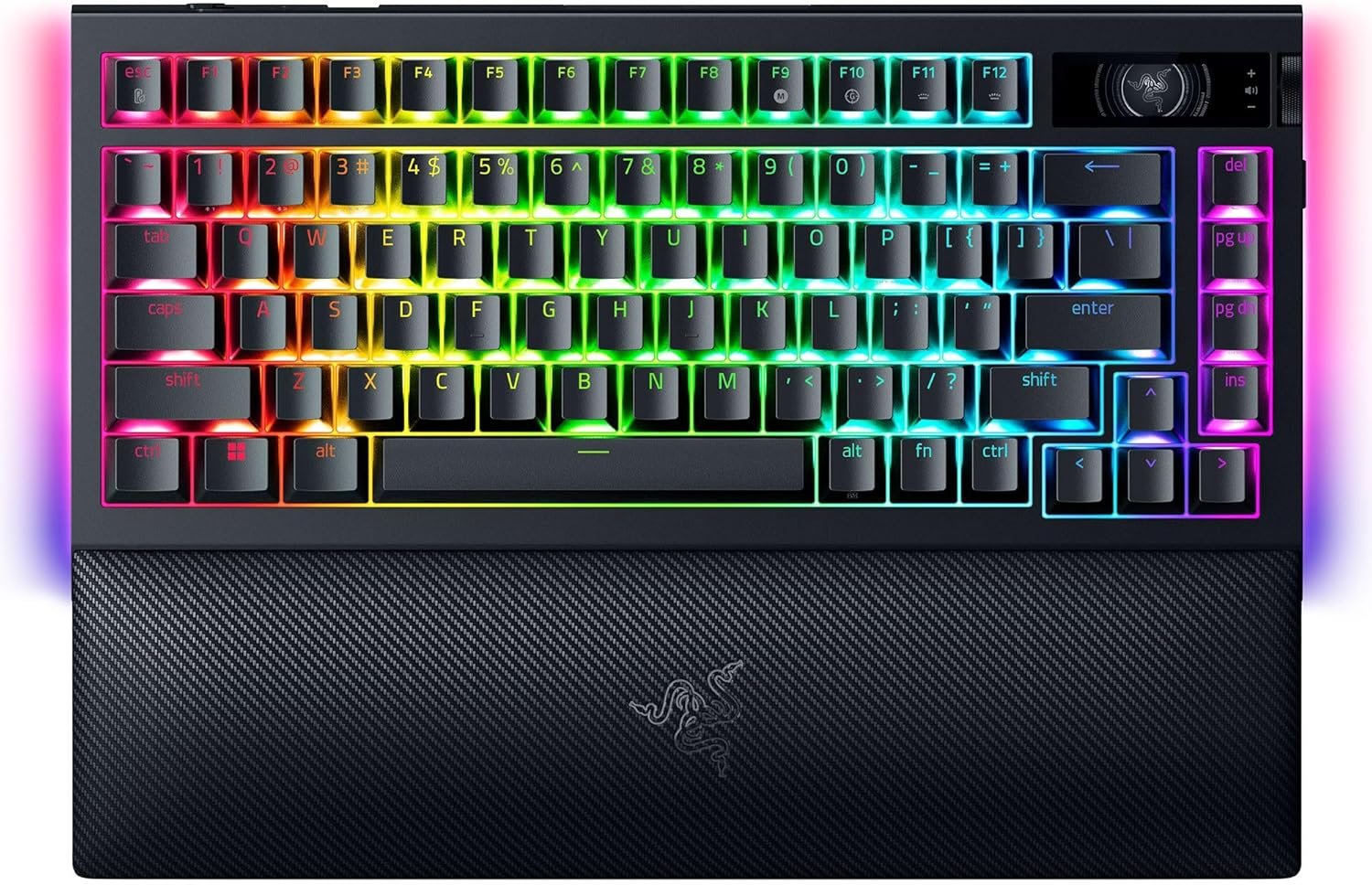
Razer BlackWidow V4 Pro 75% Wireless Gaming Keyboard: OLED Display – True 4K Hz Wireless – Bluetooth – Hot Swappable – Orange Tactile Switches – Command Dial – Snap Tap – Chroma RGB – Wrist Rest
$36.99
Related Products


Elevate your gaming experience to newer heights with the Razer BlackWidow V4 Pro 75%—a wireless, hot-swappable gaming keyboard equipped with an all-new OLED display with Razer Command Dial.
Using the OLED display with Razer Command Dial, you can now check vital information such as your PC system metrics at a glance or customize to your heart’s content with custom GIFs, Images, and more. With the use of the Razer Command Dial, expand your control with up to 100 customizable modes via Razer Synapse 4.
Experience peak gaming performance thanks to Razer HyperSpeed and Razer HyperPolling technology which allows you to game at a blistering 4K Hz polling rate wirelessly, ensuring unrivaled precision and responsiveness even after long hours of intense gaming. Easily multi-task by connecting and toggling between 3 different Bluetooth devices for an added layer of versatility.
Enjoy a truly optimized typing experience thanks to a gasket-mounted FR4 plate, tape-enhanced PCB, lubricated screw-in stabilizers, and two layers of sound dampening foam. The PCB is compatible with 3 or 5-pin mechanical switches, allowing you to easily swap out its pre-loaded switches for custom ones to achieve your desire key feel. Topped off with textured doubleshot PBT keycaps which are tougher and more durable than ABS, the keycaps maintain its finish and are also optimized to promote greater backlight illumination.
Complete your battlestation and bring it to the next level thanks to Razer Chroma RGB with per-key lighting and a striking 2-side underglow, allowing greater immersion for hundreds of Razer Chroma RGB integrated games. A soft, cushioned wrist rest completes the deal by securely snaping to the keyboard, providing long-lasting comfort throughout the most intense gaming marathons.
The BlackWidow V4 Pro 75% also introduces a new Power Saving Mode, designed to maximize battery life. This can be toggled through Razer Synapse or a simple hotkey combination FN + Esc. This allows the keyboard to have a battery life of up to 2100 hours in its idle state when fully charged.
Creating your dream keyboard now has no limits.
TRUE 4K Hz WIRELESS & BLUETOOTH 5.1 — Experience a greater level of gaming response powered by Razer HyperSpeed and Razer HyperPolling technology, and expanded control by connecting and toggling between 3 Bluetooth devices
HOT-SWAPPABLE DESIGN — Compatible with 3 or 5-pin switches, the keyboard’s socketed PCB makes it easy swap out its pre-loaded switches for custom ones to achieve desired key feel
OLED DISPLAY WITH COMMAND DIAL — Check the PC system metrics at a glance, show custom GIFs on the display, and enjoy expanded control with up to 100 customizable modes using the Razer Command Dial
OPTIMIZED TYPING EXPERIENCE — With a gasket-mounted FR4 plate, tape-enhanced PCB, lubricated screw-in stabilizers, and two layers of sound-dampening foam, enjoy a clean typing sound and feel with minimal rattling or wobble
2-SIDE UNDERGLOW WITH PER-KEY LIGHTING — Featuring per-key lighting and a striking 2-side underglow, sync the keyboard with your battlestation and enjoy greater immersion for hundreds of integrated games
8 reviews for Razer BlackWidow V4 Pro 75% Wireless Gaming Keyboard: OLED Display – True 4K Hz Wireless – Bluetooth – Hot Swappable – Orange Tactile Switches – Command Dial – Snap Tap – Chroma RGB – Wrist Rest
Add a review

$36.99
John and Sarah –
I have bought 7 razer keyboards and loved them all
So i’ve been using mechanical keyboards for about 12 years now and every single one of them has been mechanical. The following items are why i like this keyboard.1. The dual cables which one is used as a USB passthrough are long enough that i can move the keyboard to my lap if i need to. I have a bad shoulder so this is a nice function.2. the wrist rest is magnetic so even when using it on my lap i still can use it pretty well. This is important for me as when my shoulder acts up it’s useful.3. the click sound that many of us computer nerds enjoy is just the right volume and enhances to function of the keyboard4. Razer synapse is kind of m’eh and the side buttons do sometimes trigger when i pick it up by the side cause they are so close to the top but nothing that really bothers me to any major extent. But overall it’s got good options and easy to customize. I even use it for work because opening some functions is just a pain.5. I have only had 1 razer keyboard last a short time for me. It died due to large amount of fluid falling onto it. As of right now i use this keyboard for my desk. My 5 year old keyboard is being used by my partner as if it was brand new and i have a 2 year old keyboard at my office all of which are functioning perfectly.
Tyler Koenig –
A Masterpiece of Art, Comfort, Control, and Creativity – My Setup Will Never Be the Same
There’s something truly special about the Razer BlackWidow V4 Pro—it doesn’t just sit on your desk, it transforms it. As someone who balances gaming marathons with hours of digital creativity, this keyboard feels like it was made with both in mind. The plush wrist rest with its radiant wraparound RGB lighting instantly drew me in. It’s not just about aesthetics (though, let’s be honest, it looks incredible)—it’s also one of the most comfortable typing experiences I’ve ever had. Whether I’m deep into editing a design or in the heat of a battle, the support and feel are flawless.What’s blown me away even more is how thoughtfully designed this board is. The command dial quickly became my favorite feature—what started as a curiosity is now something I rely on daily to scroll timelines, adjust brush sizes, or control volume with the smoothest twist. And the three hidden macro keys on the left side? Pure genius. Subtle, out of the way, but once discovered, they unlocked a whole new level of control I didn’t know I needed. I’ve bound them to game commands, workflow shortcuts, even lighting presets—it’s incredibly versatile. Add to that the sleek media buttons and the satisfying resistance of the volume roller, and you’ve got a piece of hardware that’s as elegant as it is powerful. This isn’t just a keyboard. It’s the centerpiece of my creative and gaming space—and honestly, I don’t know how I ever lived without it.
Brent Trehern –
Great keyboard, but terrible documentation, customer support, and faulty software.
It’s probably well-known by now that you need the Synapse software to unlock a good chunk of features this keyboard has, but did you also know that the incredibly terribly written manual also neglects to mention details like needing to download additional software and offers misleading information? Yeah, neither did I, but after spending 3 hours with Razer technical support I found that to be the case. One hour was spent with an agent who kept putting me on a silent hold and wouldn’t respond and two hours with another agent who put me on hold a lot as she came to grips with the fact that what I saw on my screen didn’t match what was on hers plus needing time to research/request help from people on her end.So, what did I discover?Well, one of the features of this keyboard is creating macros, yes? That extra row of keys on the left-hand side labeled M1-M5? Looking at the attached picture, one would think you press a key-combo (Function + F9), press whatever you want the macro to be, press the key-combo again, then one of the M-buttons, and from now on any time you press that Macro key you’ll repeat what you just made, yes? Nope, that’s not entirely how it works. Oh, you MADE a macro, sure, but the keyboard somehow doesn’t already know how to use it even if you have Synapse installed. No, what you need to do is go to the Dashboard of the Synapse software, click Modules, and download the module for Macro. THEN you can actually use the macro you made. Do you see anything similar to “Download the Macro Module in the Dashboard” in the attached picture? No, no you do not. Minor detail, I suppose, but when giving a step-by-step, skipping the FIRST step is very counterproductive.Another fun little fact is, if you look at the picture, you’ll see key combos for how to change the lighting patterns and colors. Function key + CTRL + a number and you’ll have a different pattern. Press that combo again and you change colors. Seems pretty simple, right? Wrong. Apparently, that’s an EXAMPLE chart…just without the word “Example” anywhere on the page. The second agent on the phone merely referred me to YouTube videos on how to program these in because, I suppose, they don’t have example keyboards and software to use and have to rely on screenshots and knowledge-base articles. I’ve only had this keyboard in my possession for a day, so I haven’t had time to watch YouTube videos on how to decipher the puzzle that is the Chroma Effects. Obviously, since the combos listed in the manual don’t do squat, I have to figure out something else.I even had to instruct the agent on how the Gaming Mode function worked because the manual doesn’t mention that having it “off” in the Synapse software means it is then toggled by the key combo, whereas having it “Enabled In-Game” does exactly that and “Always” means it is literally always on no matter what you do (or until you turn it off in Synapse).A fun bonus was when the ‘R’ key on this brand-new keyboard stopped working for some reason while I was still testing it. At that time, I had nothing programmed and was merely installing the Synapse software. Every other key worked, but ‘R’ just…was taking a break, a nap, or was on hiatus while the rest of the keyboard was still functional. I thought I had a defective keyboard because, let’s be honest, I had a manual telling me to do things that didn’t work so having a specific key not function seemed to confirm something was wrong with it. Shortly after a reboot, the key was working again, as you can tell by the fact I’m not typing in a strange way.I have a word or two for whatever absentminded professor wrote this documentation: find someone who hasn’t used the keyboard before and have them follow the manual you created and see how well it goes. THEN make the necessary corrections before you send it off with the product. I’d use other, more colorful words, but Amazon would not allow me to actually post this. I’d also advise Razer to provide actual products and software suites for their support representatives to use, so they can accurately answer questions, but something tells me they aren’t concerned with customer satisfaction. Otherwise, they wouldn’t be sending out poorly-written manuals with their products. Razer also has this bizarre obsession with offering to replace products rather than doing anything that can even remotely be called “troubleshooting”, so adjust your expectations accordingly when purchasing ANY Razer products. For example, I purchased a Deathadder V2 mouse over a year ago and contacted Razer regarding cosmetic damage that was occurring because of normal use. Their solution was to use up three weeks of my time by sending a replacement mouse and tape grips instead of just having a way to fix the cosmetic damage.And yes, I know this is not exactly a place where Razer looks for feedback and acts on it, so that’s why I’ve copied and pasted this into a document to send it right to them. I am a simple person with regard to the concept of having proper expectations. If Razer advertises a product can do something, it should be able to do it. If the manual that comes with a product provides instructions on how to do something, following those instructions should work. Finding out that there’s missing information or that the listed information doesn’t work at all does not build consumer confidence or satisfaction. I’d almost know it down to 2-stars for that, but I’m sure the keyboard itself works perfectly fine…though I may adjust my rating and review to reflect that in the future if that changes. Unlike most who say this sort of thing in their reviews, I DO adjust mine.Update: May 5, 2023 – So I contacted Razer “Support” through their site and used the chat function. After describing the problem, the agent immediately jumped to the concept of performing an RMA replacement. As someone who purchased this thing on May 1, 2023, and received it three days later, I’d go through Amazon if I wanted to do that (which I’m starting to consider). As part of the troubleshooting, the agent suggested I disconnect the keyboard, press and hold Escape+Caps+Space, connect the USB, and let go of the keys afterward. Congratulations! I now have a keyboard in Demo Mode that doesn’t respond to input. I had to connect up another keyboard to look up (and realize) I had to perform the same steps to take it out of Demo Mode. So, not only is Razer “Support” obsessed with RMAing products for trivial things, but they’re also giving out terrible troubleshooting instructions without providing all the details. That knocks an otherwise good keyboard down from 3-stars (due to the documentation and poor customer service) to 2-stars (due to the absolutely terrible customer service). If I wasn’t stuck in a place that literally prevents me from returning this product, at least for the next 15 days, I would be doing so. Instead, I’m trying to unlock the full usage of a product I’m paying for. I’m starting to realize my mistake.To summarize: I need the Synapse software to use macros. I need to turn off/disable the Synapse software to use the Chroma Effect key binds, but then I can’t use macros. Absolutely *Brilliant*, Razer. Note: that was sarcasm.Update 2: May 18, 2023 – The keyboard developed an ADDITIONAL problem: the Control key would randomly act like it was stuck. So, for example, if you held down Control and pressed Escape, the Start Menu would pop up, right? Now imagine it doing that without holding down Control. Now imagine this kind of “undocumented feature” also applied to any other key you pressed. To fix this, I could press both Control keys at the same time, using Alt+Ctrl+Del, putting the keyboard into/out of Demo Mode, or exit the Synapse software. However, if I EVER intend to use Macros with this thing, I need the Synapse software…and that software is causing the problem. I did not intend to spend nearly $300 on this keyboard and insurance just to have to work around poor programming and poor documentation. Razer has seriously dropped the ball on this and I’ve been dealing with 2 weeks of issues. As compensation, they’ve offered me numerous apologies in a template format, which truly shows they couldn’t care less. I’m NEVER purchasing another Razer product and I highly encourage anyone reading this to shop elsewhere. From 2-stars down to 1.
Jac Evans –
Keyboard was great when I first got it, however it eventually started typing 2 of a few letters even after tapping the key once. It was great, just don’t get this. You’ll thank me later.
LuminolBlue –
Another great product from Razer, and since all of my gear is Razer, it only made sense to go with a Razer keyboard. I have the Green switches, and I’ve seen a few reviews of people saying how loud the green switches are, and I can tell you from experience, they are not as loud as I was expecting them to be. Razer says these are the Gen 2 Green Switches and are supposed to be better. A friend of mine has an older Razer keyboard with green switches and his keyboard is a bit louder than mine. I guess over time the keys will feel different and may sound a bit louder, but for the time being the tactile and clicky sound and feel is acceptable. Granted, I wouldn’t recommend using this keyboard in an office or a school setting, but for everyday use, this keyboard is perfect.I haven’t had a chance to use the keyboard to its full potential yet, but it does come with just about everything but the kitchen sink. There are a few miner annoyances with this keyboard. First of all, the Command Dial is too close to the Esc key, I think Razer could have left a bit more room between the two buttons. Secondly, it’s very easy to accidentally press the 3 macro keys on the left-hand side of the keyboard, so I have mine disabled. Someone may find 8 macro keys useful, however, I think it’s a bit overkill. Last but not least, you can tune this keyboard’s polling rate all the way up to 8000 Hz, but realistically speaking, there is no real-world advantage to this, so for all intents and purposes, I feel 2000 Hz of polling is adequate for most users–gamers and everyday users, alike.
Donnie –
Very pricey keyboard, but worth every penny.Synapse 4 still has software issues and I experience the odd random problem but honestly hasn’t been as bad as it was in the past with Synapse 3.Typing works great. I’ve upgraded the switches inside to baby kangaroos and they feel and sound amazing on this board. RGB lights are bright and super customizable.If you’re on the fence about buying this thing… Do it…. Do itttt…
MR G D BELLIS –
Well to start with this is NOT a UK layout keyboard even though in the Q&A the seller says it is!Lovely keyboard with still a fair amount of noise for the yellow switches, i was expecting an almost silent key press. The keyboard wil take a short time to gve used to as my previous had a large enter key and this one isnt as large and i keep pressing # and enter at the same time. Shortcut keys are a nice touch and the 3 macro buttons on the side were a surprise when i accidently pressed them. Think i will have to change the default on those for when gaming!
Abdullah –
Very good keyboard, very beautiful to look at and sounds amazing. And always with razer, good build quality