

JD-23 Sticker Printer, Mini Portable Thermal Printer Print Pod, Inkless Bluetooth Label Maker Machine for DIY Crafts, Journaling, Office & Home Use, Includes 2 Rolls Sticker Paper
$18.99
Related Products




From the brand

Gloryang JD-23 Sticker Printer
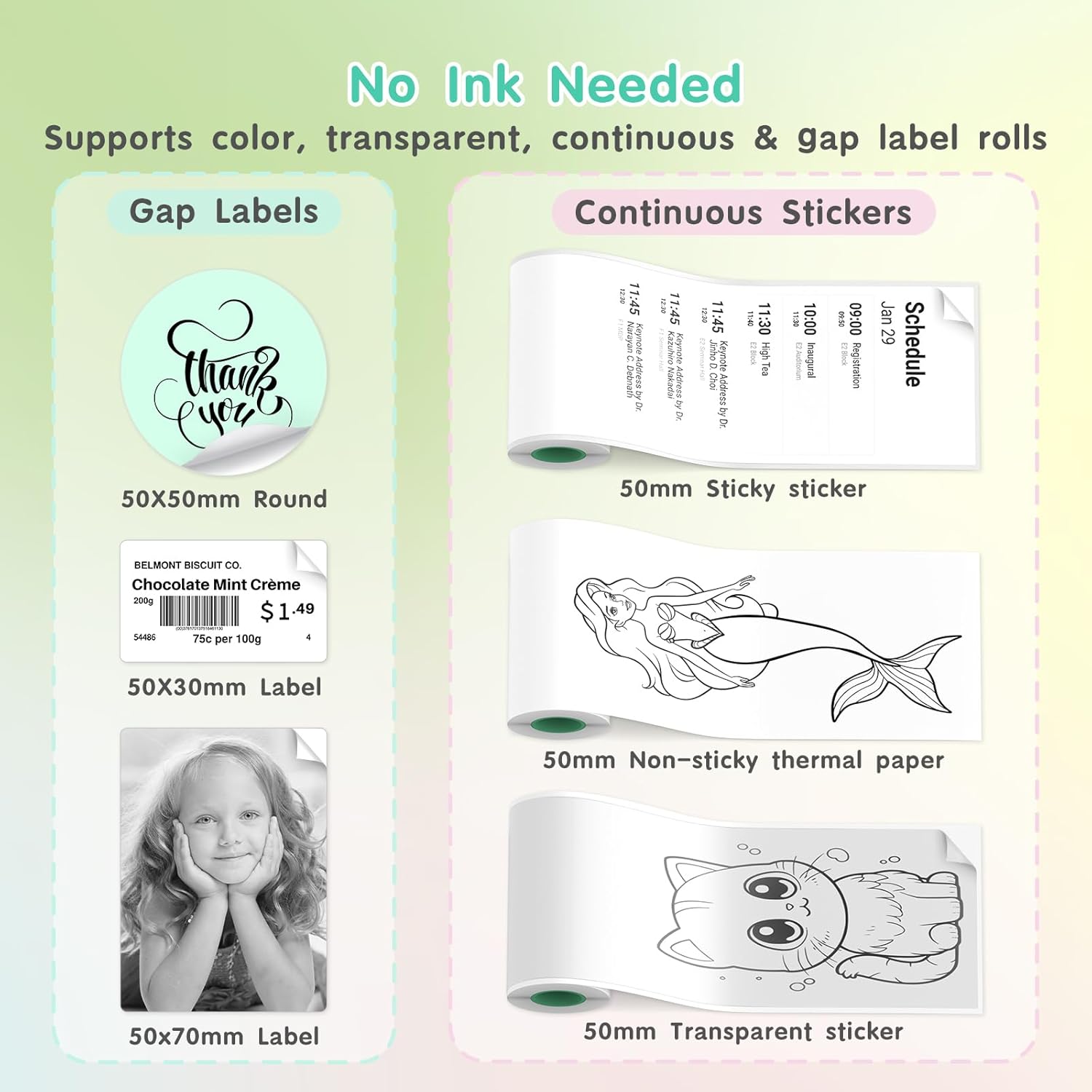
Included a roll 2inch white continous paper & a roll 52x30mm gap sticker paper. Ideal gift for family, friends & colleagues.


Portable Printer
Easy to carry anywhere. Pint anytime.
JD-23 Printer & Paper

Study Printer
Convenient to print all kinds of study notes & pre-educational materials.
Ultra-Compact & Lightweight – Measuring only 3.39″ x 3.5″ x 1.54″ and weighing just 0.32 lbs, this mini thermal printer is truly pocket-sized. Its portable design makes it convenient to carry in a bag or even a pocket, so you can print receipts, notes, and labels anytime, anywhere—whether at school, the office, home, or while traveling.
Ink-Free Thermal Printing Technology – Enjoy clean, cost-effective printing with advanced thermal technology—no ink, toner, or ribbons required. This upgraded version is compatible with both continuous and gap labels, as well as sticky or non-sticky paper. It also supports multiple roll types, including standard white, colored, and transparent sticker paper (2-inch width).
Smart App Control – Easily connect to your iOS or Android device through Bluetooth using the Jadens Printer App. The app provides a rich set of features: document and photo printing, QR code and chart generation, OCR text recognition, drag-to-resize editing, DIY drawings, AI-assisted image printing, and an extensive library of templates.
Versatile for Study, Work & Creativity – Designed for a wide range of uses—print study notes, teaching diagrams, to-do lists, receipts, labels, journals, and greeting cards with ease. It’s also perfect for kids, offering fun and educational applications such as alphabet learning, maze games, drawing, and creative DIY projects. Encourages productivity and imagination for all ages.
Thoughtful Gift Choice with Starter Rolls – The package includes two thermal rolls: one 50×30mm label roll (great for QR codes, address tags) and one 50mm continuous adhesive sticker roll. A built-in serrated cutter ensures neat, easy tearing. With its toy-like yet practical design, this mini printer makes a unique and useful gift for students, teachers, kids, planners, and creative individuals—perfect for holidays, birthdays, or back-to-school season.
13 reviews for JD-23 Sticker Printer, Mini Portable Thermal Printer Print Pod, Inkless Bluetooth Label Maker Machine for DIY Crafts, Journaling, Office & Home Use, Includes 2 Rolls Sticker Paper
Add a review

$18.99
3LittleVIps –
Print Your First Label in 5 minutes from start to Finsh
I’m Embarrassed by how little I engage in technology. It’s so bad my children have to help me with my own cell phone but this little printer was so inexpensive I couldn’t pass it up and it was even easier to set up. Instructions are straightforward /simple ,design is compact /convenient / and I Printed my first label within 10 minutes. It doesn’t come charged but the charging doesn’t take long. Overall I’m impressed and the sale price was of incredible value.
Maverick rodriguez –
Handy and Lightweight Mini Printer for Everyday Use
This small thermal printer is very convenient and easy to carry. It’s compact and lightweight, so it fits easily in a bag or even in a pocket. The setup was simple, and connecting it to my phone through Bluetooth worked smoothly.The print quality is good for notes, labels, and small documents. I like that it doesn’t need any ink or toner, just thermal paper, which makes it easy to maintain. The included starter rolls are a nice addition for trying it out right away.The app offers several useful options, such as printing text, QR codes, and small images. It’s helpful for organizing study materials, labeling items, or adding creative touches to journals
Evan –
Expectations blown away by this tiny printer
I got this little printer for helping with labeling some drawers. I was absolutely blown away by the quality when I did my first print of a picture of my cat. The contrast was way more than I expected from a tiny little thermal printer. It was really cool to just make a sticker out of any image I wanted. I could see this being a cute way of taping a birthday envelope shut
Pinup girl –
A lot of fun
I got this on sale. So the price was great. I think The included apps are more for kids than adults. It is a lot of fun to use. It’s not big enough to print shipping labels so if that’s what you’re looking for you’ll have to buy one of the bigger ones that cost more. I bought this to print out numbered stickers, but the sticker sheets would be wasted just for one single number and I have yet to figure out how to get the layout of the numbers the way that I want them. I was hoping one of the apps it had would let you do consecutive numbers, but I haven’t found a way to do it yet. Still a great little printer for nine bucks though.
Amazon Customer –
Love love love
Easy connectivity took me all of 45 seconds, picture quality was better than I expected you can make out images, the size reminds of the old school pictures perfect for any notebook decoration, and it will fit in your purse so easy to move around.
G –
The stickers worked perfectly for any project
Bluetooth easy to connect picture quality good easy to use. The only thing I did not like is that you cannot print color
T Vang –
Must have gotten a bad one.
I was really looking forward to this item given the great reviews but I must have received the one bad one out of the bunch because the printer could not be found by my network, Bluetooth could not connect to it and customer service was horrible. Yikes! Sounds like a great product if it works for you but if you’re having any issues, not much help from customer service support.
Jessi –
Fun gift idea…endless possibilities
So fun for home use! I love that you can customize what you want with literally anything. Great for your little ones to have and be creative with. Love that it doesn’t need ink! Super easy to install with Bluetooth and location. No confusion at all. Color is so cute. Picture quality is grainy but that’s part of the charm. It is small and portable. Great gift idea for a great price.Only thing I would change is the amount of paper you need. If I just want one small label…I don’t need that much paper surface. But granted it’s not ink…I guess i could get used to the space.
TechnologyRocks –
I’ve been looking for a label maker for a while, so when I saw this come up for review I jumped on it. It’s very compact, and came basically fully charged. I plugged it into USB-C on my desk while reading the setup guide, and it went from Red->Green before I finished reading through the simple instructions.I scanned the QR code to get the app (which has a pretty horrible 2.1 star rating – with lots of comments about people having issues) – so I went in expecting some pain. I was surprised, however, to find it extremely useable and responsive. I wanted this to make some labels for the drawers in our pantry, where kids throw stuff at random. So, I started with simple trying to print out “Water Bottles” and then “Lids.” Without referring to any instructions I had this figured out and printed in under a minute. Easy Peasy. I was super impressed at how fast it works. Just get the label looking like you want in the app, hit the print icon and boom – there it is. I also tried adding a stock icon from the app to the Water Bottles label – think it’s a coffee cup, but it makes the point – and that was also super easy.The only thing that wasn’t amazing was trying to print out a random picture from my camera roll. Sure, it printed – but it’s very low res. Do I care though? No. This isn’t a photo printer – and I can still tell what the pic is. If you’re looking to print labels with good performance and some simple icons – this is perfect!
DerekM –
I’ve been using this mini sticker printer for a little while now, and it’s a surprisingly handy little device for labeling, organizing, and even a bit of creative fun.Setup & ConnectivityGetting started was simple. The printer charges via USB-C, and pairing over Bluetooth to my phone was quick. The included QR code takes you straight to the companion app. It does take a bit of experimenting to learn your way around the app, but once you figure it out, printing is fairly smooth.Printing & PerformanceThe biggest plus for me is how fast it prints; there’s almost no lag from tapping “print” on the app to having the sticker in your hand. The printer also supports large continuous rolls of paper, which means you can make labels bigger than what many other mini printers allow. That flexibility alone makes it stand out.The print quality is clear enough for text and simple graphics, and it even handles small black-and-white photos decently. It’s not photo-quality of course, but fun for quick prints.Portability & ConvenienceBecause it’s cordless and compact, you can take it anywhere. It’s light enough to slip into a bag or desk drawer, and it feels well made. For labeling storage bins, cables, jars, or even craft projects, it’s way more convenient than dragging out a full-sized printer and label sheets.App & PaperThe app works, though it could use some polishing. There are templates, fonts, and editing tools, but some of the menus feel clunky and it’s easy to get bumped back to the start. Still, it does the job once you know where things are.One thing to keep in mind is replacement rolls. It comes with two to get you started, but there are a lot of different thermal paper sizes and styles on Amazon, and not all of them will fit this printer’s compartment. I’ll have to do some research before stocking up.OverallThis little printer is great for anyone who likes organizing, labeling, or adding a personal touch to projects. It prints fast, the large continuous rolls give it extra versatility, and it’s small enough to use on the go. The app isn’t perfect, but it’s functional, and the ability to print both labels and little B&W photos makes it more versatile than I expected.
Kelly M –
2” wide thermal label printer.The app (iOS) was easy to download, and the connection via Bluetooth (iPhone 16) was trouble free.I was able to print cropped parts of saved .pdf files, .txt and other files, and the app “DYI” section has templates, quick text or micro-text, web, and other options to create sticky labels. (See pictures).Easy to create wiring labels (although it is thermal paper), shipping labels, and even a B/W print of a picture of my keyboard.You can adjust the print to improve resolution and clarity of the subject with-in reason for a small thermal printer.Although it could detect it and connect via both usb and Bluetooth in Linux I was unable to find a protocol that would let me print directly to it outside of the app.I subtracted a star for 2 reasons- it may be to be locked to the app, and the app offers “premium” paid features. If I buy hardware I don’t expect to pay for premium content in the app for a simple device.Staying within the app, it is a capable little thermal printer- quick and easy to create a label, or import one from pdf, image or other sources.Very portable, throw it in your bag and have it with you in the road.Paper loading is easy- no convoluted routing of the roll, just drop in and feed out the top and it’s ready to go. When empty or not in position right it warns on the app that the paper is out.Niche, but handy, portable, prints very fast, compact, usable app with many options for printing and source, and it charges from standard USB with the included cable.If you are looking for a printer like this it is a good option.
Julian –
I am obsessed with label makers so I just had to try it out to see how it compares with my existing one. I was impressed with how easy this one was to set up and connect to via Bluetooth. Once I got it up and running I experimented with the app, and found it to be easy to use with many templates and fonts. The printer is fast, with no lag, and clear. It can handle text and simple graphics and images. I like how unlike my existing label makers you can actually print more than one line of text, images and graphics and the like are nice, too, if not essential for my needs. Overall, I am happy to report that it exceeds the functionality of my old label maker, and though it is slightly bigger, it is still portable enough to be taken anywhere in a small bag. I would recommend it to anyone who is looking for a label maker.
Cynn T –
I’ve heard so much hype about these little thermal printers and always wanted to try one. When I saw this one, I fell in love with the design — it’s super cute and I love the color! The seller even included an extra roll, which was a nice bonus.Setup was incredibly easy. It took no time at all to start printing — I tested both an image and a text label. Both turned out great! There was a small hiccup with the text (as shown in the photo), but that was one of the first prints, so it may have just needed a moment to get going.To use the printer, you’ll need to download their app, which is simple and easy to navigate. With the included manual, all the steps from setup to printing were clear and easy to follow.The only minor issue I’ve noticed is the occasional need to disconnect and reconnect to the printer. I’m not sure if that’s due to my phone or the app itself.One thing to keep in mind: finding sticky paper refills might be a bit tricky. I haven’t looked into it much yet, but hopefully, the refills are affordable and easy to get, because I really love this little machine and can already think of so many ways to use it!This printer is perfect if you want to get a bit more creative — from making labels to printing notes for school or work. The possibilities are endless!Just a heads up: it only prints in black and white. So if you’re looking for color printing, you’ll need a different model. Still, I absolutely love this and would love to try a color version one day!