

HPRT Mini Photo Printer for iPhone, Smartphone, Portable Instant Picture Printer with Bluetooth, Wireless Thermal Dye Sublimation Photo Printer CP2100 (Pink, Printer + 10 Sheets)
$11.99
Related Products



From the brand

Desktop Photo Printer
Mini Label Printer

Print Freely, Excel Always
With 18 years of deep expertise in the printing industry, HPRT stands as a preeminent manufacturer of comprehensive system printing solutions.
Guided by its core philosophy of “continuous improvement and pursuit of excellence,” the company delivers secure, reliable, efficient, and cost-effective printing solutions tailored to diverse applications—encompassing home, commercial, and industrial settings alike.
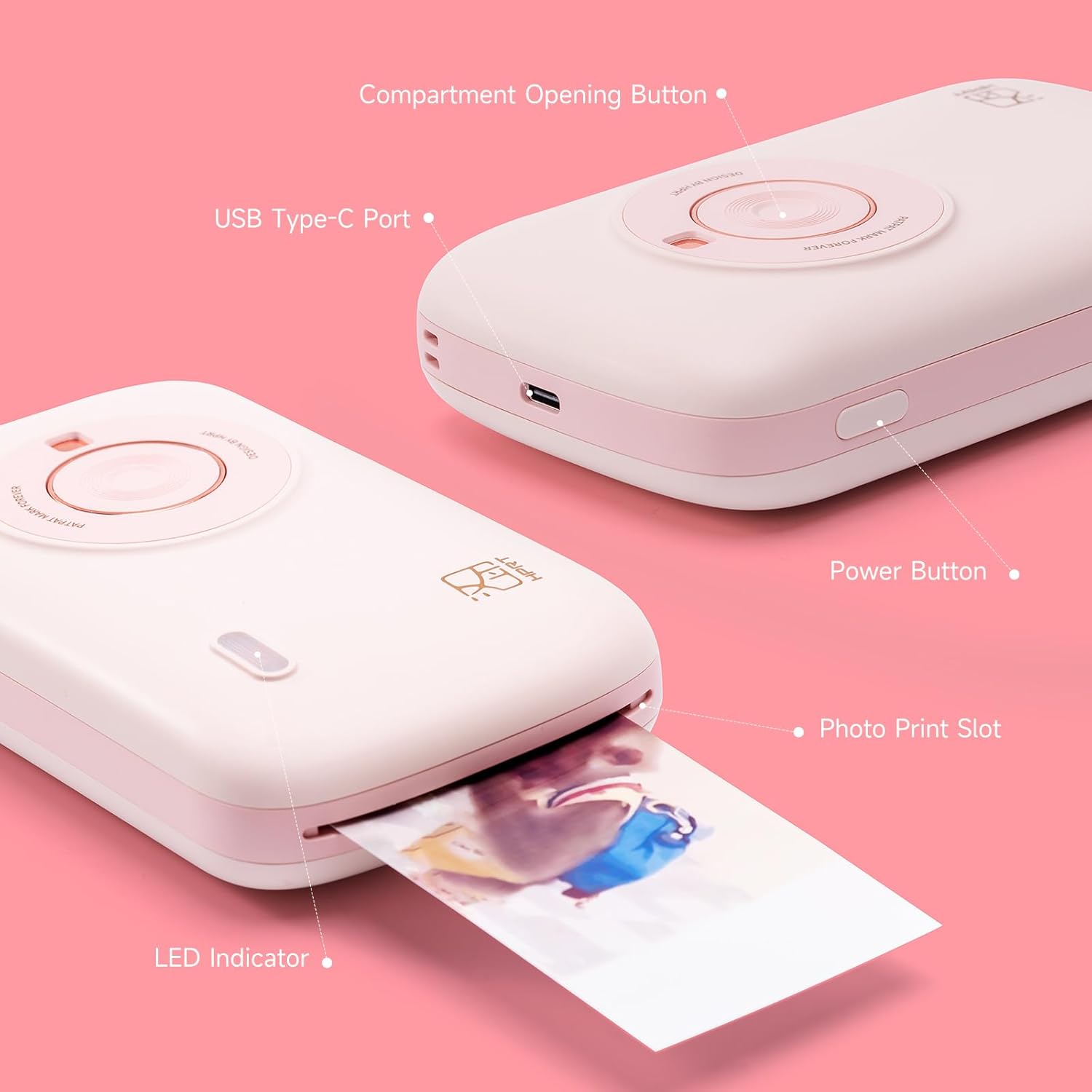
Quick Start Guide: CP2100 picture printer comes with printer consumables and wireless printing technology, just insert the ribbon into the machine, turn on and then connected with your smartphone via bluetooth, the printer will be ready
Excellent Printing Experience: Thermal dye sublimation technology provides good color accuracy and smaller blurriness. The automatic lamination technology of our photo printer will make the photo waterproof, stain proof, dustproof and fingerprint proof,which can keep your photos for a long time
Portable Photo Printer: Compact machine without additional cables required to use and brings high photo resolution ( 300 DPI). Small enough to throw in your purse or pocket, taking up minimal space in your space and still delivering professional-grade results, which is perfect for use anytime or anywhere
Personalize Your Prints: Using the HEYPHOTO app to add border and filters for your photos, make ID photos in various sizes, print AR photos,create collages and customize your snaps to have more fun in your life
Package Includes: A HPRT mini photo printer, printer USB cable, product manual and 10 sheets 2×3 inch photo paper. We recommend that you REFER TO THE PRODUCT MANUAL before using the product for a better user experience. (YOU CAN FIND THE PHOTO PAPER REFILL OR BUNDLE IN OUR STORE)
After-sale Service: If you have any questions about the use of the machine, please feel free to contact us at any time via Email. TIPS: Please do not touch the color bar of consumables with your hands during the installation process to avoid affecting printing quality
Perfect Gift Idea: Buy CP2100 as a gift for someone you love,which is great to be a birthday gift, Thanksgiving gift and Christmas gift
13 reviews for HPRT Mini Photo Printer for iPhone, Smartphone, Portable Instant Picture Printer with Bluetooth, Wireless Thermal Dye Sublimation Photo Printer CP2100 (Pink, Printer + 10 Sheets)
Add a review

$11.99
Naomithrasher –
Cute and useful
I love this printer. I’ve had it for a while. I love the color and how it print the print so clearly and the app is really good and useful you can make collages and other types of things. This is definitely a good thing to get if you are a scrapbook girl or just like to keep your memories and little photos
Be the consumer –
Easy to use
Delightful little printer
Reneé Lara –
Perfecta
Su color rosita es genial, pero la calidad de la impresión es aun mejor
Natasha Patrise –
I returned
Paper runs out fast and the refills add up, the pictures were ok but I felt like I preferred better quality so I returned. It’s ok for basic bare bones printing but I’m looking for more as I am junk journaling!
ms4sman –
Go with the Canon Ivy it HP Sprocket
I wanted to love this printer. To me, it seemed like all the fun of a Polaroid with the benefits of digital photography. I’ve had my eye on the HP Sprocket or Canon Ivy, but didn’t have the funds. I was excited to see this item available through the Vine Program! But, it’s not a great printer. First of all, the printer isn’t user friendly. I’m pretty tech savvy and had a hard time figuring out if the thing was even turned on correctly. There weren’t any instructions and I couldn’t find any online. The app was also confusing. Plus, the printer comes with 10 pieces of photo paper. Theoretically enough to print 10 photos. Unfortunately, the first photo came out with huge streaks all over it. I figured maybe it was just a fluke. Nope. Every photo has ended up with these huge streaks. Maybe it’s the printer. Maybe it’s the photo paper. But at these prices, when you’re competing with the likes of Canon and HP, you need to deliver a better product. I also can’t figure out how to buy more photo paper, whereas it’s very obvious where I can find Canon or HP photo paper refills. Save your money. Go with a different printer.
Antonio Ramos –
Photo
Love it bought for my BFF for her birthday she love it
Just Laura –
Good for travel
I am looking forward to taking this little photo printer with me on an upcoming family vacation, despite a few drawbacks I’ll mention later. It is a little heftier than I expected but still fairly small and quite portable – perfect for traveling, but I probably would not haul it around with me on a daily basis when I’m home.Pros:1. Decent photos. I know there are those who would say the quality is only so-so, but for me, it reproduces the picture from my phone quite respectably on paper, which is all I need. The colors may not be super-brilliant, but they’re not wrong. I can look at the printed picture and see exactly what I can see on my phone, so I’m happy.2. Small size. Prints are 2X3 inches, which is a nice pocket size for travel. You can share prints with others in the moment, or paste them into a travel journal, as I tend to do. You still have your digital photos, so you can always come home and make larger prints later if you want.3. Easy. Download the app, tap Connect to connect your phone to the printer, then click Picture to select and print a picture. You can print multiple copies, apply filters and effects, use frames/templates to enhance your photos, and more. But the path to just print a photo is quite simple and therefore something I will likely actually do, rather than put off.Cons:1. Refills are expensive. You can only use the proprietary cartridge refills, 10 prints each, and the only place you can buy them from, as far as I can tell, is the manufacturer (they have a store on Amazon). One cartridge is $15 at this writing, so in addition to buying the printer, once you’ve used up the cartridge(s) that came with it, your 2X3 inch prints are going to cost you at least $1.50 each.2. There is no way to use all of the paper. The machine prints at 2X3, period. Even though the app allows you to set up a different size (in mm only), that does not change the size of the picture you get in your print. The paper is actually over 3.5 inches long, so there is always a bit of wasted paper on the end that you can never use, and that you will need to cut off if you want a “full-bleed” print.3. Phone pics only. The app only sees pictures in your phone’s camera roll and there is no way to look anywhere else for other pics. I was unable to print anything in cloud storage that was not also in my phone’s Camera Roll gallery. I did copy a photo from another camera over to my phone’s Camera Roll and the printer found and printed it just fine. For a while I couldn’t even see all the Cameral Roll pics (just those from the last month or so), but later on I could, so I’m not sure whether the app needs time to load them all or what.Overall, I still like this printer and I have ordered extra cartridges to take on an upcoming trip. However, I think the inability to find and print pictures from anywhere on the phone (including cloud storage the phone has access to) to be a little limiting, and the cartridges are a bit pricey. I’ll use it for travel but probably not at home.
Austin –
Really cute; refills cheaper than before but still pricier than competition.
It’s obviously very cute and convenient. I find the app experience to be pretty easy to understand and use. I think the imagine quality is fine for the size and it’s a good printer for a fun time. The only thing I am hung up on is the that refills were very expensive when I first got this item. At the time of this review it seems like it got a bit cheaper at 20 prints for 17 dollary-doos. There are also bundles you can buy upfront with the camera to a a pretty good discount on refills. Me and my S.O are having lots of fun printing out our dog photos and sticking it on the fridge. Would recommend if you would want an alternative to big brands.
John –
This a a great, good quality photo printer. It is portable and easy to use. Instructions are easy to follow and the quality of the paper is excellent too. Pack contains the printer, charging cable, user manual and ribbon wirh 10 printing paper.Highly restores the true colours of a photo and preserves it permanently. Easy to use, just need to pay a bit more attention when the ribbon and printer paper are installed. Bluetooth connection is stable and good when using it, I have no problems with.I can print photos, vouchers or small personalised cards quite quickly, it works slower than I imagined but still okay, it takes nearly 2min to print a photoI would use it for ID photo prints, because I actually think it’s worth mostly for this reason. I can get the pictures taken by myself, whichever I like the most, and have in my passport or driving licence.I really like the app, Heyphoto, free in appstore, there are many options for printing, like collages of a maximum of 9pictures, where I can change the effect on every photo if I want to, change borderline’s shape size and distance, even printed backgrounds can be used.In my opinion the only down side for this device is the price per photo as the photos are small and is quite hard to find spare peper, reason I dropped a star, apart from this is a super photo printer.
Neil Cook –
Great pocket size printer with Bluetooth connection, ones you have chosen the image you then send it to print via this portable photo printer. The ink comes in a form of a cartridge which you load from the bottom and work very well. Spare cartridges are available to purchase too so you can reload them ones there have been used.
Jade Hewlett –
I was surprised when I opened the HPRT Portable Photo Printer at just how big it is. As it’s a portable printer I was imagining it to be closer to the size of a camera or a phone but it is quite bulky and heavy if you were to carry it around with you. It would fit in a bag easily though.The printer comes with ten sheets of photo paper which is great to try the device out but the printer is useless once these sheets are used up as I can’t find anywhere to buy any more which is a shame.The printer is easy to use and once the app has been downloaded which worked perfectly on my iPad I was able to easily choose a photo to print via Bluetooth. The photo takes a while to print as the printer looks like it’s releasing the paper and then sucking it back in again to add a different shade of colour but it comes out perfectly in the end.I am very impressed by the quality of this product and the photos it produces but because I can’t find anymore paper and how heavy it is and not as portable it seems I’m going to have to give it three stars instead of five.
Customer –
Comes nicely boxed with all parts seperated out, the film itself being into its own box and plastic wrapping (to stop from any moisture damage from the manual explaination), charging cable and manual. The item does feel nice with a soft plastic type shell, button to open the side to insert the film “cartridge”, power button and a light to tell you the status.The manual states to pop open the side, insert the cartridge until it clicked and close. Power it on, scan and install the app (i did like it both comes from the google play store aswell as doesnt need a signup/personal info to work) and off you go….well not for me.Upon powering it had a blue light and made the sounds you’d expect from a movie with giant robots fighting each other, then went red. The manual uses red as a cover all “it has a problem so could be a list of things” but all mostly relating to the cartridge. Well from the video you can see that the cartridge had jammed itself into the thing and wouldnt budge.After trying for a few minutes it was well n truely stuck in there and the whole thing was making all kinds of noises so i turned it off, got a pair of pliers and pried it out. It turns out the ribbon for printing had gone wrong in multiple ways. It had twisted itself on spooling as can be seen in 1 picture. The red side that pulls the used ribbon to itself had a thin metal spring holding it in so popped out of its enclosure and the entire part was wrecked.Sadly my partner had been after one of these for awhile so i didnt want to completely give up and looked to order a replacement cartridge….thats the second issue. Even if mine didnt go faulty the way it did, theres literally noway of finding replacement “consumables” (the name from the manual). It only comes with 10 photoes so you’ll go through those fast and then…nothing?It also doesnt help the cartridge part is alot of plastic and metals that once you’ve used 10 photoes just goes into the bin so feels very wasteful and sadly could end up being a long term cost that far outweighs the portability of the device.
Donna –
I was surprised by the quality of the print, it’s as good as you’d expect from a professionally printed photo.There is a white gap along the side, which I assume is to allow you to pull out the photo at the end without putting fingers on the print – this would need trimming.The machine works very well and was easy to set up. The video shows the process it goes through, adding each individual colour layer at each pass through the machine.This would be perfect if I could find the replacement paper set. It’s not as simple as putting in some paper, you need to replace the cartridge with the ribbon (the current one holds 10 sheets).It’s difficult to comment on value for money when you’re unable to gauge the cost of each print. And you wouldn’t want to buy a product with the capability of printing only 10 photos.So, the product itself – print quality – would be 5 stars. BUT – you need to search online to see if the cartridges are available before buying.