
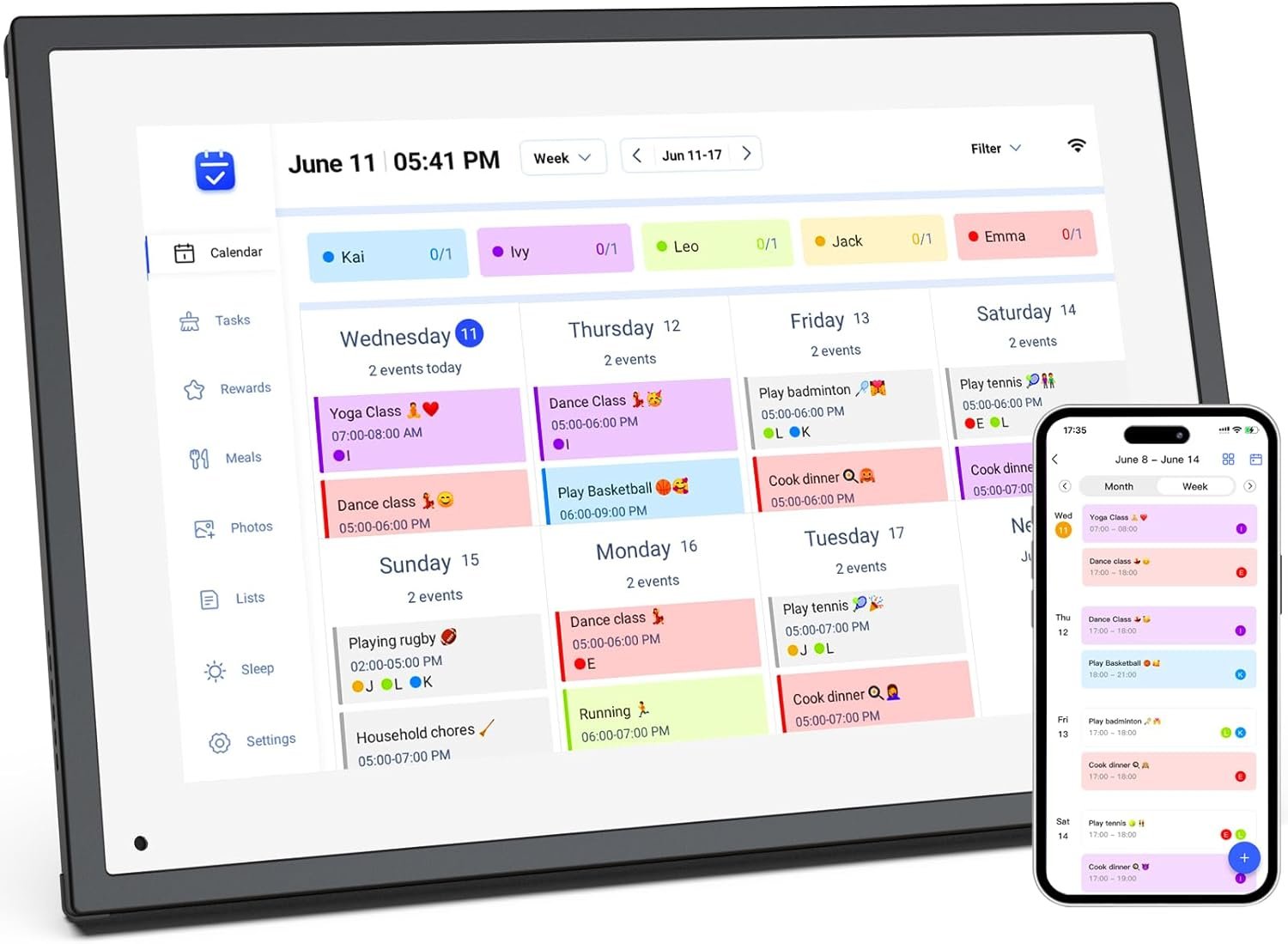
10.1 inch Wall Planner Digital Calendar & Chore Chart,Smart Touchscreen Interactive Display for Family Schedules,Hearth Display Digital Calendar, Digital Photo Frame Share Moments from Anywhere
$18.99
Related Products





Product description


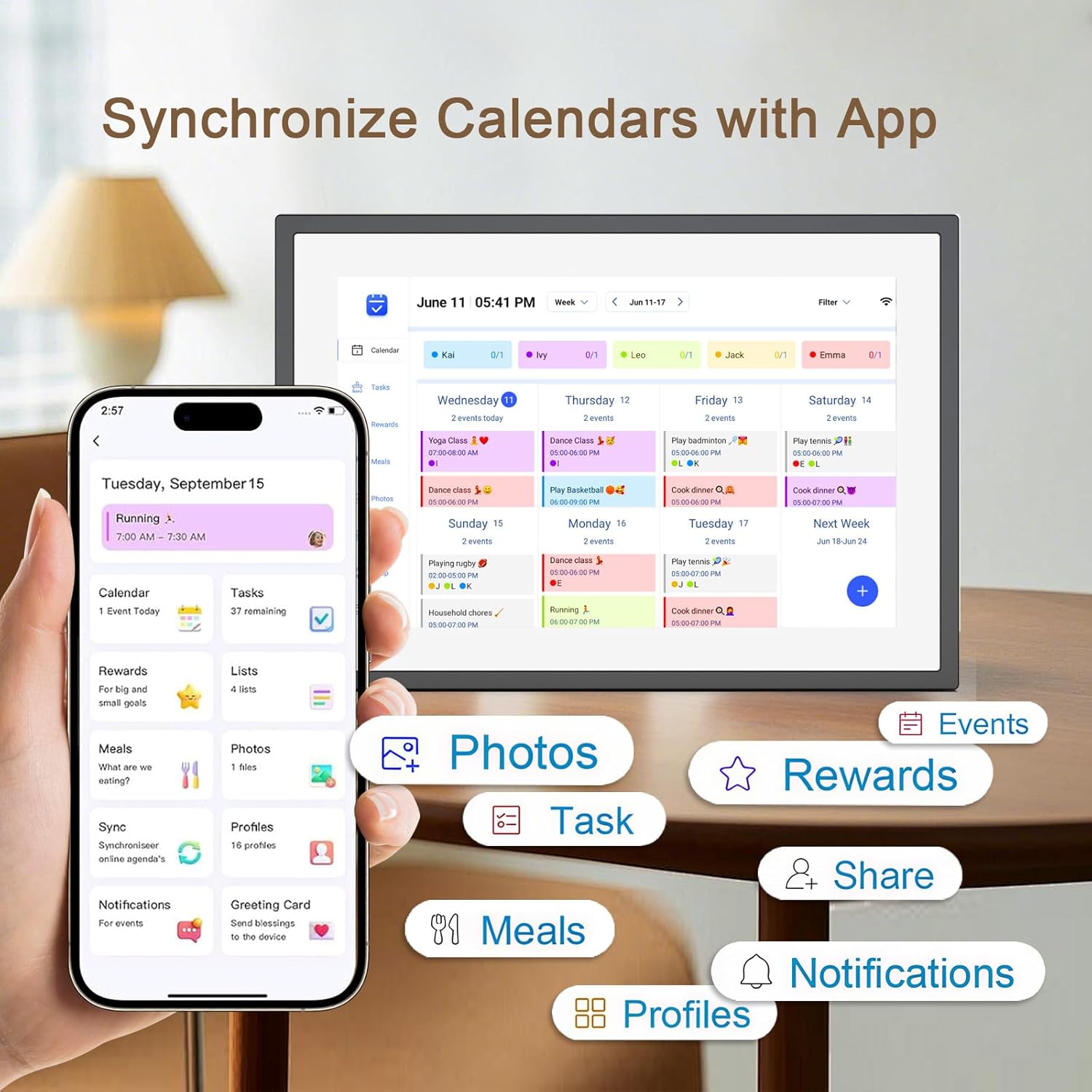
1 Chore Chart 2 Grocery List 3 Star Rewards 4 Dinner Plan 5 Event Syncing


Operation Video How to set and bind your calendar
1.Set up Digital Calendar. 2.Scan the code to download the eCalendar App on your phone.
3.Set up your email address to generate a code. 4.Digital Calendar input code to bind your phone.
5.Start using your Digital Calendar
The video showcases the product in use.The video guides you through product setup.The video compares multiple products.The video shows the product being unpacked. 10.1 inch Wall Planner Digital Calendar Merchant Video
How to Add Chores
Digital Calendar Add Chores
1.Click on the “+” to add Chores 2.Name chores, set date and time 3.Add members and assign chores, or assign chores to already added members
App add Chores to syn to Digital Calendar
1.Click Chores 2.Add new members 3.Click “+” to enter chores name, set the date and time 4.After saving, it can be syn to Digital Calendar
The video showcases the product in use.The video guides you through product setup.The video compares multiple products.The video shows the product being unpacked. 10.1 inch Wall Planner Digital Calendar Merchant Video
iCloud schedule sync to Digital Calendar
1.Click “Sync” 2.Select Email Account 3.Click “iCloud” 4.Copy email address
5.Open calendar 6.Click “Calendar” and select “Public Calendar”
7.Click “Share link” 8.Click “email” 9.Paste email address to the sender and send email
10.iCloud schedule Sync to Digital Calendar
The video showcases the product in use.The video guides you through product setup.The video compares multiple products.The video shows the product being unpacked. 10.1 inch Wall Planner Digital Calendar Merchant Video
Google schedule sync to Digital Calendar
1.Click “Sync” 2.Click “sync New Calender” 3.Click “Google”
4.Select “Two way sync” 5.Enter email number 6.Select language, click continue
7.Select email, click “sync calendar”
The video showcases the product in use.The video guides you through product setup.The video compares multiple products.The video shows the product being unpacked. 10.1 inch Wall Planner Digital Calendar Merchant Video
How to add lists and events
How to add lists
1.Click on the list 2.Add list 3.Name the list and add event 4.Click on it after completing the task
How to add events
1.Click “+” to enter the event 2.Set the start time and end time 3.Add members
The video showcases the product in use.The video guides you through product setup.The video compares multiple products.The video shows the product being unpacked. 10.1 inch Wall Planner Digital Calendar Merchant Video
How to send photos
1.Click “Photos”
2.Click image icon
3.Select the connected Digital Calendar and click “Pick from Gallery”
4.Select image, confirm and send
The video showcases the product in use.The video guides you through product setup.The video compares multiple products.The video shows the product being unpacked. 10.1 inch Wall Planner Digital Calendar Merchant Video

【All-In-One Digital Calendar】: WiFi digital calendar + planner touchscreen display + digital picture frame that will get the whole family organized and running smoothly. It’s never been easier to keep the whole family informed by assigning each member their own color and chores. (NOTE : Can Not Wall Mount)
【Versatile Family Assistant】: This versatile digital calendar planner goes beyond a calendar; it helps you create meal plans, access recipes, and watch cooking tutorials. With touch screen, you can easily access smart home apps to control your existing devices. It also serves as a digital picture frame to showcase cherished family memories.
【Easy Setup & Use】: Simply plug it in, connect to Wi-Fi, and sync your calendars – all your events will automatically populate and sync. Synchronize with the internet time servers to ensure the utmost accuracy.Add events or chores directly on the device or use the free to download mobile app. Compatible with Google Calendar, iCloud Calendar, Outlook Calendar, Cozi, and Yahoo.
【Chores Chart & Dinner Planner】: Easily add, edit, and track chores to promote independence with an interactive Chore Chart. Especially children, to develop healthy habits with an interactive chore chart. Display your family dinner plans to keep everyone informed and eliminate the daily “What’s for dinner?” question.
【Built-in Digital Picture Frame】: Supports sending Photos & Videos by Fr-ee App, sharing wonderful moments with your family & loved ones from anywhere. All your precious and cherished moments can be displayed on the digital photo frame instead of just being locked inside your phone.
【Say Goodbye to Family Chaos】: Our smart calendar digital wall is your ideal solution to reduce stress and keep everyone organized effortlessly. Transform your home into a hub of harmony and productivity. While also serving as a beautiful digital photo frame to relive your most cherished moments. Perfect for organizing busy family lives or for gifting!
13 reviews for 10.1 inch Wall Planner Digital Calendar & Chore Chart,Smart Touchscreen Interactive Display for Family Schedules,Hearth Display Digital Calendar, Digital Photo Frame Share Moments from Anywhere
Add a review

$18.99
PHofHP –
Terrific image quality, has every feature you could want.
Terrific image quality, love that its battery lets you remove it from its charging stand to view photos. The Wi-fi works great- you can send it photos from anywhere. I thought I’d have to connect a thumb drive, but its internal storage capacity is plenty large .We are buying a second one as a gift for my son and his wife. We previously had a 10 year-old Pandigital brand digital frame, and are amazed how much better the image is on the Frameo.
kkt60 –
Perfect gift
I purchased this for my Mother’s 84th birthday. She is absolutely thrilled with it. She can constantly see nice clear pictures of all of the family that are scattered all over the country. This was very easy to set up and use. Highly recommend this.
Jane M. –
Ready use app for frame
Great frame for the money. Just download the app frameo and share the pictures to the frame you can select fit to frame portrait or landscape for perfect size display. You can also share the link forth friends for them to send pics as well. Has a setting for automatic backup so you never lose your photos. Can select how long each one is viewed for. Love this frame!
Becca –
Best for Long Distance Family
We love this frame! We bought one for both of my grandparents last year and now I’m back to get another one for my mom. They live states away and it’s so easy for the whole family to use the app to send photos over.
Richard Fletcher –
FRAMEO 10.1 Inch Smart WiFi Digital Photo Frame: A Great Gifting Choice
The 32GB FRAMEO 10.1 Inch Smart WiFi Digital Photo Frame has proven to be a truly fantastic product and an ideal way to share memories with family. The 10.1-inch screen size is perfect—large enough to see clearly from across a room, yet compact enough to sit unobtrusively on a shelf or desk. The 1280×800 resolution IPS LCD panel delivers sharp images and vibrant colors, making photos look beautiful from any viewing angle. The 32GB of storage capacity is generous and allows for thousands of high-resolution pictures to be uploaded and organized. The FRAMEO app functionality is seamless and makes it incredibly easy for family members to contribute photos remotely, which is the frame’s best feature.Overall, this is a great product that excels at its core function of displaying and sharing digital photos. It has brought a lot of joy to our family by keeping us connected through pictures.My only constructive feedback relates to the user interface: the touch screen has some lagginess. While navigating the menus and settings, the screen can occasionally be slow to respond to taps and swipes. This minor issue doesn’t impact the main function—displaying the slideshow—but it is noticeable when you are first setting up the frame, adding new users, or adjusting the settings. It’s a slight inconvenience, but not a dealbreaker, given the excellent photo quality and the convenience of the WiFi and FRAMEO app. Highly recommended despite the minor UI speed issue.
Christina Roberto –
The gift that keeps on giving
I absolutely love my frame and especially the back part that lets it stand on my tv unit. It’s such an easy to use product that brings me joy to constantly see the pictures stroll through. Easy to add them as well. This is the best gift to give also.
Twanette –
Excellent price and quality.
The best choice for displaying pictures at work on my desk. It’s customizable. I have created photo albums so I can pick what others see. I have a lot of staff asking where I ordered and what’s the name of the frame, so they can give as gifts or buy for themselves.
Delilah N –
Buy it!!!!!!
I have been wanting a Frame like this . I like that it has a thin frame. Goes better with all decor. It is thin and light weight. I am bot super techy and i was able to set it up easily and quickly. I love that it is touch screen so no crazy up down menu buttons on the back. I am a new mom and always have a new photo so this works perfectly. You can adjust the zoom, how long the pics stay, back ground music, and just sooo much more. I have only had it one day so jot sure how much you can out on it yet but by golly. I have not one bad thing to say so far. Well maybe a remote because i hung it up at my desk and have to take it down or unplug to turn it off. The picture i took was from below and ana ngle so quality doesn’t look the best, but it truly is great quality.
Calvin S –
This frame lives up to its ad, great picture, easy to use, easy to setup. To top it off though This frame is incredibly robust, my kids have dropped it from heights upwards of 4′ off the ground multiple times, stepped on it, slammed it on tables and it still works. The frame itself has popped apart but it snaps together no problem and keeps on going. If you have small kids and are worried about it surviving, dont worry it will.
Amazon Customer –
It was easy to setup and works like it should
Carol Hutchison –
Mom loved it! Easy set up and code sharing with the family. 300 photos shared the first day, great gift especially if every family lives in different provinces
josee l’ecuyer –
Facile de transférer des photos. Le seul reproche, on doit en permanence être connecté au WiFi sinon, un message est en permanence à l’écran. Ce n’est pas possible pour la personne à qui j’ai offert le cadre
Anthony David Brearley –
WOW, this exceeded my expectations. Very good product. Easy to use and great picture quality