
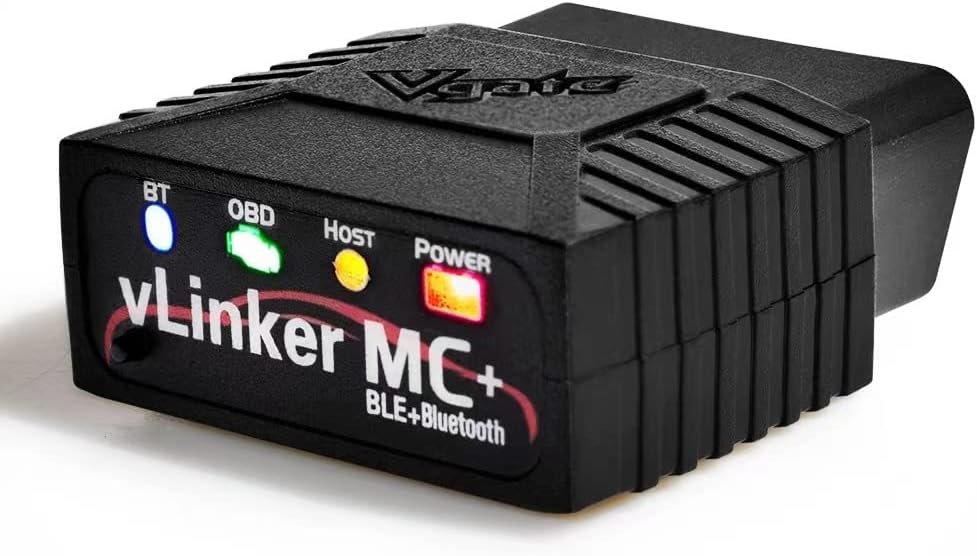
Vgate vLinker MC+ Bluetooth OBD2 Car Diagnostic Scan Tool for iOS, Android, Windows
$7.99
Related Products


From the brand

Vgate
My Car, My Way
Vgate Battery Terminal Series
Vgate

Vgate
My Car, My Way

Vgatemall is a company that specilizes in manufacturing and developing automotive products, focusing on affordable product, high-quality product and A-list after-sales service.We stand behind every product we sell, so if you have an issue or question, we are here to help.

Vgate vLinker FS USB Adapter
我们如何开始?
Established in 2011, Vgate adheres to the slogan “My Car, My Way”, and is committed to the research and innovation of automotive intelligent diagnosis, testing products.
Our Mission
Committed to the most functional OBD products, controlling the cost to the extreme, and making the most perfect functions. We have always made the user experience our top priority.
Our Value
Our products combine high-tech with down-to-earth practicality to fix your car on your own. Believe that everyone who loves cars can become a professional Mechanic.
– Advanced Protocol Support: Vgate vLinker MC+ OBD2 diagnostic tool supports SW-CAN and MS-CAN protocols, providing access to proprietary GM and Ford networks alongside all five standard OBD2 protocols. It’s part of our popular line that includes the Vgate iCar Pro Bluetooth.
– Special iOS Support: Unlike the vLinker MC Bluetooth, the Vgate vLinker MC+ Bluetooth scan tool extends support to iOS devices like iPhones and iPads, making it a versatile choice for users across multiple platforms.
– Enhanced Data Transfer: Ideal for coding applications requiring high data throughput, this Vgate vLinker MC+ Bluetooth OBD2 adapter works seamlessly with iOS, Android, and Windows platforms.
– Wide Compatibility: Fully compatible with ELM327, ELM329, and STN command sets, ensuring broad software support for both professional and DIY diagnostics.
– Energy Efficient: Featuring a low operating current (24 mA) and intelligent sleep mode (3 mA idle), this Vgate vLinker MC+ Bluetooth OBD2 scanner prevents battery drain when left plugged in.
– Compact Design: Its small size won’t interfere with legroom, offering top-tier performance, robust security, and excellent third-party app support for vehicle diagnostics.
– Check Compatibility: Visit our website or contact us to ensure your OBD2 app works with this Vgate vLinker MC+ Bluetooth OBD2 car code reader.
– Firmware Updates: Contact Vgatemall for assistance with firmware upgrades for your Vgate vLinker MC+ Bluetooth OBD2 tool.
9 reviews for Vgate vLinker MC+ Bluetooth OBD2 Car Diagnostic Scan Tool for iOS, Android, Windows
Add a review

$7.99
yaaargle –
Fixed the issue with auto headlight function for my JL Wrangler when paired with JScan
I have a JL Wrangler which suffered from a glitch with the auto headlight function after using FlashCal. The Vgate vLinker MC+, when combined with JScan, fully resolved the issue.The device itself is easy to use. With Bluetooth Low Energy, I didn’t even have to pair it using traditional Bluetooth. You just plug the device into the OBD-II port, then launch whichever diagnostic app you have, select the BLE option and it connects within seconds. It’s small enough that I can just throw it into the glove box or the center console and just dig it out again whenever I need it. It was fully compatible with my vehicle and I was able to change a lot of functions using it–far more so than I could do with FlashCal. It worked pretty well, although there were a few hiccups when trying to save some of the altered settings where the app became stuck while trying to save the changed settings, but I was able to resolve that issue by restarting the app and cycling the vehicle’s ignition state.If you own a JL Wrangler and have issues where you have malfunctioning auto headlamp feature, I have the tutorial on how to fix that issue below:FlashCal and Tazer users, including myself, have reported the two products that introduce a glitch with the JL Wranglers’ auto headlight function, where the headlight will automatically turn on when the ambient lighting is low but refuse to automatically turn off when it gets bright, which commonly happens when you’re driving through a tunnel or at an extended stop under an overpass. Some people have suggested replacing the ambient light sensor by the windshield, which I tried and that did not resolve the issue.What seems to happen is when you use FlashCal and Tazer to change any of the settings, they seem to cause a bug where invalid value is entered for how the BCM reads the voltage from the ambient light sensor. The way the ambient light sensor works for JL seems to be resistor-based where being exposed to brighter ambient lighting will cause it to read lower voltage and vice versa. FlashCal and Tazer do not have a way to read and adjust the data to and from the ambient light sensor. JScan, on the other hand, goes fairly in-depth with not only reading the voltage but allows you to adjust, as well.After you plug the device into the OBD-II port, you can use Bluetooth Low Energy on your phone to establish connection to the JScan app. That only takes a few second, and you don’t even have to pair the device to your phone. You will then need to go into the ADAPTATION menu, and then AUTO HEADLAMP & AUTO HIGH BEAM SETTINGS. You will then see two options, “Auto Headlamp OFF Threshold” and “Auto Headlamp ON Threshold”. When I accessed mine, they were set at weird three-digit values instead of the proper voltages. Change the OFF threshold to 2.80V and ON to 3.60V, and you should have full functionality of auto headlamp again.
sugob –
Phone BT [BlueTooth] disconnect after initial BT pairing is correct [see review]
Product: Vgate vLinker MC+ Bluetooth OBD2 [bought Jan 2022] $60Car: Mazda CX-5 2021Test: OBD software ‘FORScan Lite’ v1.5.12.1 on 2 mobile phones [Android 12 & Android 10]I thought there was a problem as, after following the instructions to pair phone with BT [i.e. select “vLinker MC-Android” in phone BT ‘pair new device’ settings], it prompted for the code [1234], then the BT would seem to connect…then disconnect about 2 secs later [according to phone] :-(. I was expecting it to stay connected [& now clicking the ‘connect’ button on phone BT does nothing]Turns out this BT disconnecting is expected – the above pairing defines a new BT adaptor config in phone [for the MC+] and you now have to set your OBD software to use this config i.e. in my case run the FORScan software on phone then select ‘Settings’ / ‘Bluetooth adaptor’ & choose ‘vLinker MC-Android'[I left ‘Settings’ / ‘Connection type’ as ‘Bluetooth 0’]. When you click the FORScan icon to connect to MC+, it will then start this BT connection – only need to do this BT pairing onceI think VGate should update their instructions to indicate the BT disconnect is correct/normal [I almost returned mine]FYI 1: When connect the MC+ to car socket, the MC+ power LED lights up solid red & the BT LED goes on/off every second [i.e. indicates that BT disconnected]. When click the button on front of MC+ [to enter BT pairing mode], the BT LED flashes rapidly [several times a sec] until pairing complete [then goes back to the 1 second on/off i.e. disconnected]. When connect with FORScan, the BT LED is solid blue [i.e. connected] – the OBD and Host LED flash rapidly only when pulling dataFYI 2: I can use BT to pair the phone to the car infotainment [e.g. to play music from phone to car] at the same time as FORScan is pulling live data from MC+. This may depend on phoneFYI 3: The FORScan software is only intuitive once you get the hang of it e.g. run it & BT connected to MC+ but NOT active [don’t click the button that looks like play] so can then add items [called PID’s] to monitor [e.g. speed, revs, oil pressure/temp…there are literally hundreds] – after adding PID’s, only then click the play icon to actively get the vals of these PID’s from car i.e. can’t add PID’s when in play modeI’d expect other OBD software to work similarly i.e. need to pair MC+ to phone & then change the software config to use this connection. Remember, although the MC+ should work on most modern-ish cars [US >1996, Euro cars > 2004, OZ/NZ > 2006 etc] and some light trucks, the OBD software you choose usually only fully supports [i.e. a large range of PID’s] on very specific car make [and to a lesser extent model/year] e.g. FORScan is for “Ford, Mazda, Lincoln and Mercury vehicles”I got this OBD scanner as vLinker series seem to be well supported by OBD software [so less chance of ‘issues’], it supports additional protocols [future proofing & use on other car makes], can connect using android/iOS/laptop [only tested first], and has a faster transfer rate [baud equiv of 500kbps – about double that of cheaper OBD readers]Overall, the MC+ seems to do what it says on the tin!M
MATTHEW –
Great scan tool
Needed a scan tool with write capability for reprogramming a Jeep Gladiator transmission. Worked great, and was cheap! Connected without any issue at all, and worked with three different apps.
Brandon Cash –
Great for using the live data in A Better Route Planner (ABRP) !!!
Got this device to use the live data feature in A Better Route Planner in my new EV. Once setup, it seems to work great and I haven’t really had any issues. I am using an Android phone (Google Pixel 7 Pro) and the setup was mostly straight forward following the instructions. Pay attention to the bluetooth name the instructions tell you to look for. I didn’t fully understand that there would be multiple bluetooth names that would pop up when trying to connect to it the first time. There is a generic one, one for iOS, and one for Android. Make sure you choose the one for your phone’s operating system. Do not just choose the first one that pops up or it may not work properly and you will have to delete and forget the connection and start over to fix it. If you are using this with ABRP, when you go to search for the device in the ABRP app, it will only show up as the iOS name as far as I can tell. The Android one never showed up there. But that seems to work fine in the app as long as you connect to the correct one in your phone’s bluetooth settings first.
Tiwi –
Köpte till min Triumph tiger för läsa felkoder och nolla servicelampan och den fungerar kanon 👍
Marc VH –
prijs kwaliteit, snelle bezorgtijd, top product ik kan het alleen maar aanbevelen !
Gregor Melchert –
Am Tag der Bestellung geliefert. Ich denke immer wie geht sowas. Das Gerät funktioniert sehr gut und ist deswegen empfehlendswert. Es ist hochwertig verpackt und sehr gut verarbeitez. Vielleicht das Beste am Markt.
Jack –
Excellent OBD scanner at a brilliant price. I considered this against other scanners and for the price of the listing it was a great deal. The vGate vLinker MC+ connects quickly and performs read/writes operations at a blazingly fast speed which is great as I’m not sat there concerned how long it is taking.Obviously, you’ll need a dedicated app to interface for your car’s system – don’t expect to just plug in, download any random app and get going – do your research! For example, FORDs like FORSCAN, Bimmerlink for BMW, Jeeps work with JScan/Alfa OBD, etc… You’re paying for the wireless scanner that the app uses to communicate with your car!With that aside, it instantly connects to my phone when powered, and has native compatibility with many apps, the manual even comes with a little booklet of apps to download. For me, it connected with JScan for my 2021 Jeep Renegade with ease and was able to read all codes, OBD information, etc, and was able to write data to the system too (to enable hidden features, etc. note FCA vehicles 2018+ need a security bypass module).Overall, 100% worth the money, a must get even for the minor car lover, great to just leave in the boot just in case you need it some day.
Locaspera –
Immédiatement reconnu par mon véhicule, et mise à jour du véhicule parfaitement réalisée