
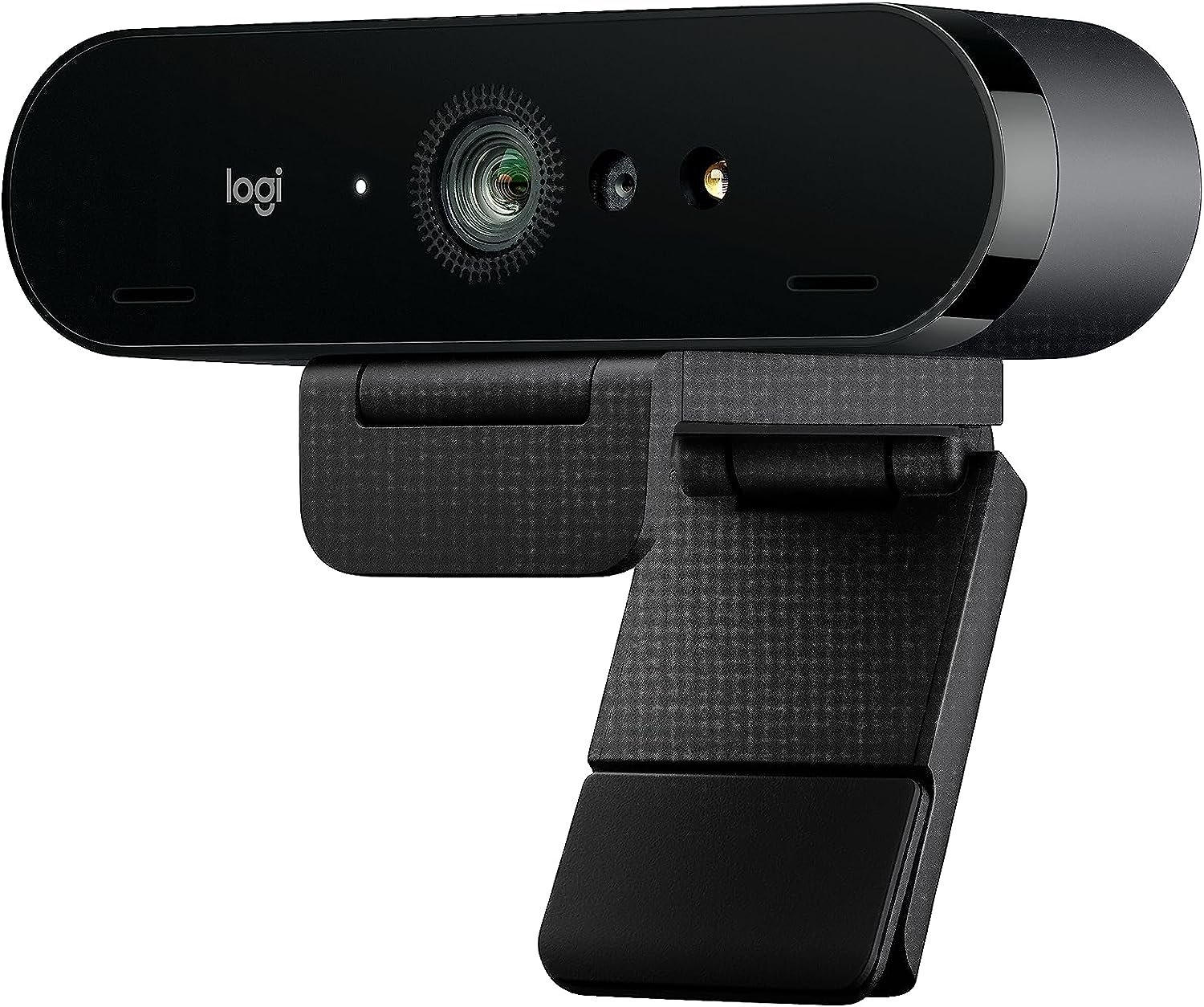
Logitech Brio 4K Webcam
$16.99
Related Products


Discontinued – Not Supported
SUPPORT WORK FROM ANYWHERE WITH SYNC: Whether employees are in the office, at home, or somewhere else, Sync device management software helps everyone stay connected by letting you ensure their Logitech video collaboration personal devices are being used and up to date.
Ultra 4K HD resolution: 4 times the resolution of a typical HD webcam; look your best and enjoy professional video experience wherever you are with 5x HD zoom. Auto light adjustment: Logitech RightLight 3 uses HDR technology to show you in the best light, even in low-light and backlit situations.
Noise-canceling technology: Dual omni-directional mics suppress background sound so you can be heard clearly.
3 field of view presets: Choose 90°, 78° or 65° dFOV via Logi Tune to include more of your environment or narrow the focus on you.
Up to 90 fps: Create high-quality video recording or streaming in any light condition. Windows Hello integration: Easily and securely sign into your computer without a password.
Privacy shade: Flip up or and down to cover or expose the lens. Works with Windows, Mac, or ChromeOS and popular calling and streaming platforms; 1 year limited hardware warranty. Detachable universal mounting clip fits laptops, LCD or monitors

Phil Vasile –
Nice tool!
Crystal clear image and lots of action on the screen following hosts. Pretty cool.
Malissa Atkins –
Excellent Quality
If you have the money to invest in this webcam, I highly suggest making the purchase. Logitech has a great reputation when it comes to the webcam sector. I have several webcams and this is now my favorite. Hopefully, this review helps with any decision you are trying to make.This is one of the few webcams that supports 4K Ultra HD 2160p/30fps. I just upgraded to a 4k monitor, so maybe most people are not looking for a 4K webcam. At full HD 1080p/30 or 60 fps, this webcam also supports HD 720p/30, 60, or 90fps, it is still by far the best webcam I have right now. It is impressive! Even with makeup, you will probably notice a few flaws in your skin. It is that amazing!It does come with a privacy shutter that you can attach if you want a physical block of the camera. Not only that, but it snaps on easily. There is also a black drawstring travel bag to prevent scratches and dust when not in use or if you need to travel with it. It does not come with a tripod, but it does have a tripod thread mount.There is a detachable mounting clip. I tested it on an older, bulky laptop. It is wide, and it worked great. I purchased a tripod because I will primarily use this for my desktop. I didn’t like the idea of it hanging on my monitor, as it doesn’t have a plastic outside edge. My monitor screen runs to the very edge. If you have a similar monitor, I would highly suggest purchasing a tripod. Another consideration that might make you want a tripod, this webcam can’t be tilted up or down or turned left or right, so it’s basically stuck in a fixed position. With the tripod I bought, the top half has a ball with the plate of the screw that attaches to the bottom of the webcam. This setup on the tripod allows me to adjust it to where I need it.This webcam is compatible with video conferencing platforms like Skype for Business, Microsoft Teams, Cisco, Cisco Webex, Cisco Jabber, Microsoft Cortana, Windows Hello, Skype, Google Hangouts, and other VC applications, XSplit, OBS, Twitch, BlueJeans, Zoom, Fuze, GoToMeetings, and Ring Central. I use several of these platforms and compared to my older 920 Logitech webcam, I can see a huge difference in quality. I share videos with colleagues, and they have also noticed a difference. As for the platforms, many have a maximum of 720p or 1080p. You probably won’t notice a difference when joining a meeting.Once you start using the webcam, you will see the autofocus and the auto light correction with high dynamic range (HRD). It tracks movements and quickly makes the right adjustments. There are also three fields of view, so you are not limited to a single default. The three views are 65-degree, 78-degree, and 90-degree. If you are not familiar with what each would offer, the 65-degree view is a close-up view of your face, the 78-degree is more balanced with your face and some of the background, and the 90-degree view shows more of the background with you in the center.You also have omnidirectional microphones with noise-canceling to reduce background sounds to make the voice clear. It does not take away a cat meowing in the background, but I do notice less noise from my chair if I slightly spin. I have not had any results where my voice is distorted, echoing, or that hollow sound. I think it helps to have two microphones built into this webcam. I want to mention, that the USB cable with this webcam is of high quality. It also is slightly over 7 feet in length.Pros:Great sound quality, crystal-clear video, autofocus, auto light correction, 3 adjustable fields of view, high dynamic range (HDR), the image quality of the camera is impressive, and offers a good range of resolutions with still image and video capture.Cons:The quality of the construction of accessories isn’t consistent with the camera. It feels like I got cheap accessories. Some might consider the price as a con, but I particularly do not. I feel the price matches the quality of this webcam and the features it does have.Tech:Supported resolution: 4K/30fps; 1080p/30 or 60 fps; 720p/30, 60, or 90 fpsDiagonal field of view: 65 degrees, 78 degrees, 90 degreesFocus type: AutofocusLens type: GlassBuilt-in mic: Stereo-dual Omnidirectional, with 2 microphonesDimensions: 1.06 inches high x 4.02 inches wide x 1.06 inches deepWeight: 2.22 ouncesCable Length: 7.2 feet
Win –
Good cam
Simple setup, unlike some past Logitech products, works well with my Mac OS. The mounting could be a little bit better, because if you have a monitor with a curved back, which most have, it’s a little dicey to get it to sit just right. But it appears to be a good camera and relatively intelligent with numerous options. Personally, I recommend an additional app called, unbelievably, Webcam app. I don’t know if it’s made for Windows or not, but that’s what I used to use, and it has more adjustments than the built-in Brio adjustments. What’s nice is that both will work with the camera at the same time, so the Brio can make rougher adjustments, and the Webcam app can make more minute adjustments for saturation, zoom, pan, and tint controls.
bookluvr –
Great camera, super easy to install, great support
I works very well. I was a little disappointed in the resolution but it isn’t bad (the only reason I gave it four stars). The camera I had previously had fantastic resolution but the auto zoom didn’t work half the time making it virtually useless for Windows Hello. The Brio auto focus works well. The unit was easy to install, plug and play and it works with my GHUB. Unlike the company who made my previous camera, I know Logitech tech support will be great as they have been for my other Logitech devices. I am very happy to have made this purchase.
Jay C –
Excellent WebCam for Price
Not cheap, but worth it for its quality 4K output and functionality. This sleek WebCam is easy to install, connect, and adjust, and offers a wide, bright output feed, even in less-than-optimal light conditions.
s –
Pleased with camera, mount lacking
ProsGood sensor, for what you can get on a computer (pc/laptop) I’ve tried it in light and dark rooms. It’t not better than what your getting with an iPhone or high end android device. But it’s a lot better than several I’ve used including other Logitech and some off brands and few Microsoft ones as well as several laptops. Why logitech cameras are so good is they use good parts, and have solid software. You really can’t over come bad camera firmware even if you put in more expensive hardware. it also has a decent mic. It’s an all around camera that you will always look good in an office setting or just conferencing. I think it’s worth the money these days to have a good camera like this with everything having gotten so virtual. i use it for work, health care (pt sessions), and calls.No external branded weird software to get in the way. They kept this clean just as I like it. It’s just works. That’s what we want we are working no nonsense Logitech gets it.Software/drivers and hardware is good: Logitech generally an expensive company. You could say overpriced, but their stuff has worked well for me when competing products haven’t. The mice for example are fantastic. They have these little touches and never fails that’s not the review but I’m just saying their products are well together on the software end. Autofocus works no messing around with your operating system trying to get the camera to work. It works fine with Team and Zoom.ConsCost: I mean 170 is a lot of money for good but not high end camera. Think about a high end Iphone or a highend Samsung phone. You almost expect that for a 200 stand alone camera. This is sharp but it can’t touch those kinds of cameras on color or light handling. Does it matter for office calls. Ehh, but still your spending this you must care right? I did. I got tired of looking like a faded blurry mess which is why i upgraded to this. Your just not making memory here. They aren’t artistic beautiful web cam pictures but you look pretty decent.The biggest con for me is the stand. I get it everyone will complain about a stand I’m telling you take their 910/920 series and give me that stand anyway. It sticks better on the monitor, it pivots way better. This thing has a tripod attachment, but I don’t know many offices workers sticking a tripod on the desk. This is the place where I thought they could do a ton better. I mean I can live with it, but it needlessly sucks. Once you get it right it’s basically set and forget well unless if you are a call with a whiteboard and moving around or something (I do that).It’s a good camera. I ‘d probably do it again, because again the other ones just don’t create clear video or have other problems, I prefer to buy something good rather and keep it for like 10 years. I had a C910 for 10-11 years until it got a bit flakey. I bought a Microsoft one before that the cam studio where the autofocus never worked right and kept getting crappy ones form my it department that had weird issues or were impossible to see fine details. I finally expensed this, they pushed back and I just appealed to them … environmental care … buy suggesting continuing to buy me crap that breaks or doesn’t’ work will just fill landfills. Just get me a good camera and be done with it. They are happy because I went away and shut up about the camera. And I am because I ‘ve got Gorilla tape holding a great camera to my monitor. It’s win for everyone. I think you’ll be happy. You’ll be mildly annoyed with the stand. Don’t expect iphone. Expect good computer camera for calls.
Ralf M –
For a better picture quality as online trainer I purchased the Logi Brio 4k. Setup was done after connecting it. There is some Logitech Software for the cam – but its not really necessary. I was impressed how much better the picture quality – especially under low light/non optimal light – improved in comparison to my Logitech c925e – which is already a very good one.As a bonus for me does the cam support login via Windows Hello – to login in Windows with your Face. Works really well for me.It’s on the bigger side – compared with others. But ok. And its tripod mountable. Thats helpful sometimes. Also prolonging the cable to around 5m was no problem (had my share of problems with a Elgato Facecam Pro here).One thing – the included privacy flap – I didn’t realised what the included plastic thing was for at first. Then I got it – you are supposed to clip it on top. An included privacy flap like in the c925e would have been nicer and easier to use.The only thing I regret is that I didn’t bought it earlier 😉 …
Stephens –
First off, there is no other webcam available to me that I could compare it to, so this is a biased opinion.Secondly, it does a very decent job at serving its main purpose: Logging into a modern Windows 10 desktop PC via Windows Hello facial recognition. I think whenever Hello doesn’t work efficiently it’s the fault of Windows 10 (amongst this OS’ *many* other shortcomings!).Re: the 3 features: It does a good enough job at auto-focussing, I think, again with no other webcam available to compare it to. However, there is a bit of lag even on a machine with 8GB RAM and an 8700T CPU. (VERY IMPORTANT: Note the “T” in the CPU. Maybe if it was the higher-end 8700MHz CPU there wouldn’t be any lag. I just don’t know.)The Picture quality is decent too, but I find it a bit grainy when using software like OBS.As I am writing this, I changed the Low light rating to 5**, as I think it does an excellent job in medium to low lighting.The mic’s quite good on it too. I think unless you’re doing really high-end computing (perhaps professional YouTubing), this webcam’s mic would serve you very well.I’ve only had a month to intermittently test it, but I *can* say this: Whether you’re using Logitech’s own Capture software or something like OBS for recording or streaming, you *will* tax your system. On the desktop PC described, CPU usage went up to over 30% – with its fan going like a jet engine’s! The PC’s built-in Intel UHD630 goes to 98.5% and up! I’ll definitely have to look into what can be tuned on the PC, e.g., graphics RAM allocation (a BIOS thing), etc., to make this webcam work more smoothly.The PC is new too so there could be some tweaking to be done to make things more harmonious. Any proven suggestions that worked for you would be welcome.Oh, and one more thing: If you’ll be using this for Hello, USE LOGITECH’S LATEST DRIVERS otherwise you’ll be *extremely frustrated* as to why the feature isn’t working out of the box!That was a lot to say, and it’s only scratching the surface, but it gets the main points across I think.
Nick Schwarz –
Super Webcam! Die nutze ich bis heute noch und habe sie glaube vor 2 oder 3 Jahren erst gekauft und sie funktioniert immer noch wie eine 1
Noa Maitrel –
Incroyable qualité et fait très bien le focus doit rajouter des lumières pour une qualité optimale.
Cliente de Amazon –
Uff, excelente producto, buenísima calidad de materiales, es pesada, lo que me asegura que tiene muchos componentes internos que soporta los vídeos y fotos en 4K, se siente la textura de buena calidad y materiales, realmente enfoca y lo hace rapidísimo, aunque tengas poca luz te ilumina con sus ajustes predeterminados bastante bien, sin distorsionarte ni pixelarte, realmente te sientes adentro de un vídeo en 4K, eso sí, no incluye software para ajustes, así que te recomiendo que entres a la página de Logic, y bajes los 2 software que son gratis, para que modifiques y optimices la cámara para que de el %100 del 4k, así como el zoom y otras cositas, porque la aplicación predeterminada de tu computadora no sirve para ajustarla. Lo único que me parece extraño y no me gustó… Fue que no se puede girar físicamente la cámara hacia la derecha ni la izquierda, tendrías que comprarte otra base que le embone y si se puede mover a los lados, porque únicamente te permite moverla de arriba hacia abajo, es lo único malo, ya que con la base que trae, tienes que mover la computadora si quieres que se vea tu perfil bueno, ya que actualmente la realidad es que nadie se enfoca de frente todo el tiempo, necesitamos movilidad, ojalá lo arreglen para futuras cámaras, otro pequeño detalle es que se calienta rápido, por eso recomiendo usarla en un ambiente con aire acondicionado, sin embargo sigue funcionando, no se apaga ni reinicia como hacen algunas camaras go pro, entre otras