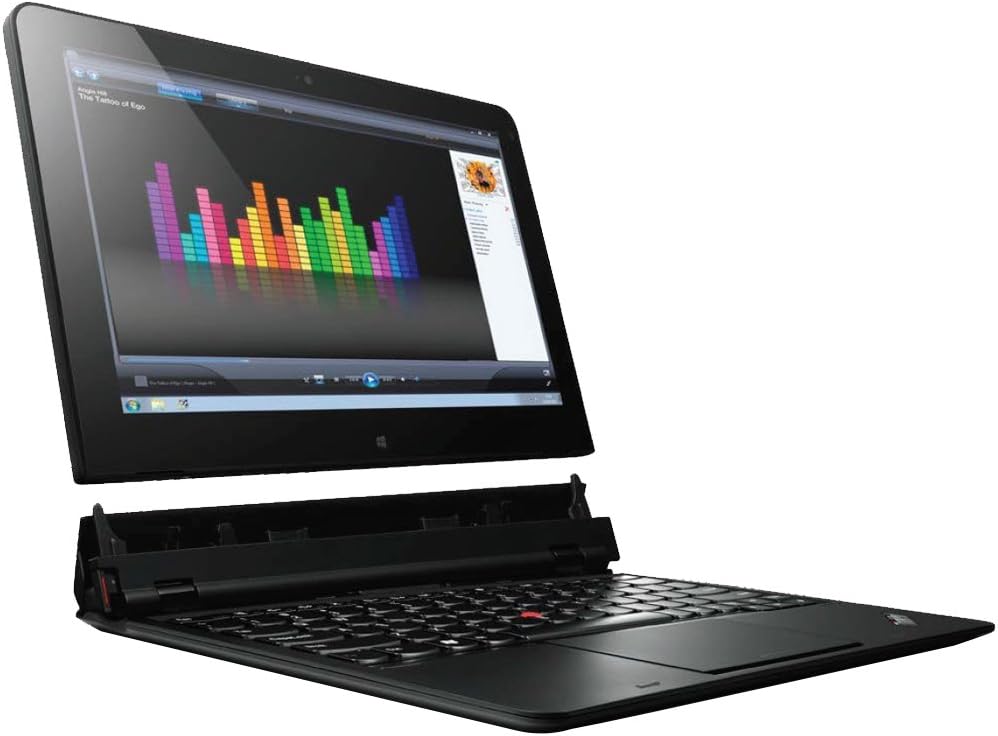
The ultrabook convertible defines the next generation of mobile computing through its ground breaking “rip and flip” design. This special design gives users absolute mobile freedom and versatility with four unique ways to use it. It’s an ultra flexible machine with four usage modes – laptop mode, tablet mode, stand mode and tablet+ mode. Intel Core i7-3667U 2 GHz 8 GB DDR3 180 GB Solid-State Drive 11.6-Inch Screen Windows 8 Professional
5 reviews for Lenovo ThinkPad Helix 11.6-Inch Detachable 2 in 1 Touchscreen Ultrabook (36984RU)
0.0out of 5
★★★★★
0
★★★★★
0
★★★★★
0
★★★★★
0
★★★★★
0
Write a review
Show allMost HelpfulHighest RatingLowest Rating
Imwalsh2112 –
Horrific Machine
Lenovo Helix made a lot of promises, but lived up to few. It’s heavier than expected, and the keyboard is a little tighter than a conventional laptop. The machine arrived defective. Worse, Lenovo support didn’t even know about the device, and couldn’t help troubleshoot. Lenovo did offer to replace the Helix at no cost, but the damage was done. I returned it and will not recommend Helix.Not all Helix’s problems are Lenovo’s fault. It’s a Microsoft Windows 8 machine. The Windows 8 experience is awful. Had Helix been built with another operating system, say Google Chrome, the experience may have been different. Windows 8 is just too limiting.
Helpful(0)Unhelpful(0)You have already voted this
Vivin Viswanathan –
I’d rather get the Microsoft Surface
Fan way too loud and system runs fairly hot.Not exactly my ideal combo system. I quickly went back to my X1 Carbon because of the quieter fan and approximately comparable weight. For the cost of the system, the Microsoft Surfaces are easily better alternatives.Sorry Lenovo. 🙁 I typically love your products, but this one just didn’t do it for me.
Helpful(0)Unhelpful(0)You have already voted this
Simple Buyer –
Solidly Lenovo…
but thin. OK, well, thinner than a lot of Lenovo products. I’m glad to see Lenovo improving on this point. I don’t have an issue with holding down the keyboard when I open it. I’m just glad it stays shut without clasps, magnets, clips, springs, hooks, and doesn’t weigh twice as much as a lappy than it does as a tablet.It’s fast.It has NFC. I use it.The stylus has a silo. There are two kinds of people in the world, pen collectors and pen suppliers. I’m in the latter group, which is fine as long as it’s not $40 a pop.I don’t use the touchpad. I never liked them. I’d rather go back to the knob & button configuration. It’s OK, though. I don’t understand the scathing reviews of it.I think the fan flap, under the circumstances, is brilliant design. If you want a pretty Macbook, go get one.Connectivity is rock solid. I swear this wifi is faster & more reliable than ethernet, if only because RJ45 cable connectors have gotten really cheap lately. It’s the only MAC address that gets an IP within seconds from our horrendously cheap Centurylink modem/router, and keeps it without a break for days. BT is just as good.I got a matte screen protector and haven’t regretted it. It’s glarey bare. The shine makes it nice & sticky.It’s gets pretty warm, but not impossibly hot. The guys that complain have their meals served to them.I don’t have any trouble with this as a tablet weight-wise. I’ve never used anything lighter though, because they don’t have styli, and I don’t need 5.5, 8, *and* 11.5 inch devices. If I’m standing/holding it flat-hand, though, I have to remember to curl my pinky or it cramps. No, it’s not a 9″ iPad, but it’s not a problem, either.I love the finish. I always have. Lenovo needs to do that in color.I can see what’s on the screen clearly from, like, 170 degrees, any angle.It’s very easy to physically accessorize given its size. The keyboard is great, of course. The lock/dock mechanism is excellent, if a little clacky, but not cheap-sounding. Battery life is excellent. I can go about six hours with screen & wifi always on and not worry, with the keyboard, 8 or 9. Constant use. If I have lunch and a no-gadget meeting, and go offline at all, I easily make it through a workday and home again. Haswell’s great, but this gets the job done.I like that it has miniDP (DisplayPort). It beats MHL hands down & eventually (soon?) the resolution capability of HDMI won’t cut the muster.Beefs:The camera is for scanning barcodes, if not just a perfunctory inclusion to qualify as a tablet. It’s another indicator to me that if Lenovo has any women in design or parts decisions, they’re lesbians, and the guys are all straight, or so. (I know, I know. I’m a lesbian. It’s a stereotype. People don’t actually fit it, OK, a couple do, but how better to describe the traditional Lenovo ,er, aesthetic? It’s, well, butch, frankly, kind of antiquated like that word, too.) Cameras are for pretty. This one is, well, tidy and sensible.In order to expand local storage you have to add bulk and use one of two USB ports when docked. You have to use the only USB port in tablet mode. (Conversely, it’s a tablet with a full USB port. Not dongles is *really* nice.) Inside the fan flap would have been a perfect place for all the ugly print-data. The dummy SD slots chap my hide daily. There’s story there, that didn’t end well for me. At least my 128GB is fast enough, but work machines have bulky software. I’ve got 40GB left, and I have absolutely nothing consumption-related on it. If I unload my photos, I have more than that on my phone. I’m not even syncing/storing any photos on this.Which brings me to another point (pun intended). Windows software that exploits a pressure-sensitive stylus rather rots. (If you know of a good one, please, please comment.) Sorry OneNote & Fresh Paint fans, Android wins, and generally for about a $5 app price. Another $3, and you can sync with whatever service you choose, exporting and importing pdfs at will, or doodling right on them, without a printer driver, for free. Vector drawing; free. Oh yeah, there are several free pdf annotators, too. Sketchbook Pro is $6 (sans a few features). MyPaint (Win) is free & OK, but the pressure sensitivity calibration isn’t fine enough, and, well, it has to be re-calibrated. Kritta *is* great, but….This is my biggest complaint: Windows and the power of the machines that run it are for memory-hogging production software. Windows OS requires it. (e.g. 2GB of RAM on a Windows machine is not practical for most, but it’s ample for Android.) That equates to big monitors. The Helix isn’t, but it runs on the resolution of one that is. Your average 24″ monitor at 1920 x 1200 is 20 1/2″ x 13″. This one is 10 1/4″ x 5 1/2″ (bigger than the Surface Pro 2, though). Kritta, Eclipse, Chrome (because you can’t use IE safely), SQL Server 2012, even Visual Studio don’t scale. So? Simple, change the screen resolution, right? Then everything is blurrier (harder to see) than when it was tiny, defeating the purpose of the relatively hi-res, if weirdly proportioned screen. Firefox, by the way, scales fine, which means the plugin icons, like the taskbar icons (small) are a whopping 3.5mm tall (yep, the diameter of your earbud plug).A very close number 2: so, I can take my -6.0-prescription glasses off (yeah, I’ve got about 5 inches from my nose that’s clear, but it’s a very detailed 5 inches), really appreciate that I still can’t see pixels, and then crack out the stylus. Or not. First, the Wacom driver won’t load unless the boot process happens without the stylus in the silo (granted it takes about 42 seconds to restart, 30 of which is the shutdown). The native driver seems to render crisper response, but after a few minutes, seems to wander off, particularly on the sides (landscape, top & bottom in portrait), and stays off. The Wacom holds its calibration a little better, but with some use, it too ends up 2-4 mm off (note the end of the last paragraph pre-parentheses). the Wacom Feel Stylus is better yet, but not by much.Windows gestures aren’t intuitive. you may be used to them by now, but going from iOS and back to Android isn’t something I notice. I feel brain damaged when I haven’t used Windows 8 for a couple of days. I might be, but that’s not how.So, if you’re looking at this, we both want it all: A dual-booting, fully loaded coding machine we can take hand-written notes on (for all those flow charts & models), a textbook markup so we don’t have to haul around 1500 pages… per book, and a lunch break that includes a bit of real graphic work (OK, just a non-frustrating doodle or a decent touch-up of that last selfie). It’s almost there.If what you want is Office functionality and a *relatively* accurate stylus, save some cash ($400+, add software license fees, Office alone is $200 for two years, throw Adobe products in…) and go Android. There are even $5 apps that fill the Outlook gap. Yes, Excel macros too. Free. Or spend a little less on the more Apple-ish approach to hardware, skip paying for Office and get the Surface Pro 2 and one of those needlework magnifying glasses you hang from you neck.Yes, it really is a big upgrade from the Thinkpad 2.Funny, my favorite, most reliably accurate stylus gadget is the ThinkPad. The Android one with the useless GPS. It’s N-Trig. Four or five stylus batteries over 3 years. Definitely worth it.For what this is, it’s the one of the best you can get for a reasonable consumer price. it’s definitely bleeding edge product, and enough for me for now, but it’s enough of a visual PITA to have me really looking forward to its replacement when the time comes.Oh yeah, I forgot the speakers….
Helpful(0)Unhelpful(0)You have already voted this
cotp74 –
Five Stars
Solid computer; a little heavy to carry
Helpful(0)Unhelpful(0)You have already voted this
Muhammet aydogdu –
You can get something broken and live with it!
I never been this much embarrassed. I bought laptop as a gift. Touch screen not working at all, battery is not working. I reach seller via email and message i got reply as a joke like I’m mistaken it’s working. I feel like my money stolen. But there is always karma!







Imwalsh2112 –
Horrific Machine
Lenovo Helix made a lot of promises, but lived up to few. It’s heavier than expected, and the keyboard is a little tighter than a conventional laptop. The machine arrived defective. Worse, Lenovo support didn’t even know about the device, and couldn’t help troubleshoot. Lenovo did offer to replace the Helix at no cost, but the damage was done. I returned it and will not recommend Helix.Not all Helix’s problems are Lenovo’s fault. It’s a Microsoft Windows 8 machine. The Windows 8 experience is awful. Had Helix been built with another operating system, say Google Chrome, the experience may have been different. Windows 8 is just too limiting.
Vivin Viswanathan –
I’d rather get the Microsoft Surface
Fan way too loud and system runs fairly hot.Not exactly my ideal combo system. I quickly went back to my X1 Carbon because of the quieter fan and approximately comparable weight. For the cost of the system, the Microsoft Surfaces are easily better alternatives.Sorry Lenovo. 🙁 I typically love your products, but this one just didn’t do it for me.
Simple Buyer –
Solidly Lenovo…
but thin. OK, well, thinner than a lot of Lenovo products. I’m glad to see Lenovo improving on this point. I don’t have an issue with holding down the keyboard when I open it. I’m just glad it stays shut without clasps, magnets, clips, springs, hooks, and doesn’t weigh twice as much as a lappy than it does as a tablet.It’s fast.It has NFC. I use it.The stylus has a silo. There are two kinds of people in the world, pen collectors and pen suppliers. I’m in the latter group, which is fine as long as it’s not $40 a pop.I don’t use the touchpad. I never liked them. I’d rather go back to the knob & button configuration. It’s OK, though. I don’t understand the scathing reviews of it.I think the fan flap, under the circumstances, is brilliant design. If you want a pretty Macbook, go get one.Connectivity is rock solid. I swear this wifi is faster & more reliable than ethernet, if only because RJ45 cable connectors have gotten really cheap lately. It’s the only MAC address that gets an IP within seconds from our horrendously cheap Centurylink modem/router, and keeps it without a break for days. BT is just as good.I got a matte screen protector and haven’t regretted it. It’s glarey bare. The shine makes it nice & sticky.It’s gets pretty warm, but not impossibly hot. The guys that complain have their meals served to them.I don’t have any trouble with this as a tablet weight-wise. I’ve never used anything lighter though, because they don’t have styli, and I don’t need 5.5, 8, *and* 11.5 inch devices. If I’m standing/holding it flat-hand, though, I have to remember to curl my pinky or it cramps. No, it’s not a 9″ iPad, but it’s not a problem, either.I love the finish. I always have. Lenovo needs to do that in color.I can see what’s on the screen clearly from, like, 170 degrees, any angle.It’s very easy to physically accessorize given its size. The keyboard is great, of course. The lock/dock mechanism is excellent, if a little clacky, but not cheap-sounding. Battery life is excellent. I can go about six hours with screen & wifi always on and not worry, with the keyboard, 8 or 9. Constant use. If I have lunch and a no-gadget meeting, and go offline at all, I easily make it through a workday and home again. Haswell’s great, but this gets the job done.I like that it has miniDP (DisplayPort). It beats MHL hands down & eventually (soon?) the resolution capability of HDMI won’t cut the muster.Beefs:The camera is for scanning barcodes, if not just a perfunctory inclusion to qualify as a tablet. It’s another indicator to me that if Lenovo has any women in design or parts decisions, they’re lesbians, and the guys are all straight, or so. (I know, I know. I’m a lesbian. It’s a stereotype. People don’t actually fit it, OK, a couple do, but how better to describe the traditional Lenovo ,er, aesthetic? It’s, well, butch, frankly, kind of antiquated like that word, too.) Cameras are for pretty. This one is, well, tidy and sensible.In order to expand local storage you have to add bulk and use one of two USB ports when docked. You have to use the only USB port in tablet mode. (Conversely, it’s a tablet with a full USB port. Not dongles is *really* nice.) Inside the fan flap would have been a perfect place for all the ugly print-data. The dummy SD slots chap my hide daily. There’s story there, that didn’t end well for me. At least my 128GB is fast enough, but work machines have bulky software. I’ve got 40GB left, and I have absolutely nothing consumption-related on it. If I unload my photos, I have more than that on my phone. I’m not even syncing/storing any photos on this.Which brings me to another point (pun intended). Windows software that exploits a pressure-sensitive stylus rather rots. (If you know of a good one, please, please comment.) Sorry OneNote & Fresh Paint fans, Android wins, and generally for about a $5 app price. Another $3, and you can sync with whatever service you choose, exporting and importing pdfs at will, or doodling right on them, without a printer driver, for free. Vector drawing; free. Oh yeah, there are several free pdf annotators, too. Sketchbook Pro is $6 (sans a few features). MyPaint (Win) is free & OK, but the pressure sensitivity calibration isn’t fine enough, and, well, it has to be re-calibrated. Kritta *is* great, but….This is my biggest complaint: Windows and the power of the machines that run it are for memory-hogging production software. Windows OS requires it. (e.g. 2GB of RAM on a Windows machine is not practical for most, but it’s ample for Android.) That equates to big monitors. The Helix isn’t, but it runs on the resolution of one that is. Your average 24″ monitor at 1920 x 1200 is 20 1/2″ x 13″. This one is 10 1/4″ x 5 1/2″ (bigger than the Surface Pro 2, though). Kritta, Eclipse, Chrome (because you can’t use IE safely), SQL Server 2012, even Visual Studio don’t scale. So? Simple, change the screen resolution, right? Then everything is blurrier (harder to see) than when it was tiny, defeating the purpose of the relatively hi-res, if weirdly proportioned screen. Firefox, by the way, scales fine, which means the plugin icons, like the taskbar icons (small) are a whopping 3.5mm tall (yep, the diameter of your earbud plug).A very close number 2: so, I can take my -6.0-prescription glasses off (yeah, I’ve got about 5 inches from my nose that’s clear, but it’s a very detailed 5 inches), really appreciate that I still can’t see pixels, and then crack out the stylus. Or not. First, the Wacom driver won’t load unless the boot process happens without the stylus in the silo (granted it takes about 42 seconds to restart, 30 of which is the shutdown). The native driver seems to render crisper response, but after a few minutes, seems to wander off, particularly on the sides (landscape, top & bottom in portrait), and stays off. The Wacom holds its calibration a little better, but with some use, it too ends up 2-4 mm off (note the end of the last paragraph pre-parentheses). the Wacom Feel Stylus is better yet, but not by much.Windows gestures aren’t intuitive. you may be used to them by now, but going from iOS and back to Android isn’t something I notice. I feel brain damaged when I haven’t used Windows 8 for a couple of days. I might be, but that’s not how.So, if you’re looking at this, we both want it all: A dual-booting, fully loaded coding machine we can take hand-written notes on (for all those flow charts & models), a textbook markup so we don’t have to haul around 1500 pages… per book, and a lunch break that includes a bit of real graphic work (OK, just a non-frustrating doodle or a decent touch-up of that last selfie). It’s almost there.If what you want is Office functionality and a *relatively* accurate stylus, save some cash ($400+, add software license fees, Office alone is $200 for two years, throw Adobe products in…) and go Android. There are even $5 apps that fill the Outlook gap. Yes, Excel macros too. Free. Or spend a little less on the more Apple-ish approach to hardware, skip paying for Office and get the Surface Pro 2 and one of those needlework magnifying glasses you hang from you neck.Yes, it really is a big upgrade from the Thinkpad 2.Funny, my favorite, most reliably accurate stylus gadget is the ThinkPad. The Android one with the useless GPS. It’s N-Trig. Four or five stylus batteries over 3 years. Definitely worth it.For what this is, it’s the one of the best you can get for a reasonable consumer price. it’s definitely bleeding edge product, and enough for me for now, but it’s enough of a visual PITA to have me really looking forward to its replacement when the time comes.Oh yeah, I forgot the speakers….
cotp74 –
Five Stars
Solid computer; a little heavy to carry
Muhammet aydogdu –
You can get something broken and live with it!
I never been this much embarrassed. I bought laptop as a gift. Touch screen not working at all, battery is not working. I reach seller via email and message i got reply as a joke like I’m mistaken it’s working. I feel like my money stolen. But there is always karma!