
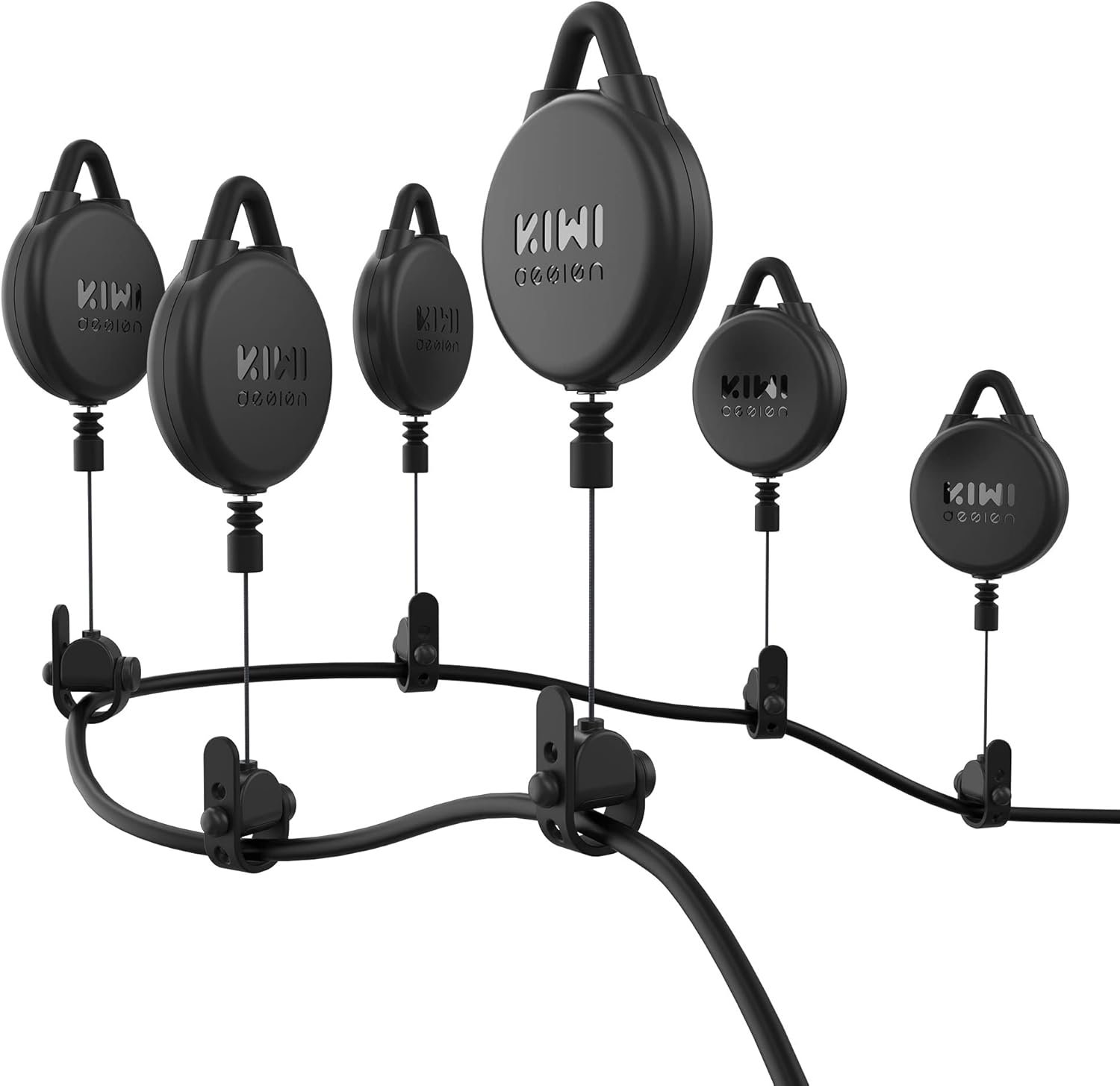
KIWI design VR Cable Management, 6 Packs VR Pulley System Compatible with Quest 3S/3/2/1/Pico/PSVR/PSVR2
$4.99
Related Products



Product description


1 Did not disturb others
2 Freely Choose the Length
3 Two Installation Ways
4 Fit for All Cables
The video showcases the product in use.The video guides you through product setup.The video compares multiple products.The video shows the product being unpacked.
 Enjoy Broader Gaming with Families
Contains 6 packs, brings a broader gaming area for you and your families
Which equipments does this cable management fit into the cable?
Our VR cable management compatible with the link cables for Quest 3/2/1/, Rift S, Valve Index, HTC Vive, Vive Pro, HP Reverb G2, PSVR, PS VR2.
Would it be inconvenient to move around while gaming when using this VR Pulley System?
No. On the contrary, the cable managements will greatly enhance your gaming experience as it will prevent your cables from getting tangled and eliminate you from tripping and getting injured during the game.
Are all rooms suitable for this VR pulley system?
Yes, in most rooms, but if you have a room with low ceilings where you can reach up and touch the ceiling, we do not recommend installing this system.
KIWI design VR Accessories Product
Add to Cart
Add to Cart
Add to Cart
Add to Cart
Customer Reviews
4.7 out of 5 stars 4,675
4.4 out of 5 stars 1,787
4.7 out of 5 stars 4,675
4.7 out of 5 stars 1,115
4.4 out of 5 stars 717
4.1 out of 5 stars 725
—
Price
$46.99$46.99
$18.99$18.99
$39.99$39.99
$29.99$29.99
—
—
—
Used for
VR Cable Management
Quest 3/2/1/Pro, Pico 4
VR Cable Management
VR Cable Management
Quest 2/1/Pro, and Pico 4
facial interface for index
for base station
Color
Black
Grey-white
White
Black
Black
Black
Black
Package Weight
100g
0.46lb
100g
50g
9.6 Ounces
130g
5.59 pounds
Special Features 1
Quiet Pulley System
Flexible and lightweight
Quiet Pulley System
Quiet Pulley System
Upgraded Stable Link Cable
Unique breathable design
3 Adjustable Height
Special Features 2
Broad Gaming Area
Fast and quick connection
Broad Gaming Area
Broad Gaming Area
4.8 Gpbs Fast Transmission
Anti-Leakage Nose Pad
Stable Design
Special Features 3
Manage you cable
Longer lifespan
Manage you cable
Manage you cable
16Feet/5Meters Length to Move
Anti-Dirt Sweat-Proof
Adjustable Ball
Special Features 4
Two Installation way
High-speed data transfer
Two Installation way
Two Installation way
Wide Compatiblities
With Lens Cover
Durable Material
Free to Move, Play Impressively- This VR pulley system dramatically reduces the cable’s presence and lets you freely move around your playspace without the worry of yanking your cable or headset. Makes every game so much more fun on PC and avoids the cord dangle on the back or the tripping Hazard or getting tangled.
Quieter VR Pulley System- The whole VR Cable Management System adopts silicone, ABS, and rubber materials and noise dampener technology to maximize silence and minimize cable tug during use, making it easier to get fully immersed without noise around and tripping over cables. Our pulley system must be a good option for any VR player using a wired set.
Simpler Yet Smarter Design – We simplify this cable management system from noise-free integrated design of the top soft loop and pulley body to 360° rotations function integrated inside the HMD cable holder, make it is easy to assemble and disassemble and adapts to different types of cable to fix them without slipping over the cable.
Two Ways to Install – Easy to set up, you can choose adhesive hooks or screw hooks, depends on whether you want it to permanent or not and what kind of ceiling you have. The tension of the retractable wire is moderate and can extend up to 61 inches long then rebound automatically, gives you a more comfortable VR experience.
Broad Compatibility – The VR accessories is perfect and must have compatible with Quest 3S/ Quest 3/2/1/Pro, PSVR2, Pico and other wired virtual reality headsets, the HMD cable holder is made of soft elastic rubber so no worry about damaging your cables.
8 reviews for KIWI design VR Cable Management, 6 Packs VR Pulley System Compatible with Quest 3S/3/2/1/Pico/PSVR/PSVR2
Add a review

$4.99
Spider –
General real use case review. With ceiling fan.
Kiwi 6-Pack Cable Management Clips ReviewI recently tried the Kiwi 6-pack cable management clips for managing my computer cable to my vr, and here’s my detailed take on them.Setup & InstallationThe kit comes with six clips and even includes an extra one. I used them primarily to hold and slack cables from my PC to a VR headset (specifically a heavy cable for the Pimax Crystal). Installation is straightforward: these clips stick firmly to both walls and ceilings, making it possible to route cables neatly across rooms or tricky angles.PerformanceOne of the things I liked is how versatile they are. Even when doubling up a clip to reach a distant corner, the cable can easily extend across an entire room. In my test, it reached from one end of the room to a corner with no issues, and it didn’t interfere with ceiling fans at all. The clips hold heavy cables well—something to keep in mind, because this is a high-tension scenario.Even with slacking for extra length, the clips maintain a strong hold. I’m over six feet tall, and with the cable routed about a foot above my head, the clips still kept everything secure without sagging or losing adhesion.Cautions / ConsiderationsThe adhesive is extremely strong, so removing the clips can be tricky if you want to reposition them.You can’t “yank” the cable out once it’s in; the clips are meant to hold cables firmly in place.If you plan to run cables near fans or other obstacles, testing first is recommended, but in my experience, it worked fine even near ceiling fans.ProsStrong adhesive for secure cable managementFlexible placement on walls and ceilingsCan hold heavy cables without saggingExtra clip in the kit is a nice bonusWorks across longer distances than expectedConsHard to remove once appliedNot designed for frequent cable removal or adjustmentCable must be carefully placed; can’t just yank it outOverallThe Kiwi cable clips are highly effective for permanent or semi-permanent cable routing, especially for heavy or long cables. They are strong, versatile, and ideal for neat setups across walls and ceilings. Just be cautious when removing them or repositioning—they’re meant to stay put once installed.Rating: ★★★★★(5/5) — Very strong, reliable clips, but limited if you need frequent adjustments (why would you, there ment for a permanent vr setup)On a side note they can fit any cable size, thin small or multiple huge ones, the end is rubber that holds the cable and can stretch alot, it also has 3 different cliping sizes like a belt.-Furry_smasher
Sparky –
Definitely Worth the Upgrade!
I had previously bought the $20 VR Cable Management from KIWI, and I’m replacing them for multiple reasons, which the pro version has improvements for:The wire – steel vs dyneema:The pro version has a dyneema wire, which is stronger than steel, more flexible, cannot rust, cannot weaken from bending, cannot weaken from twisting. These are all problems that I experienced with the thin steel wire, which broke after 150-200 hours of use, and I’m confident the dyneema will handle constant movement and bending far better than steel.The cable holder – silicone strap vs rubber o-ring:The pro version has a plastic cable holder with a silicone strap to buckle the cable in. On the standard version, they give you a rubber o-ring, which you wrap around your cable, and attach to a tiny metal clip with sharp edges. The metal clip wears into the o-rings and causes them to break. On the pro version, the silicone strap is far thicker than the o-ring, and is held straight by the plastic buckle, so it cannot twist or wear down.The wall attachment is identical to the standard version, which is fine. It worked well for me in the past, and I don’t mind that nothing changed. Though the standard version also used the metal clips and o-ring to attach to the wall. The pro version has a silicone loop built into the reels, which again, is much better because the o-rings can break.The overall construction is also much nicer. The reel is a custom plastic mold for the brand with a higher quality plastic, as opposed to the standard version, which looks and feels like a generic part, made with cheap materials. The higher quality materials do make the pro version quieter than the standard version, but I would not call it silent. There is still the sound of the the reel (think of how a retractable badge, or key holder sounds).I look forward to using the pro version of this product for a long time, and I would recommend anyone considering the standard version to upgrade. The standard version will work ok, but it will wear down after a while.
Harbagar R. Bagarbahar –
It works well, but…
So, it works as advertised and I love it. Makes it very easy to play games without a wire interrupting you. Here is the downside: you will feel a tug when you move too far from center.Depending on how you set it up, you can mitigate this pretty well, but the fact is, you will always feel it. I got this along with a few friends. We all prefer having our set up this way, however, for one of my friends it’s a close call.I think it’s great for games where you are consistently turning, and especially for games where you are sitting down. When you are sitting, if you set it up correctly, there is no tug and no wire going down your shoulder or back. When you are standing, and moving around to bend over, etc… you will feel a tug. Again, it can be mitigated, but only to a certain extent.Ultimately, you have to ask yourself whether you prefer feeling a cable going down your side, or a tugging when walking too far.I have a small play area so the tug is a helpful reminder that I am almost out of my play area. It is a plus for me, but perhaps, you might not feel the same way if you have an extremely large room.Also, it’s extremely easy to take down and put back up (after you have initially set it up) if you need the area to look cleaner when you have guests.Lastly, and this is more of a tip: depending on what game I’m playing, I do a lot of turning in the same direction. This can lead to the wire twisting significantly. I learned to provide some slack on the loops closest to me so the cable is free to turn as needed. After, I play this game, I usually disconnect my link cable and ensure that it is not under tension. Personally, I prefer having to do this than having the cable dangling by my side when playing, or having to be aware of its presence and having to account for stepping over it when playing.At the end of the day it works.
LexLev –
Das Kabelmanagement hält was es verspricht.Nachdem alles richtig eingestellt ist, merkt man gar nicht, dass die Brille ein Kabel hat.Das auf und abrollen funktioniert einwandfrei und ist leise.Außerdem sind Schraubharken,Dübel und die Möglichkeit Harken mit Klebestickern zu nutzen dem Paket beigefügt.
Kutschera –
Es gibt nichts schlimmeres, als während einer hitzigen Runde auf einmal in seinem Kabel verknotet zu sein und im schlimmsten Fall dieses durchreißt.Die 6 Pulleys kann man entweder per Schraubhaken oder (sehr klebrigen) Pads an der Decke anbringen. Ich empfehle eine Montage in Dreiecksformation mit insgesamt 4 Pulleys + Metallring (siehe Bild). Spiele damit ziemlich angenehm mit meiner Rift S auf 3x3m Fläche.Die Pulleys sind leise und ziehen sehr gleichmäßig ohne zu sehr am VR-Headset zu ziehen. Habe noch mit meinem 3D-Drucker eine Kabelhalterung für den Hinterkopf gemacht. Wenn es mal zieht, dann wenigstens nicht schräg links.
Paul B –
Excelente calidad y las opciones de montaje son muy buenas. Use el aro incluido para hacer una polea triple y en verdad mejora el uso del VR al no sentir el cable al moverse.Puedes agacharte y mover sin la sensación de tropezar. También se desmonta fácilmente por si no puedes dejar permanente tu VR.
Jnt –
The product is a worthwhile investment. For a wired VR headset, this accessory is essential; while I find the pricing somewhat excessive, the superior comfort justifies the cost. There is no comparable alternative currently available.
Jesús Ramirez –
Use la parte de pegamento para pegarlo al techo y funcionan muy bien llevo unos 5 meses con ellos y no rompen para nada la inmersión tanto que ni se siente que esta el cable conectado pero para eso tienes que ajustar bien el limitador que viene para que no tengas que estirarlo mucho y se sienta bien