
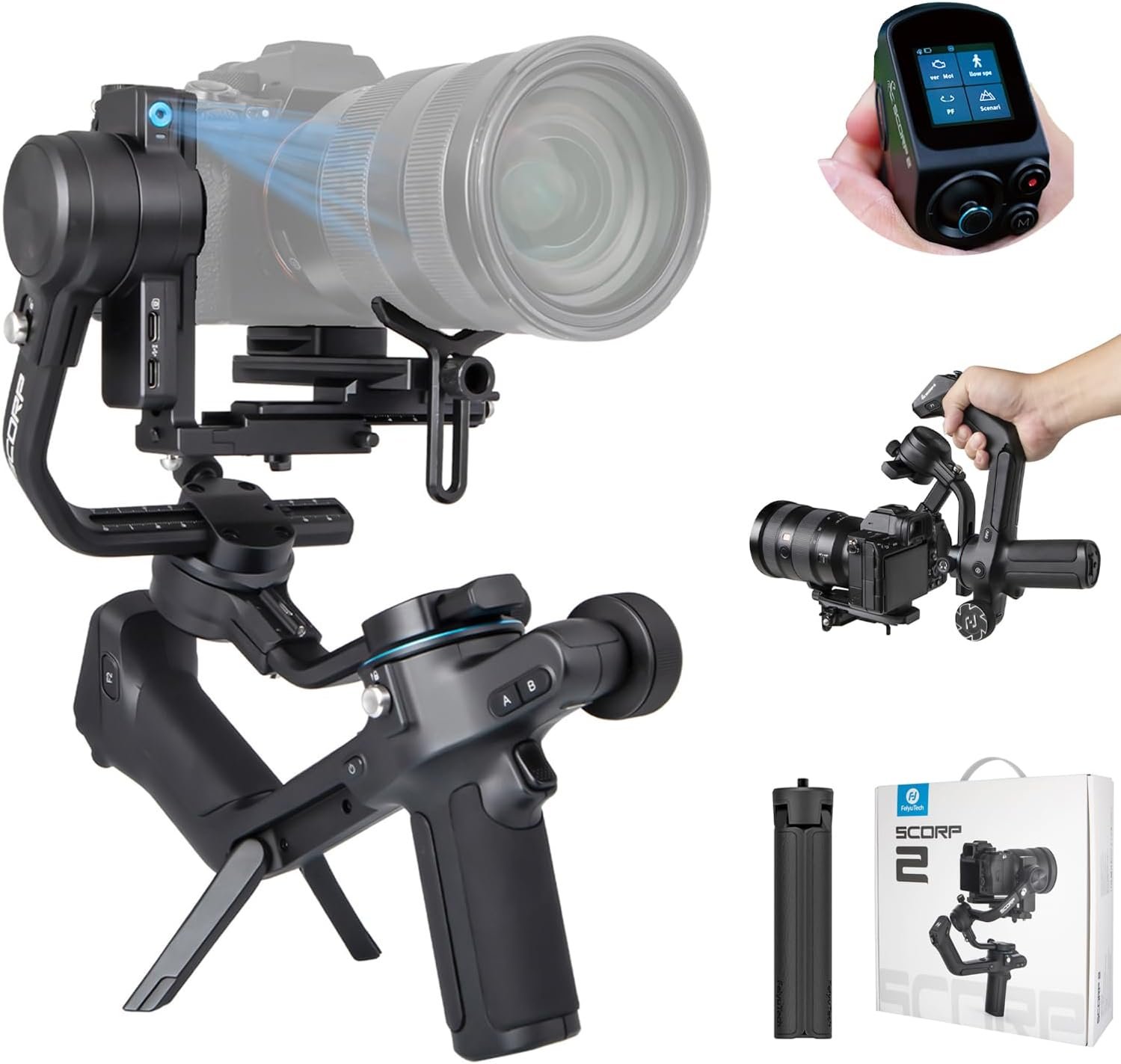
FeiyuTech SCORP 2 Gimbal Stabilizer for DSLR and Mirrorless Camera, Integrated Al Tracking Sensor, 3-Axis Camera Stabilizer for Sony Canon Panasonic Nikon, 2.5kg Payload Touch Screen Vertical Shooting
$26.99
Related Products




From the brand

Feiyu Technology Co., Ltd
Feiyu Technology Co., Ltd, Is a professional company engaged in production, development,and sales of civil drones, gimbal stabilizers.

Integrated Handle
Integration of lifting and holding, enable to change various angles in different shooting scenes.

Magic Knob
Precisely control follow focus, zoom and the rotation of three axes and set camera parameters.

A-B Point Trajectory Memory
to achieve automatic focus/zoom/movement for professional and stable videos.
does it work with Nikon Z30 camera?
Nikon Z30 can be mounted and stabilized on SCORP-C, but the gimbal cannot control the camera functions or parameters.
How can I zoom using the Scorp-C gimbal?
Scorp-C only supports the zoom function of some cameras. Please check this page for more details about the compatible camera functions: Camera Function Query
Does it work with a Canon 5D mark IV?
Yes, SCORP-C can work with Canon 5D mark IV camera.
Can feiyu scorp c controlled by phone using apps?
Yes, you can control the SCORP C gimbal via Feiyu SCORP app.
Does it work with NIKON D7500?
Yes, SCORP C is compatible with Nikon D7500 with Type-C to micro cable.
Will this be compatible with my 35mm 1.4 GM on my Sony A7ii?
Yes, it is compatible with scorp c and your camera lens with TYPE-C to Multi.
【Built-in Al Sensor for Intelligent Tracking】The SCORP 2 features an integrated Al tracking module, enabling intelligent shooting without the need to install additional accessories. Making an ‘OK’ gesture to enable subject tracking, while other gestures provide control over photography, video and more. Ensuring you capture every dynamic moment.
【Instant Vertical Filming Setup】The quick-installation system has been fully upgraded, featuring new generation L-shaped mounting plates with a new anti-off quick-release slider. The slider can be directly installed on the vertical arm of the camera body to quickly shoot vertically without the need to install additional accessories, allowing photographers to fully unleash their creative potential.
【Wireless/Cable Control, Easy to Use】The gimbal can connect to the camera either through a control cable or wirelessly via Bluetooth. You can trigger the focus by lightly pressing the shutter button, making it easier to control the camera for capturing photos and videos. This allows you to master the shooting rhythm and fully enjoy the fun of photography.
【1.3″ Touchscreen & Multifunctional Control Knob】The body features a 1.3-inch touchscreen, providing clear filming status and parameter settings. The multi-function knob can be used to control the precise rotation of each axis of the gimbal or directly control the electronic zoom function.
【Connect to the App, Unlock Various Functions】Connecting to the Feiyu SCORP App allows you to access even more professional settings, such as parameter adjustment and somatosensory remote control which enables our mobile phone’s gravity sensor to achieve the remote control of the lens direction, providing an immersive and interactive exploration experience filled with fun.
8 reviews for FeiyuTech SCORP 2 Gimbal Stabilizer for DSLR and Mirrorless Camera, Integrated Al Tracking Sensor, 3-Axis Camera Stabilizer for Sony Canon Panasonic Nikon, 2.5kg Payload Touch Screen Vertical Shooting
Add a review

$26.99
EvoFusionHQ –
Huge upgrade! Worth every penny.
I’ll be honest, I was hesitant at first because I’ve gambled on another gimbal in the past that looked good on paper but left me frustrated. This one (the SCORP 2) completely changed the game for me.The built-in AI tracking is a standout feature — no extra modules or add-ons needed. I just make a quick gesture, and it follows perfectly. Compared to my old gimbal where I had to fiddle with extra accessories, this feels effortless.Another win is the instant vertical setup. On my previous gimbal, switching to vertical was a whole process, sometimes making me miss the moment. With the SCORP 2, it’s literally just slide, click, and done.I also love the 1.3” touchscreen and control knob — way more intuitive than tiny buttons. It makes fine-tuning rotation and zoom so much smoother. Plus, the wireless/Bluetooth control is reliable and feels way more seamless than the clunky cable setup I had before.When you pair it with the app, it unlocks even more features, like remote control using your phone’s motion sensors — which honestly blew me away.Overall, after trying a “budget gamble” before and being disappointed, the SCORP 2 is the real deal. It feels professional, responsive, and actually fun to use. If you’ve been burned by a lesser version like I was, don’t hesitate — this is the upgrade you’ve been looking for.
Hugh K. –
The little gimbal that could
At first glance, the FeiyuTech Scorp 2 is a seemingly unassuming gimbal that may not look much different than many other similar products out there. Once you get familiar with its features and design, however, Scorp 2’s uniqueness stands out. The Scorp 2 has a built-in sensor that tracks subjects autonomously, which is more than capable of handling its task, as it competently keep up with the movements of the subject, and it is very snappy. But this is nothing new and other gimbals also offer this feature. There’s the trigger and its quick set functions, like double tapping to center the rig, and triple to quickly switch to the selfie mode. Again, this is nothing new, it’s something we have come to expect.There are little details in the design that make this product stand out. There are adjustable, sliding red dots that mark the balance points of the axis arms so you can quickly snap them into position. And the most stand out design feature has got to be the secondary grip handle that angles up toward the user, behind the main pistol grip. The ability to two-hand hold the gimbal adds to the overall stability of the rig, especially when you have a heavier load such as a mirrorless camera with a longer zoom lens. I found this design so useful and smart, that I’m surprised it’s not offered by all gimbals.A quick kudos for the gimbal’s namesake “scorpion” legs to enable you to set down the unit without the use of its tripod (with the upwardly turned rear handle it does resemble the menacing arachnid). This is a huge plus, as I often do not want the encumbrance of the extended length while in use.The battery life is decent, though not something incredible, as it is a 2500 mAh capacity. In my experience, the battery life fell short of the advertised 13 hours of use. But of course the heavier the payload, the shorter the battery expectancy would be. It offers a quick charge via its USB-C port (which is clearly marked for charging), which is nice, but again, expected in 2024. The F2 button on the right side locks the control screen to prevent accidental setting changes, which is a cool feature.Aside from all of the above mentioned features, FeiyuTech also offers accessosories like wireless follow focus kit that you can attach to this unit as an option, which would make the Scorp 2 even more versatile.Overall, this gimbal is a highly capable, well constructed, and sturdy piece of equipment. I can think of no better place to start your journey as a videographer than with this gimbal to aid you. By itself, it offers an impressive stability, and when coupled with your camera’s IBIS and post stabilization, the images you get will be rock solid. Scorp 2 is one solid product. Highly recommended.
Amazon Customer –
A Great Balanced, Versatile Gimbal! Excellent!!
I was pleased with the quality of the Scorp 2 Gimbal as soon as I opened the box. It was packed well and each piece was solid. The printed instructions were clear to follow, had a large enough print, and pictures to get me going. Going online with the included QR Code, brought me to the app and instructional videos for this specific gimbal to get it all set up.I use a Canon 6D Mark 2 and the balancing process was the easiest process of any gimbal I have used. Once I got it physically balanced, I turned on the Scorp 2 and through the connected app on my phone, the balancing process was then fine tuned with what I needed to do. (The best I have seen.)Once balanced, I picked up the Scorp 2 and I was amazed at the ease of holding this even with a heavier camera. The design of how it is held in your hands puts little stress on your arm. With your connected camera, cords included in the box, you have full control of your camera through the joystick and various buttons. The touch screen is very helpful in getting what you want. (Although there was a small challenge on my part to get to the English screen.)When placed on a flat surface or holding it in your hand, the AI tracking was incredible and very accurate. I have not had a single glitch in it following me. If you are the one on the other side of the lens, you can start and stop the tracking with ease. You can also snap a picture with a three second delay by showing your palm. The same way also will start the video if you are in that mode.I have not yet tried it on my cell phone, but I am sure for those times that I use only my phone, it will be just as great as with my DSLR.As a videographer, I have used a few different gimbals, but this one outshines them all. Even with the initial setup, this gimbal is intuitive and easy to use. The high quality, easy to follow instructions, the balance, AI tracking, and quality have now made this my go-to gimbal for my job. As much as a gimbal can, this one makes my life just a bit easier.
Sebastián Fernández –
Cuenta con funciones avanzadas y muy completas. Estabiliza bien. La única pega podría ser que el mango no se puede quitar, pero igualmente es bastante ergonómico.
Yannick B. –
Ce stabilisateur est très bien emballé dans une boîte en carton et protégé par une mousse découpée et ajustée.On y trouve le stabilisateur, toutes les plaques de fixation et de réglages, les différentes vis et câbles de connexion, une notice…Le tout est impeccablement fini : le métal est d’excellente qualité et les caoutchoucs sont agréables au toucher.Le calibrage est un peu délicat et long, mais c’est un peu normal si l’on veut un bon équilibrage.Les différentes commandes sont accessibles facilement et rapidement.La molette sur le devant est un plus qui permet des réglages fins.Les deux béquilles sur le devant sont une excellente idée pour poser l’ensemble, notamment pour réaliser des panoramiques.Les modes sont variés et permettent des prises de vue créatives.L’écran réagit bien et permet d’accéder facilement aux différents réglages.En utilisation, l’ensemble est lourd, notamment avec l’appareil photo, mais les mouvements sont fluides et les secousses très bien atténuées.En un mot comme en cent, si vous cherchez un “gimbal” de qualité pour votre SLR, celui-ci est une valeur sûre.
Il Cliente Evoluto –
Ottimo Gimbal Feiyutech, seconda versione del primo scorp che pure ho avuto, e che trovo molto migliorato rispetto alla prima versione. Lo Scorp 2 copre un ampio range di portata, fino a 2,5kg, ed ha delle dimensioni per cui è probabilmente il prodotto più azzeccato per una grandissima varietà di situazioni. è a suo agio anche con mirrorless FF e zoom dalle dimensioni non esagerate ma ciò nonostante ha ancora dimensioni compatte, trova posto comodamente in una normale borsa fotograficaIl Gimbal ha una costruzione impeccabile, al pari della migliore concorrenza. Tutti i serraggi hanno il fondo corsa graduale e sicuro, i bloccaggi di sicurezza hanno l’aggancio automatico, la slitta ha il pin di sicurezza.Centrare la fotocamera è rapido e gradevole, i blocchi sono sicuri e danno un’ottima sensazione di qualità (c’è anche nell’app una schermata per verificare il centraggio tra l’altro).I motori sono adeguatamente protetti, tutti i cablaggi invisibili. Dal punto di vista costruttivo non ha niente da invidiare a nessuno.Le due impugnature sono molto comode, anche usate molto a lungo. C’è poco spazio tra l’asse del roll e le dita della mano, ma ci si abitua e poi dipende dalla calibrazione e dal fatto che tutto sommato il gimbal è assai compatto per essere un 2,5kg.Nella confezione è compresa una doppia slitta sovrapponibile nel caso si dovesse usare un obiettivo dal diametro particolarmente importante, la baionetta per le lenti invece particolarmente lunghe, ed una serie di cavetti per collegare – come se non ci fosse il bluetooth – anche praticamente qualsiasi sistema fotografico mi venga in mente.Il vantaggio di usare il cavetto? La generosa batteria del gimbal caricherà anche la macchina fotografica.Motori e funzionamento di base è al pari con la migliore concorrenza. Movimenti perfetti, ineccepibili. Tutte le principali modalità d’uso del gimbal sono assolutamente customizzabili e la ghiera multifunzione è assolutamente adeguata per eseguire qualsiasi movimento: ha le dimensioni giuste e la resistenza è configurabile. Addirittura quando la si usa per modificare grandezze discrete (es. il diaframma) diventa a scatti. Perfetta. Invece sono stato meno contento della taratura di fabbrica del joypad, troppo veloce, ma dopo averlo configurato secondo mio gusto (rallentato) adesso mi sembra perfetto.Gli altri tasti hanno un buon feedback tattile ed un posizionamento adeguato. Sono molti e all’inizio si fa un po’ di fatica a sviluppare la necessaria memoria tattile, ma poi si vola.Il touch screen è piccino, e di conseguenza ha una interfaccia grafica semplice (ma comunque completa, il cellulare con l’app è una opzione ma non necessaria) in cui nella maggior parte delle schermate ci sono – correttamente – massimo 4 opzioni. E infatti resta facile da utilizzare.L’app è la solita FeiyuTech: collegamento bluetooth immediato, mai un ritardo. Come dicevo però non è obbligatoria, e la uso solo quando devo fare qualche scena particolare, che capita praticamente solo quando lavoro da solo. Ha praticamente le stesse opzioni del menu touch, ma in più c’è un help in ogni pagina e il libretto di istruzioni completo del gimbal. Molto apprezzata. Qualche traduzione migliorabile, la UI potrebbe essere più chiara… ma è un validissimo (ed affidabile) aiuto.Oltre alle classiche modalità pan/panR/FPV ci sono una pletora di modalità di tracking aggiuntive, molto adatte allo sviluppo della creatività individuale. Cito per esempio l’autorotate, il waypoint, e la famosa intelligenza artificiale. Putroppo il tracking IA funziona solo in modalità selfie, ed è un peccato, perchè funziona benissimo.Capisco che l’utilità è limitata se c’è un operatore, ma ci sono alcune situazioni in cui mi sarebbe piaciuto averla, per esempio sugli sci. Funziona perfettamente. I movimenti sono fluidi, impeccabili, e l’operatore deve impegnarsi per farli e invece è possibile automatizzarli. Sono convinto che tra qualche anno sarà possibile.Mi ha stupito anche la sensibilità della camera IA, legge i movimenti anche con pochissima luce.dieci e lode.Il Gimbal mi è piaciuto tantissimo. Ormai non c’è nessun motivo per preferire altre marche, e anzi sono tanti quelli per preferire questo gimbal.L’unica cosa che ho dovuto aggiungere è stato un sacchetto per portarlo, perchè purtroppo dalla confezione – seppur completissima – non esce.Consigliato senza riserve, 5 stelle
Markus –
Wertig verarbeitet,leichte Einrichtung!Macht Spaß damit zu arbeiten.Klare Kaufempfehlung!
Michelle –
The Feiyutech scorp 2 is a seriously impressive gimbal. I love that I can track subjects without extra gear, and it’s perfect for quickly switching between landscape and portrait video formats. It handles my DSLR smoothly, and the battery life is solid. The touchscreen is a nice touch, but there are A LOT of controls to figure out, which would need a lot a lot of practice. The knob, different shooting modes, and app all take time to learn. There’s definitely a learning curve. However, once you get the hang of it, this gimbal opens up a lot of creative possibilities. I’m happy with my purchase and it will take some practice to master it.