
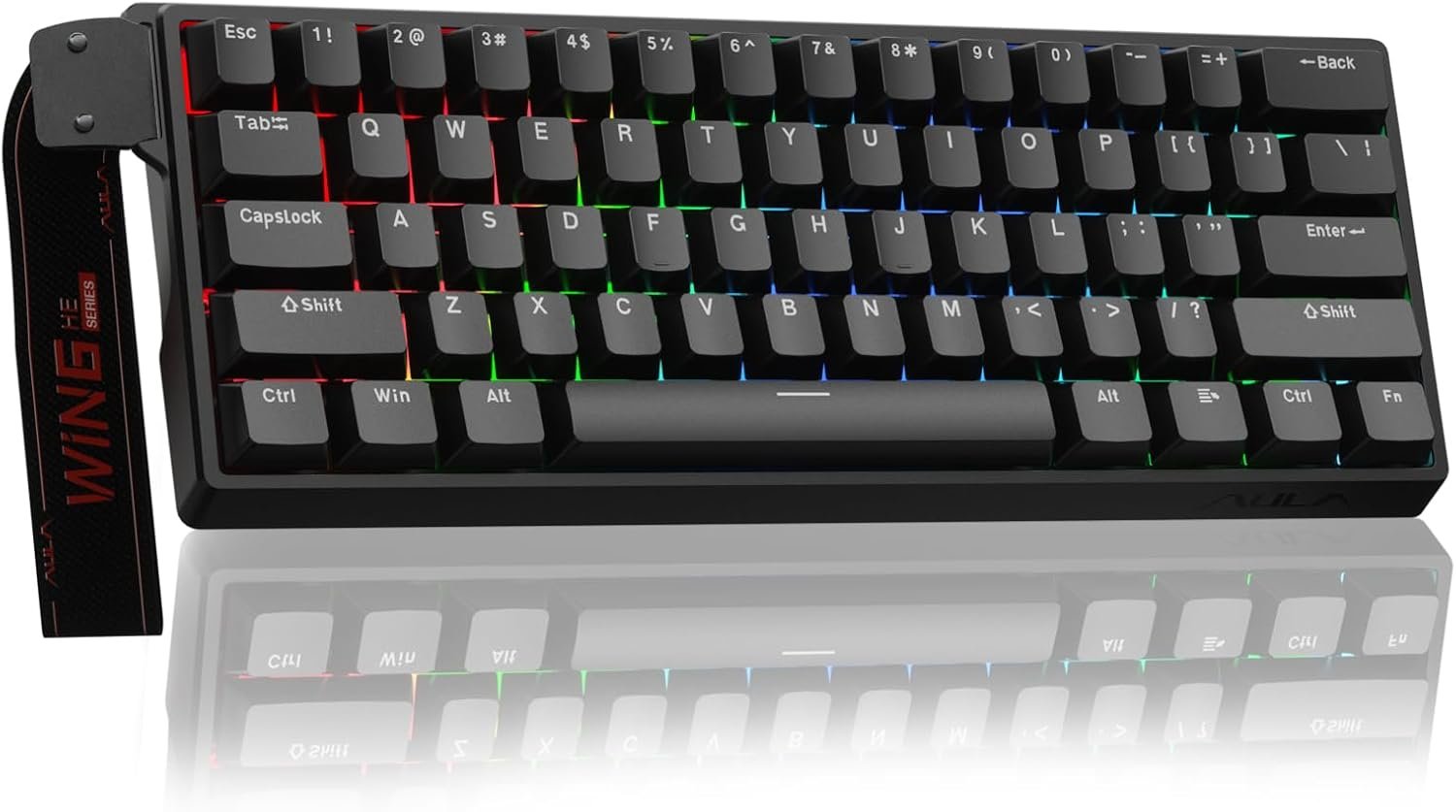
Aula WIN60 HE – 60% Mechanical Gaming Keyboard Wired, Magnetic Switch Hot Swappable, Adjustable Actuation Rapid Trigger Mode, 8000 Hz Polling Rate, RGB Small Keyboard 60 Percent Compact Design for PC
$5.99
Related Products




Product description
AULA Online Driver (Chrome)
How to Connect Software
Visit the official “AULA” website.Navigate to the “Downloads” page, then click on “Driver.”Locate the link for the “WIN60 Magnetic Switch Keyboard Website Driver” and select the “Standard Edition.”Click “Allow browser access,” choose your device from the list, and then click to connect.
The video showcases the product in use.The video guides you through product setup.The video compares multiple products.The video shows the product being unpacked. AULA WIN60 HE Online Drive Merchant Video


1 60% percent keyboard 2 8000 Hz Polling Rate 3 RGB Keyboard 4 Hall Effect Switches 5 AULA Web Driver
AULA WIN60 HE Hall Effect Keyboard-The Perfect Blend of Precision and Durability
What is the Hall Effect?
The Hall Effect is a physical phenomenon that allows our keyboard, like the AULA WIN60 HE, to detect whether a key has been pressed by sensing changes in the position of a tiny magnet beneath each key, rather than relying on traditional mechanical contact. This means every keystroke can be recognized with exceptional precision, while also avoiding the wear and tear issues common to traditional switches over time.
Why Choose the AULA WIN60 HE Hall Effect Keyboard?
Unmatched Precision: With Hall Effect technology, the AULA WIN60 HE offers unparalleled accuracy, ensuring that every keystroke is registered correctly. It’s perfect for gaming or tasks requiring rapid responses and fine control.Extended Lifespan: Thanks to its innovative design without physical contact points, the AULA WIN60 HE is virtually immune to wear from use, ensuring long-term stability and reliability.Adjustable Actuation Force: Customize the force required to activate a key according to your preferences. Whether you prefer a light touch or a firmer press, this feature caters to different user needs, making the AULA WIN60 HE highly versatile.Quiet Operation: Compared to traditional mechanical keyboards, the AULA WIN60 HE operates more quietly, providing a more comfortable typing experience ideal for both gaming and office environments.
Whether you’re a gamer, a professional, or a daily user, the AULA WIN60 HE Hall Effect keyboard is an ideal choice to enhance your input experience. Say goodbye to the limitations of traditional keyboards and enjoy unprecedented precision, durability, and customization with the AULA WIN60 HE!
Dynamic Keystroke (DKS): The current key can be modified to bind 1 to 4 functions, depending on the degree of pressing and releasing.Press and Hold/Click (MT): A single key can perform two functions; pressing and holding the key performs one action, while clicking it performs another.Toggle Switch (TGL): You can modify the current key to continuously trigger when clicked, while pressing and holding the key triggers it normally.PRCS (SOCD Function): This binds two keys, where the key pressed later will force the release of the previously pressed key, ensuring only one key is triggered at a time.Quick Trigger Function (RT): The quick trigger dynamically adjusts the trigger stroke and reset stroke based on your intention to press or release the key.Visualize Fast Magnetic Switch Travel Calibration: This feature allows you to visually calibrate the travel distance of the magnetic switch.Real-Time Detection of Visualized Magnetic Switch Travel: This feature provides real-time visualization and detection of the magnetic switch’s travel distance.
AULA Compact Magnetic Switch Gaming Keyboard
Add to Cart
Add to Cart
Add to Cart
Add to Cart
Add to Cart
Add to Cart
Add to Cart
Customer Reviews
4.5 out of 5 stars 308
4.5 out of 5 stars 308
4.4 out of 5 stars 27
4.4 out of 5 stars 27
4.4 out of 5 stars 27
4.2 out of 5 stars 38
4.2 out of 5 stars 38
Price
$39.99$39.99
$44.99$44.99
$49.99$49.99
$55.99$55.99
$62.99$62.99
$69.99$69.99
$79.99$79.99
Keyboard Layout
60%
60%
60%
60%
60%
75%
75%
Connectivity Tech
Wired USB-C
Wired USB-C
Wired USB-C
Wired USB-C
Wired USB-C
Wired USB-C
Wired USB-C
Keycap Material
PBT
PBT
PBT
PBT
PBT
PBT
PBT
Keyboard Switch Type
Gray Wood Magnetic Switch
Gray Wood Magnetic Switch
Semantic Magnetic Switch
Wing Chun Magnetic Switch
Wing Chun Magnetic Switch
Black King Magnetic Switch
Black King Magnetic Switch
Polling Rate
8000Hz
8000Hz
8000Hz
8000Hz
8000Hz
8000Hz
8000Hz
Latency
0.3ms
0.3ms
0.2ms
0.2ms
0.2ms
0.125ms
0.125ms
Rapid Trigger Accuracy
0.02
0.02
0.01
0.01
0.01
0.01
0.01
RGB Backlight
✔
✔
✔
✔
✔
✔
✔
High-Performance Hall Effect Magnetic Switch Keyboard: The AULA Win60 HE 60% keyboard features advanced, self-developed magnetic switches and a lightweight, non-memory-intensive driver, delivering polling rates of up to 8000Hz for ultra-fast response times. As a hall effect keyboard, it leverages cutting-edge magnetic technology to ensure precise and consistent actuation without physical contact, eliminating wear and tear associated with traditional mechanical switches. This level of performance gives you a competitive edge in gaming with unmatched precision and reliability
Optimized for FPS Games: Designed for FPS titles like Valorant and CS2, the Win60 HE’s magnetic switches enable faster peeking and quick-stop shooting, enhancing accuracy and positioning. Experience a clear advantage in high-stakes moments with this gaming keyboard
Rapid Trigger Gaming Keyboard: Featuring an ultra-low RT step distance of just 0.02mm, the Win60 HE ensures lightning-fast response times, perfect for rapid shooting and complex combos. Stay ahead in intense matches with unmatched speed and precision
Compact 60% Design: With its space-saving 60% layout small keyboard, the Win60 HE is ideal for gaming, work, or travel. Its compact size saves desk space without sacrificing functionality, making it perfect for gamers and typists alike
Dynamic RGB Lighting: The Win60 HE features a lower light position design that illuminates PBT keycaps, along with 16.8 million customizable RGB colors. Create stunning lighting effects to match your setup and elevate your gaming atmosphere
Effortless Customization with Web-Based Driver: The Win60 HE features a powerful yet easy-to-use web-based driver, accessible from any device with an internet connection. You can effortlessly remap keys, create advanced macros, and customize vibrant RGB lighting—all without the need for bulky software downloads or worrying about system compatibility. The streamlined interface makes it simple to personalize your keyboard for gaming, work, or creative tasks in just a few clicks. Whether you’re a competitive gamer or a multitasking professional, the Win60 HE’s web-based driver ensures a seamless, hassle-free customization experience, putting precision and convenience at your fingertips
11 reviews for Aula WIN60 HE – 60% Mechanical Gaming Keyboard Wired, Magnetic Switch Hot Swappable, Adjustable Actuation Rapid Trigger Mode, 8000 Hz Polling Rate, RGB Small Keyboard 60 Percent Compact Design for PC
Add a review

$5.99
siesta –
Standard product is better than Max product.
I have all the AULA WIN 60 HE products. (Standard, Pro, Max)Standard (White) and Pro (Gray) products are better than Max (Red) products. (The reason was at the bottom.)The product we are reviewing now is Standard White.It’s the same mechanism as the Wooting keyboard, but it’s cheap, and it’s definitely a valuable keyboard for the price.It’s a must-have keyboard for FPS gamers looking for hall effects with magnetic switches. But I bought this keyboard for typing. The LEOBOG Gray Wood magnetic switch has a low key pressure, so I can type quickly without hurting my hand. Overall, it has a good finish and a clear batting sound, so it’s great to listen to. This white product is as beautiful as the white snow fell. Functionally, there’s no problem. (Max Red is functionally, and the finish is problematic.) As it’s a well-known brand, it’s a reliable keyboard. This Standard White product is reliable.The unfortunate thing is that the wired that comes with it is gray, not white. Wouldn’t it be right to provide white wired for a white keyboard?Max (Red) products have hardware and software problems. The space bar bounces above the ALT keys on both sides. (The keycap is not level.) It also doesn’t work when booting the PC. (You need to unplug and reconnect the wires.)From this fact, the Standard product is a better keyboard than the Max Red product, which has basic functional issues.Key pressure felt during actual use (The key pressure for each switch guided on the product detail page was different from the actual use feeling.)Pro > Standard > Max
Darnell h. –
Clean, Compact Powerhouse
Honestly, this keyboard is really nice. When it comes down to the quality, it’s not bad at all, it has a sturdy frame and solid keys that give it a premium feel. The sound profile is pleasantly subtle; instead of the loud pen-clicking noise some mechanical keyboards have, it offers more of a light tap, kind of like tapping on a phone screen. It’s satisfying without being noisy.The color is nice and sleek, and the overall functionality is great. That said, if you’re someone who doesn’t like compact layouts, I wouldn’t recommend this, it’s a 60% keyboard so there’s no dedicated function row or numpad. But if you’re aiming for a clean, uncluttered desk setup and want to avoid big, bulky boards, this one’s definitely for you.The typing feel is excellent, and the value is pretty solid for what you’re getting. One thing to note: the software for the keyboard isn’t a traditional downloadable program, instead it’s browser-based witch may be a downside for some, but it still works well.A standout feature is the ability to adjust key sensitivity. This essentially allows you to change how far you need to press a key for it to register, which is fantastic for competitive gamers and fast typists alike. It’s responsive, customizable, and overall just a great experience.In short, if you want a compact, high-performing keyboard with great build quality and advanced features like adjustable actuation, the Alua Win60HE is a solid pick personally.
Brent Mahler –
Great Keyboard
Love this keyboard especially the price! Sounds great, looks great, preforms great, no problems yet!
Marco –
Best keyboard at its price range
The keycaps feel nice under touch. Has a very good response time. Dont flex much for its price point, and the sound is wunderful to hear, its not loud, but not as quiet as a membrain keyboard. The RGB lights are nice, wish it has more layouts for the pattern. It does have a bit of weight but not as bad as you would expect it to be. Overall quality is nice.The software that manages it, isnt even a program, its a website. Which of all things, i wish it was. Makes me uncomfortable that i need to go to a site just to change settings on the keyboard. But it is easy to navigate the site.
Jackson –
Best budget Hall effect keyboard on the market
For the price I don’t think you can beat it. It has every single feature that the wooting 60he has and has a web based software that makes it fully customizable from SOCD to macros. Sounds amazing stock and can be taken apart and modded very easily. Comes with extra switches, double sided switch and keycap remover. Rgb brightness is amazing and it feels all around solid and has great durability
River A. –
Great alternative
I recently had the pleasure of trying out a new keyboard, and I must say, it has impressed me greatly. The quality is outstanding, delivering a responsive and satisfying typing experience that rivals my Wooting keyboard, which I’ve cherished for a year.The build feels solid, with tactile feedback that makes typing both efficient and enjoyable. The design is sleek and user-friendly, enhancing both productivity and gaming sessions. I highly recommend checking this keyboard out if you’re in the market for a high-quality option.I’m genuinely excited to explore more products from this brand in the future. They’ve set a high bar, and I look forward to seeing what else they have to offer.
Amazon Customer –
In case you’re about to buy this for console gaming:
I bought this to use with my PS5 to play fortnite and it would not work with my PS5 at all right out of the box. Just want to write this because I couldn’t find these instructions anywhere and it took me some trial and error to get it working. You need to have access to a PC (or a Mac I assume) to be able to use this keyboard on a console because you need to be able to connect it via usb to a computer and access the web client to update its firmware. As soon as I updated it, it started working. Also took me a bit to figure out that you needed to press Fn+W to make the WASD keys work for typing and to not function only as arrow keys. These two quirks aside, once I did get it to work, the keyboard actually feels and sounds incredible for the price. The RGB looks kind of cheesy but the first thing I do with any keyboard is shut that off anyway because I almost never like the way it looks, so take that with a grain of salt
Easton –
Amazing R6
amazing i could literally feel a difference in my performance. i usually use a razor huntsman mini and this is half the price with so much more to offer. the quality is so good its a heavy keyboard. the keys are so smooth and the software. you cant get a better keyboard at this price point.
Mojab –
Very nice for games like Fortnite valarant and csgo 0.8 lowest and 3.40 highest also nice and easy to use software, it is quite loud but it’s still sounds nice
معاذ حميد –
ما يوجد حرف ( ذ) في الكيبورت
Amazon Customer –
No clear way to install driver, input lag, the controller web page always lagging