
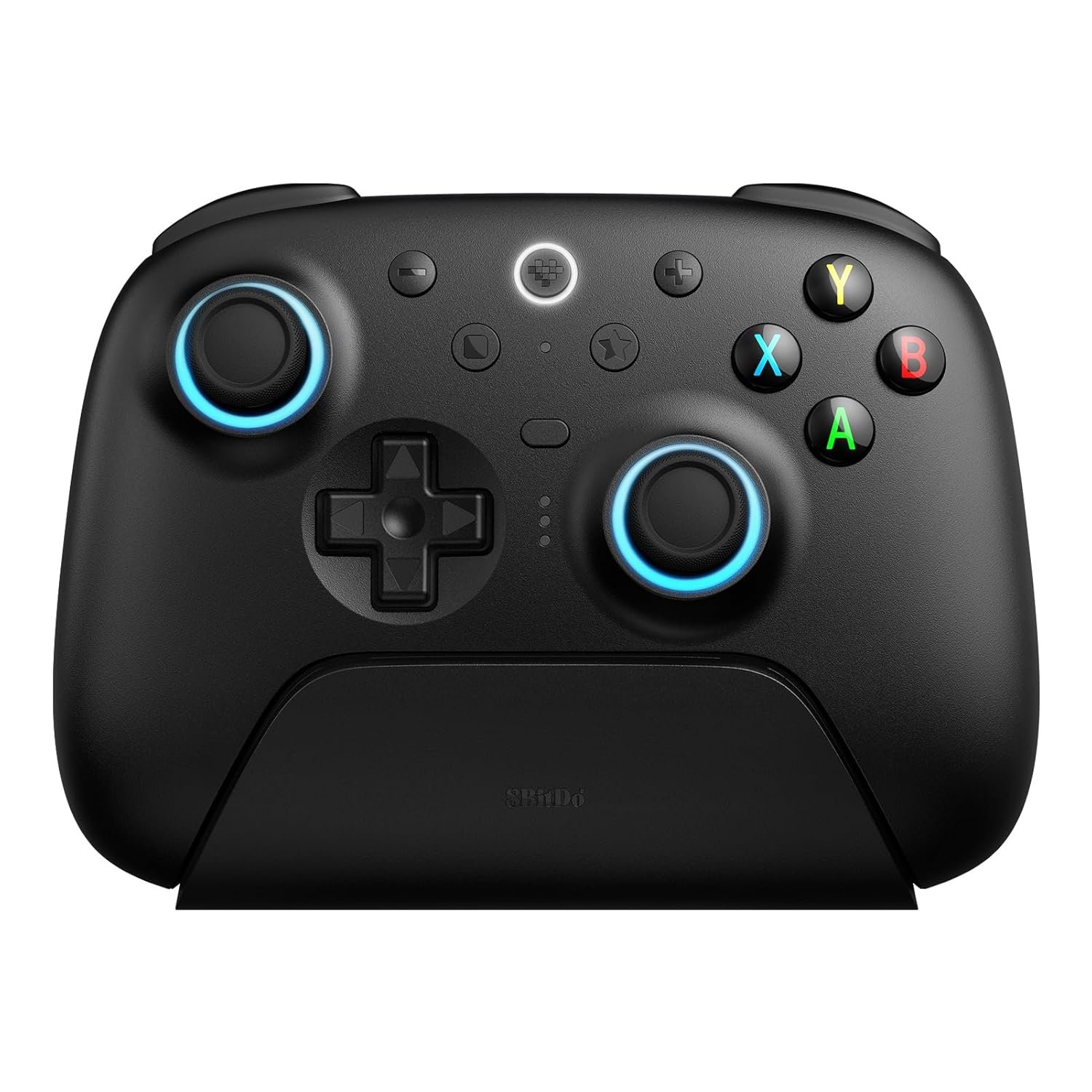
8BitDo Ultimate 2 Wireless Controller for Windows PC, Apple, Steam & Android, Gaming Controller with TMR Joysticks, Hall/Tactile Triggers, Motion Control, RGB Fire Ring, 1000Hz Polling Rate, Black
$5.99
Related Products




Product description
The video showcases the product in use.The video guides you through product setup.The video compares multiple products.The video shows the product being unpacked. 8BitDo Ultimate 2 Wireless Controller Merchant Video

Flagship, fully upgraded for next-level performance. Compatible with Windows and Android devices.


1 Next-level
2 RGB Fire Ring
3 Tactile bumpers and D-pad
4 USB-C Adapter
5 Ultimate Software V2


8Bitdo Ultimate Controller
Add to Cart
Add to Cart
Add to Cart
Add to Cart
Customer Reviews
4.2 out of 5 stars 3,354
4.2 out of 5 stars 3,354
4.5 out of 5 stars 6,746
4.4 out of 5 stars 2,838
Price
$52.99$52.99
$42.21$42.21
$29.99$29.99
$19.99$19.99
Compatibility
Windows, Android
Windows, Android, iOS, mac
Windows, Android
Windows, Android
Joysticks
TMR Joysticks
Hall Effect Joysticks
Hall Effect Joysticks
Hall Effect Joysticks
Bumpers
Tactile
Silicone
Tactile
Tactile
D-pad
Tactile
Silicone
Tactile
Tactile
Battery Capacity
1000mAh
480mAh
480mAh
–
2.4G Adapter
Type-C
USB-A
USB-A
–
Ultimate Software
Ultimate Software V2
Ultimate Software V1
–
–
Pro Back Paddle Buttons
✔
✔
✘
✘
Fast Bumpers (L4/R4)
✔
✘
✔
✔
6-axis Motion Control
✔
✘
✘
✘
RGB Fire Ring
✔
✘
✘
✘
Vibration
✔
✔
✔
✔
TMR Joysticks – Offering higher sensitivity, greater precision, and enhanced durability.
8BitDo Exclusive Wireless Technology – “8Speed”, it delivers an exceptionally stable 2.4G connection with ultra-low latency under 1ms. Engineered for rock-solid reliability, it features strong anti-interference and a 10m range with virtually no lag.
Trigger Mode Switch – Easily switch between linear Hall Effect triggers and non-linear tactile triggers for optimal control across different gaming scenarios.
1000Hz Polling Rate (for 2.4G and wired connection). Customizable 6-Axis Motion Control. Turbo function. Rumble vibration. Support 8BitDo Ultimate Software V2.
2 Pro back paddle buttons, extra R4/L4 bumpers, and tactile bumpers & D-pad for enhanced control and faster response. Includes a multifunctional charging dock and USB-C adapter for seamless connectivity.
Compatible with Windows PC, Apple, Steam, and Android devices – 2.4G and wired connection for Windows, and Bluetooth for SteamOS, Apple and Android.
12 reviews for 8BitDo Ultimate 2 Wireless Controller for Windows PC, Apple, Steam & Android, Gaming Controller with TMR Joysticks, Hall/Tactile Triggers, Motion Control, RGB Fire Ring, 1000Hz Polling Rate, Black
Add a review

$5.99
Foster –
Top Tier Daily Driver PC Games Controller
I love this thing. 98% of it is impeccable.8BitDo’s naming convention is a little bit confusing, but this particular controller is pretty much JUST for PC, and it is a very solid choice for PC at that. Very smooth sticks, nice membrane buttons, L2 and R2 triggers that can be transformed from analogue triggers to digital clicky buttons, all good stuff. The dpad is different from 8bitdo’s earlier revisions, with it being more ‘tactile’ than rubber membrane. I think the closest similarity to another product might be a PS Vita dpad, where it has an in between rubber dome of most dpads of the past and the clickiness of XBOX controllers. In theory, this should be amazing for precision platformers or Tetris type of games, as you will feel when you press a direction the way you meant to or accidentally press a wrong direction input. Could it feel fatiguing? I can’t quite tell, but playing games for over 2 hours at a time would fatigue me anyway.The input latency is insanely good, like you can have the dock connected to the PC and will connect with 2.4ghz to its dock and it feels just about the same as connecting the controller through a wire. You *could* use the Ultimate 2 Bluetooth if you want, but that would be better for Switch/Switch2 as I think it has more latency (according to Gamepadla) which is fine for the Nintendo Consoles and is more in line with how those controllers and consoles work. If your main focus is PC, get this instead for the better input latency.I also appreciate how classy, understated, and not ‘aggressively gamer’ it looks, compared to other third party controllers.My only complaint is about the R1 and L1 bumpers, but this is more of a taste thing. I would have preferred a rubber membrane button for the bumpers, but if I wanted that then I would use the older model Ultimate C that I have.If you were to get only ONE gamepad for your PC, I can highly vouch for this one.
Will –
Great controller, great price
Does everything I need it to do. Sticks feel great, I love that there’s a hair trigger option, and the connectivity/input delay has always felt great every time I’ve used it. The D-pad is maybe a bit mushy, but that’s the only complaint I have with it. The charging accessory works great.
a2020 –
Best PC controller I’ve used
Works out of the box in modern Linux (6.x kernels) with no need to install additional drivers. The charging cradle is very convenient and solves the storage problem. The controller itself is lightweight but sturdy, with comfortable, accurate controls and low latency.
B. L. –
Great, affordable controller. Can’t remap square and star buttons unfortunately.
I love the 8BitDo controllers. Formerly owned a Pro 2 and Ultimate which were both great. These are great quality yet an affordable price compared to many other controllers which make these an amazing choice. The new Ultimate 2 has a lot of nice features over the Ultimate like the two extra shoulder buttons, abrasion guards on the joysticks, TMR joysticks, hall effect triggers, and trigger locks so it becomes a button instead, etc.The only gripe I have with the Ultimate 2 is being unable to remap the two extra front buttons, square and star. Square is used for remapping without the software and star was for the rgb lights but I don’t really use either since I use the software and want to prolong battery life. The placement of the two buttons make it too easily pressed which is annoying and wouldn’t be too much of a problem if we could reconfigure it to something else.
Aaron Monaco –
Amazing budget controller
Great controller, all the buttons work and the trigger options are cool, they basically turn in to buttons. Long battery life (about 5 hours) and it’s nice that you can charge the controller and have it plug n play at the same time. Aesthetically pleasing and the RBG is cool. Eegenomic feel is great when playing for long periods of time. This is my second 8bitdo controller and I definitely reccomend buying them.
Henry S. –
Better than any First Party Controller
8BitDo’s Ultimate 2 Wireless controller is easily the greatest controller on the market, beating all 3rd party and 1st party controllers.From the pc interface that lets you adjust color, calibration, and create macros, to the ability to switch the triggers from reactive pulls to buttons. This controller is genius. You can change lighting on the go to preset options or your own custom options at the click of a button. Activating your macros is simple with a toggle. There’s even buttons coined “L4” and “R4” which mimic a press of the sticks or can be remapped to something else. The back paddles are always phenomenal if you play a game that utilizes both sticks but you need availability to press face buttons, as well.The ability to plug this controller into your pc and have it auto-pair upon pulling it off the charging station is also brilliant. My controller is always at full charge for a gaming session, and it’s always paired without me having to lift a finger.8BitDo has really outdone themselves, not just in innovation, but in raw performance, as well. This is my go-to controller, and I don’t see that changing anytime soon!
Benjamin Campbell –
Best daily driver controller in years
One of the, if not THE, best controllers i’ve ever used. Feels fantastic. Customizable back buttons are great. The lights on the joysticks are pleasing. Charger stand doubles as the wireless usb dongle (which is removeable on the bottom, on the inside). 10/10, no notes.
OZAN –
Urun güzel kaliteli bütün ihtiyaçları karşılayacak bir oyun kolu kullanımı kolay windows uzerinde cok güzel çalışıyor kesinlikle tavsiye ediyorum
Galonas –
Quand j’ai vu la couleur je me suis dis “un jour elle sera mienne” et bien c’est chose faite et elle est un poil plus petite qu’une Aero de chez Microsoft mais le contact, les boutons, la lumière et le fait qu’en sans fil elle se connecte en 1 seconde et est reconnu par le PC…si la perfection était une manette, elle se raprocherai de celle là
helena –
Completely unusable for the reason intended. I have only had this controller for a day and had nothing but problems. Firstly I want to use it on Bluetooth, it registered however when I go into my PC games the A and B button are switched.I had to download some software to fix itThought my problem was solved? Nope, next went into my game and registered as playstation despite the buttons being the same as xbox. I’m so sad, I just wanted to get away from xbox controllers as they break on me quite frequently. Do better 8bitdo.
Alessio –
Perché non gli manca davvero nulla. Innanzitutto è comodo: layout Xbox con dei grilletti simil-playstation 4. Rimpiango un po’ i grilletti della 360 ma forse solo per abitudine, e comunque nessuno ne fa di simili. La comodità prosegue con il wireless: è possibile attaccare il dongle wireless all’hub di ricarica così che sul PC avrete un solo slot USB occupato comunque decidiate di usarlo; non capisco poi perché sulla pagina dell’articolo non si menzioni da nessuna parte il bluetooth, che funziona alla perfezione passando a Xinput con l’interruttore dietro al controller. Pensavo di fare un “sacrificio” dovendo scegliere tra layout Xbox senza bt o layout Nintendo con bt, e invece sono rimasto sorpreso!Il prezzo è adeguato, e non mi sento di stare comprando un “marchio” come comprando un controller Xbox in circolazione da 10 anni ma che in qualche modo costa come al lancio. Il controller 8BitDo ha un dpad adeguato (rocker ma assolutamente preciso), levette analogiche hall che urlano robustezza, due tasti programmabili dietro, i profili, la vibrazione è corposa e mai fastidiosa, la connessione immediata, la batteria lunga (credo, non mi è mai capitato di dover fermare un gioco perché mi fosse morto il controller!)… Di controller ne ho usati e non ricordo di essere stato mai così soddisfatto
Muhamed –
Viele der Rezensionen sind für mich, jemanden, welcher über 20 Controller besitzt, völlig unverständlich!Der erste 8bitdo Ultimate hat meinen MS Elite Controller ersetzt. Wenn es etwas gab, was mir nicht sehr gut gefallen hat, dann war es das Steuerkreuz. Der Ultimate 2 hat diesen Punkt von “ok” zu “sehr gut” verbessert, gefällt mir richtig gut! Von den Maßen, dem Gewicht aber auch vom Feeling hat sich so gut wie nichts geändert, nicht mal bei der Dock – muss es auch nicht. Wenn man hier etwas verbessern könnte, dann wäre es das USB-Kabel. Nutze das von RAZER, welches bei den Mäusen dabei liegt. Kein anderen Hersteller, egal ob groß oder klein, hat so ein gutes USB-Kabel im Lieferumfang aber ich denke der Punkt wird für viele keine Rolle spielen, daher “wenn Ihr wirklich nach einem Kritikpunkt suchen müsst”.Zum Controller selbst: Der Ultimate 1, mit dem deutlich besseren Steuerkreuz und mehr Optionen, welche bereits bei den Bilder zu sehen sind. Von Hall Effect zu TMR Sticks bekommt man kaum was mit. Der Ultimate 1 ist nach über einem Jahr täglicher Nutzung weiterhin perfekt. Kein Stick Drift oder Sonstiges in der Art. Die Knöpfe auch weiterhin fehelrfrei. LED’s hat der Controller jetzt auch, bei den Sticks bzw. drumherum. Mit einem Knopfdruck, ohne Software (unter der Start-Taste) können diese geändert werden oder auch ganz deaktiviert werden.Es ist mit Abstand nach ein paar Tagen mein liebster Controller und das was Ihr auf dem Bild sehen könnt, sind nur die, die in der Nähe sind.Der Elite fühlt sich sehr hochwertig an aber überlebt bei mir nie ein Jahr, immer gab es etwas, was nicht mehr richtig funktionierte. Lasst Euch somit von der Verpackung und der Größe im ersten Moment nicht täuschen. Der Ultimate 2 ist minimal kleiner und ich habe große Hände. Die Verbindung ohne Kabel ist stabil und funktioniert von Werk aus ohne Probleme, unter Windows/Steam. Leider ist auch dieser unter Linux ohne Kabel ein Krampf. Wirklich schade!