

10.1 Inch Smart Digital Calendar, Electronic Desk Calendar, 1920 * 1080 IPS Full HD Touch Screen Display for Family Meal Planner Support – Streamline Household Organization
$129.99
Related Products






Product description


 Mobile App
Manage and access everything on your DASFIWO Calendar from anywhere with the free mobile app
 Easy Sharing
Invite your family members, who can use it together to keep life organized!
 Customized Views
Adjust font size and toggle between day, week, month, and schedule view
 color differentiation
Each member of the family can choose their favorite color that ,making it simple for everyone to see who needs to be where and when

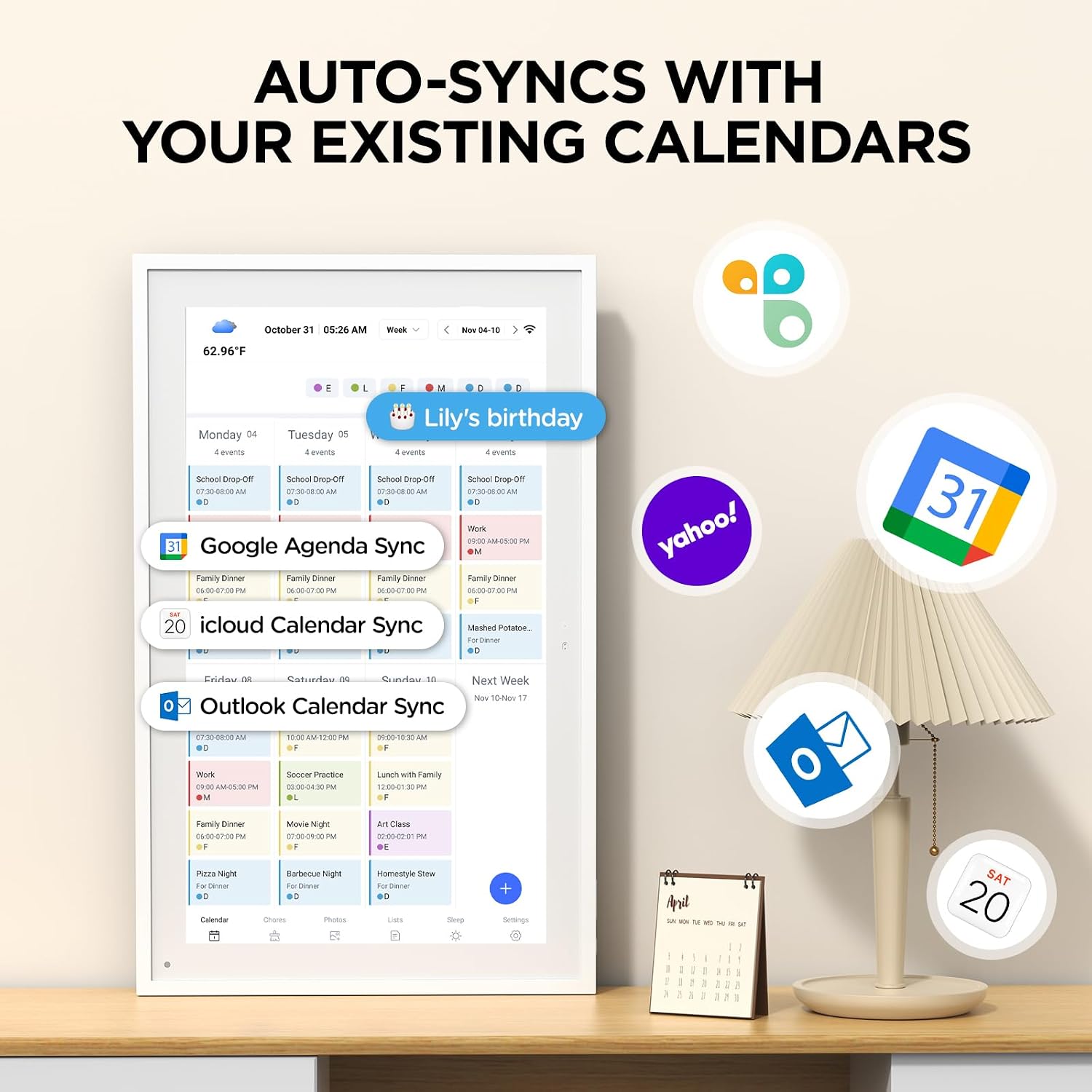
Easy Sync, Zero Subscription: Easily sync through our mobile app Compatible with Various commonly used calendar apps like Google Calendar, iCloud, Outlook, Cozi, and Yahoo. Support bidirectional operation and realtime synchronization between device and mobile app. keep your family organized.
Calendar frame can be easily switched: When in use, it can serve as a digital calendar, making it convenient for you to manage family affairs and dinner plans. When you don’t need the calendar function, it can also transform into a digital photo frame. You can upload your favorite photos to your device through a free app and set it as a screensaver, turning it into a beautiful photo frame to record your wonderful life.
Rich additional features: It is not only an electronic calendar, but also comes with weather function and sleep mode. You don’t need to check the weather on your phone every day, the local weather conditions will be updated in real-time on the calendar. When you don’t need to use it at night, you can turn on sleep mode and turn off the screen without affecting your sleep.
IPS Full HD Intelligent Display Screen: This digital calendar features a 1920 * 1080 ultra high definition touch screen and supports horizontal and vertical screen modes for easy placement. Large 32GB storage to meet your storage needs.
1-year warranty: We are committed to producing high-quality digital calendars. Each WiFi smart calendar undergoes hundreds of functional tests before leaving the factory. We provide lifetime support, 1-year warranty, and online service to help you solve any difficulties you may encounter during use at any time.
11 reviews for 10.1 Inch Smart Digital Calendar, Electronic Desk Calendar, 1920 * 1080 IPS Full HD Touch Screen Display for Family Meal Planner Support – Streamline Household Organization
Add a review

$129.99
Nicholas T. –
A Warm and Effortless Family Planning Hub
Keeping our family schedule in one place used to feel chaotic, but this smart calendar changes that. The 10.1 inch touch screen is bright and responsive, and it supports both calendar viewing and quick photo viewing; you can switch modes as needed. It syncs with popular calendar apps without a subscription, and the bidirectional flow means updates you make on the device or on your phone stay in sync in real time. In short, it turns a busy week into a clear plan you can actually follow.One of the quietly smart touches is the ability to turn the calendar into a photo frame. Upload your favorite family moments through a free app and let the display run as a screensaver when you’re not planning meals. It adds a warm, personal touch to the kitchen wall without extra clutter.Weather on demand and sleep mode are small conveniences that make a big difference. Real time local weather shows up on the calendar so you can plan outfits and outdoor meals without checking your phone. When night comes, sleep mode keeps the screen from bothering sleep while you still have access to the schedule.Storage and durability plus a solid warranty set this apart. With 32GB of internal storage and a sturdy build, you won’t run out of space for photos or plans, and you have reassurance with a 1 year warranty and lifetime online support. The setup is straightforward and the value is clear: a single device that streamlines how our family eats, plays, and plans together.
Cuqui –
I really liked it.
This calendar is something else. At first, when I bought it, I was undecided about whether it was a good value for money, but when it arrived, my opinion changed completely. From the presentation of the box to the actual product, it’s on another level. Its design is super elegant and very attractive, but the highlight is all the features it comes with and its functionality. I loved it. The portrait mode gives another level to your living room or wherever you want to install it, and its installation is super easy. In less than 10 minutes, everything was already synced with my Google accounts and the tasks in my calendar.
G9195 –
I like it so far
I like it so far. It’s just me and my wife but it helps with chores, events, and dinner plans. It allows us to both interact and put notes as well as see each other’s schedules. It’s compact but seems well put together. It works with multiple account types but I only used it with Google. Since it’s not a big name brand, my only concern is with data security. Signing into a Google account with email, photos, and files can be… compromising. There’s a companion app too which is useful. This is basically an Android tablet with a frame. I wish it used something like USB-C for power though.
Alfredo Torres –
Muy bueno
Buena iluminación y fácil de configurar
Greg Jarboe –
A must for calendar & frame for photos!
This calendar is a must for every house! It helps you organize tasks and stay on top of your things, I loved that it syncs with an app that allows you to upload tasks there and also you can upload photos and videos and have the tablet playing them anytime of the day. The sync is quick and the pics are uploaded instantly. Other than that the build of it is great and you can hang it or place it on the table!
Jhonatan Duque –
Muy buenos
Muy buenos
Bryan –
Infected with malware
Update (6 Jun 2025): On 5 Jun 2025 the FBI’s Internet Crime Complaint Center released Public Service Announcement I-060525-PSA confirming that BADBOX 2.0 has compromised millions of smart-TV boxes, digital projectors, vehicle infotainment units, picture frames, and other IoT devices. The advisory credits Human Security, Google, Trend Micro, and the Shadowserver Foundation for their contributions and recommends monitoring home-network traffic, avoiding unofficial app stores, and keeping firmware patched.BADBOX 2.0, like its predecessor, begins with backdoors on low-cost consumer devices that enable threat actors to load fraud modules remotely. These devices communicate with command-and-control (C2) servers owned and operated by a series of distinct but cooperative threat actors. The BADBOX and BADBOX 2.0 threat actors exploit software or hardware supply chains or distribute seemingly benign applications that contain “loader” functionality in order to infect these devices and applications with the backdoor.Once a fraud module is deployed, infected devices may become part of a botnet and subsequently have the capacity to conduct several attacks including:Programmatic ad fraudClick fraudResidential proxy services (which, in turn, facilitate the following attacks):Account takeover (ATO)Fake account creationDDoSMalware distributionOne-time password (OTP) theft
Brandi –
Perfect size for a desk or nightstand
So happy with my digital calendar! It’s easy to set up and has more options than I realized. I am still playing around with it but it is perfect for my nightstand to keep me up with my events. It has sleep mode which is perfect. There is a stand that easily attaches to the unit as well. Colors are bright and pictures show up clearly. So far so good!
prgmello –
Enviar fotos por wifi é super rápido.Varias transições inclusive randômico.Consegui colocar mais de mil fotos.Liga e desliga automaticamente todo dia.Toca vídeo e música.Tem relógios e previsã do tempo.Lê cartão micro SD e pendrive.
Ana Barreto –
Adorei o produto, muito fácil carregar com as fotos, só faltou local pra colocar informações sobre as fotos.
Samanta O. –
Ótima aquisição! Veio funcionando perfeitamente, o app é fácil de baixar e intuitivo para mexer. O único ponto de atenção é o carregador que tem padrão americano, então precisa de um adaptador para tomada. Recomendo!