
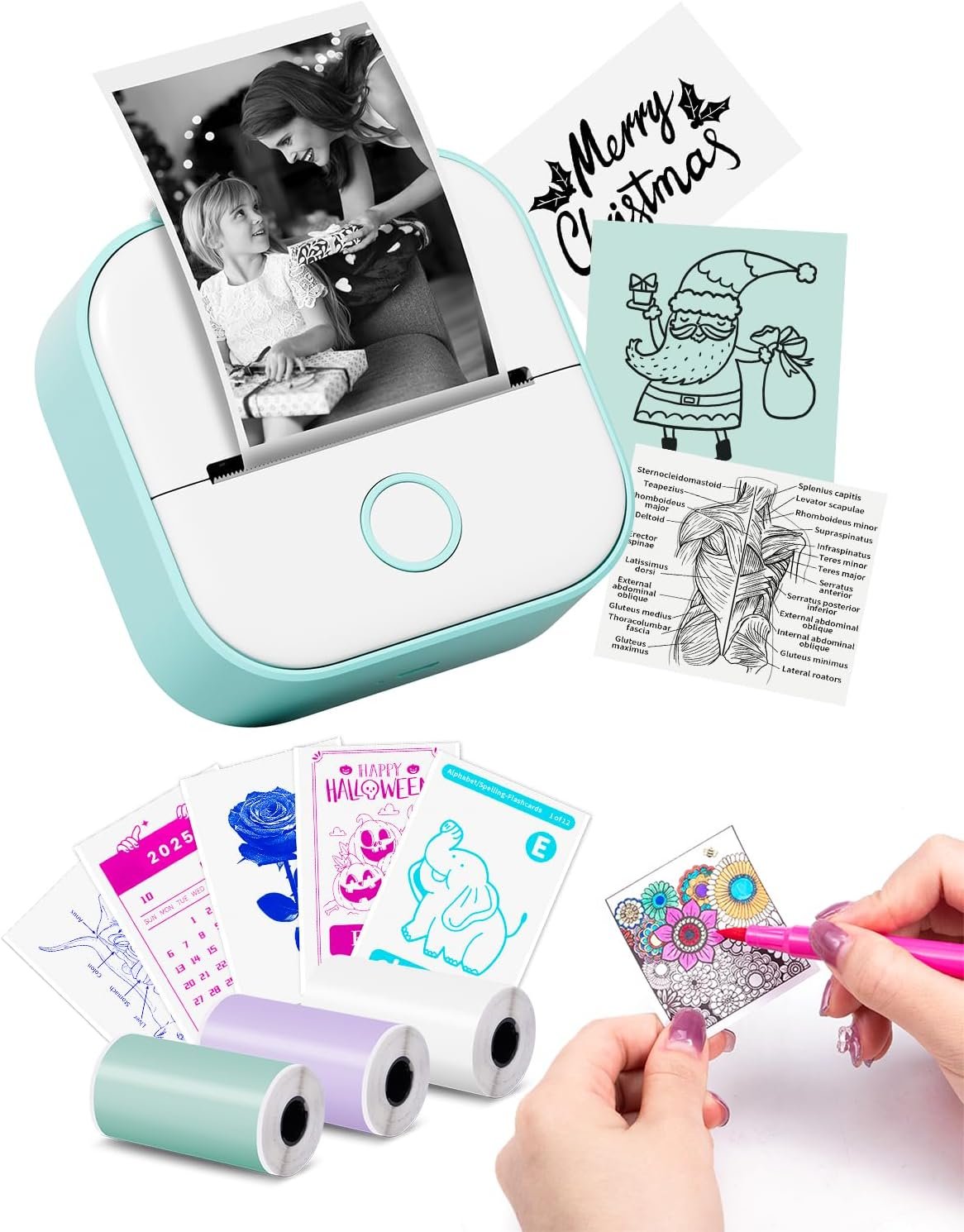
Memoking Sticker Printer – T02 Mini Printer Print Pods Portable Thermal Inkless Sticker Maker Machine Bluetooth Pocket Impresora Portátil Instant Print for Notes, Anatomical Diagrams, Journal,DIY,Gift
$24.50
Related Products




Product description
The video showcases the product in use.The video guides you through product setup.The video compares multiple products.The video shows the product being unpacked. T02 mini printer Merchant Video

The video showcases the product in use.The video guides you through product setup.The video compares multiple products.The video shows the product being unpacked. thermal printer sticker Merchant Video
“Scan & Print” Feature for Enhanced Clarity in Study Graphics Printing
1. Compatible with the Phomemo App. Simply input your graphics using the “Scan & Print” feature within the app.
2. Then, rotate your graphics vertically to enlarge them on the screen.
3. Finally, click “Print” to get your clear printouts.
 Print Your Life Photos Anytime, Anywhere
1. Note: There may be some print noise on the photos, and they are not ultra-high definition prints.
2. Our pictures represent actual results, and you can also refer to the printing video on the same product page.
 Customizable Planner Stickers
1. After printing, you can use scissors to cut them into various shapes for stickers.
2. Suitable for planner enthusiasts, fun for children, and perfect for cutting cute stickers as decorations.
 Image and Text Label Printing
1. T02 label maker allows you to print labels along with corresponding images, so you can easily identify the contents of your storage without having to open each container, saving you time and effort.
2. The printing width is 50-53mm, but there is no limit on the printing length, which means that the label length can be customized according to your needs.
 Printing in Various Beautiful Fonts
1. T02 mini printer supports hundreds of fonts (some require a subscription).
2. Easy to edit sticky notes, letters, reminders, company logos, and more.
 Supports DIY Coloring
1. You can use oil-based or water-based markers for coloring.
2. Colored pencils will result in a very light effect.

How to solve the problem of blurry printing?
The video showcases the product in use.The video guides you through product setup.The video compares multiple products.The video shows the product being unpacked. T02 mini printer Merchant Video
How to properly install the paper holder for the printer?
 How to properly install the paper holder for the printer?
The video showcases the product in use.The video guides you through product setup.The video compares multiple products.The video shows the product being unpacked. mini sticker printer Merchant Video
What should I do if the printing is too small and hard to read?
 What should I do if the printing is too small and hard to read?
The video showcases the product in use.The video guides you through product setup.The video compares multiple products.The video shows the product being unpacked. mini sticker printer print pods Merchant Video
What should I do if the printout is blank?
 What should I do if the printout is blank?
The video showcases the product in use.The video guides you through product setup.The video compares multiple products.The video shows the product being unpacked. mini sticker printer Merchant Video
The video showcases the product in use.The video guides you through product setup.The video compares multiple products.The video shows the product being unpacked. print pod mini sticker printer Merchant Video
Memoking T02 Series
Add to Cart
Add to Cart
Add to Cart
Add to Cart
Add to Cart
Add to Cart
Add to Cart
Customer Reviews
4.4 out of 5 stars 132
4.6 out of 5 stars 7
4.5 out of 5 stars 35
4.6 out of 5 stars 999
4.0 out of 5 stars 279
4.6 out of 5 stars 427
4.2 out of 5 stars 11
Price
$16.10$16.10
$12.29$12.29
$20.99$20.99
$21.10$21.10
$42.99$42.99
$10.99$10.99
$59.99$59.99
Model
T02 Paper
T02 Paper
T02 Paper
T02 Paper
T02 Mini Printer
T02 Unicorn Shape Case
Q02E Mini Printer
Papers Color
Purple/Orange/Green
Purple/Rose Red/Orange
Clear Color Printing Paper
Clear Black Printing Paper
Clear Color Printing Paper
Green
Green
Printouts Color
Black
Black
Green / Blue / Pink
Black
Black and Monochrome Color
Green
Black and White Color
Number of Paper Rolls Included
3
3
3
3
3
1
3
Need Ink?
✘
✘
✘
✘
✘
✘
✘
Mini Printer Sticker Maker: This mini sticker printer is best gift for for kids, children, teens, students, and families. It also takes photos, graphics, banners and notes for celebrations during special holidays, Halloween, Christmas, Thanksgiving, birthdays and so on. T02 mini printer is portable with 3.39 x 3.39 x 1.42 inch, mini palm size makes T02 pocket printer easy to carry and store
Sticky Note Printer for All-Stage Students: Memoking sticker maker is a back to school supplies for printing study notes, a nursing school essentials for anatomy flashcards, a teacher essentials for graphic diagrams for math, chemistry, geography, physics and excerpts. Mini sticker printer machine helps students study. It is a college essentials that can use “Scan” function to print study graphics clearly
Mini Inkless Printer: Memoking T02 pocket printer is thermal printer, you can print directly with Memoking T02 sticker paper without any ink. Mini photo printer T02 sticker maker is not only for sticky or non-sticky white thermal paper, but also for color and clear transparent sticker printer paper
Mini Printer for Phone and Tablet: T02 printpods mini mobile printer is compatible with iOS and Android devices. Wireless Bluetooth one-click connection within 2s in APP (compatible with “Phomemo” APP). T02 mini thermal printer offers variety of fonts, filter effects and themes, which brings fun to your printing
Versatile Thermal Mini Impresora Portátil: T02 Bluetooth thermal printer is for small business, to-do-list, study and work assistance that teacher must haves, memo, shopping list, delivery address, receipt, company logo, bookmark, greeting card, life and work plan, It is a school supplies for kids and children games such as maze, puzzle, calculation, coloring, alphabet learning and card recognition. You can use it for office, home, DIY, learning and more
Instant Monochrome Mini Photo Printer: T02 is not only a sticker printer, but also a thermal photo printer. Enjoy to print your photos and pictures anywhere and anytime with this mini printer mini sticker maker machine
Customized Label Maker Machine: T02 mini label printer comes with 3 rolls of thermal paper, you can cut the printouts into labels of any shape and size just with a scissor for all your labeling needs
13 reviews for Memoking Sticker Printer – T02 Mini Printer Print Pods Portable Thermal Inkless Sticker Maker Machine Bluetooth Pocket Impresora Portátil Instant Print for Notes, Anatomical Diagrams, Journal,DIY,Gift
Add a review

$24.50
A. Murray –
Great little printer for many purposes
This is a fun little sticker printer. My kids have really enjoyed creating a drawing and then printing it out to color and then use as stickers. They have also use it to make fun labels. My wife has used it to make small deliver to labels for her pen paling. Being a thermal printer you don’t need ink. Which is a plus when your kids are printing 100’s of stickers a month!
Bezuz –
Worth it
One of my all-time favorite purchases. I love using this for my scrapbook, so much cheaper than using a printer. This uses heat, so you never need to refill it. It only prints in black and white, but it captures a good amount of detail. It’s not perfect, and some pictures might look grainy or blurry depending on the size of the image, but it’s pretty nice. I would definitely buy this again or buy it for a friend who’s into journaling/scrapbooking. It’s like receipt paper basically.
Ed B. –
It’s got its good points
This printer has its limitations, but it’s also got some good points for a quick print with stickers on the back. It’s ok it’s useful. For the price they won’t be perfect.. I used it to label parts when this is something a go kart so I’m going back together. It’ll be a lot easier.
Raena –
thermal paper and wifi
Purchased as a small birthday gift for an artistic coworker. She loves it.
Megu Kirishima –
Worth it, perfect for scrapbooking & easy to use
(Please disregard my ‘decor’ on my printer, I have a s/o that will print out stupid things)In regards to usage, I had a mishap upon receiving the item. There was an error that stated the cover was open, when it was in fact- not. The red light would not signal to green no matter what method was used & I went to customer support for help. Fortunately, there is one within the app & through email, and because of live chat, I was able to get it addressed rather quickly. It was not a procedural error, and after numerous suggestions on how to restart/identify the paper/hold for 10secs, I just had to keep opening and closing until the light turns green.Annoying to experience upon just recently getting the item, but I appreciate the patient and fast response through customer support. I assume you guys will be luckier than I, but be reassured that if you have any problems, they will help & its easy to reach them.Now to the actual product: I love it. The usage of the app is so fool-proof. Connectivity is relatively easy, I had no problems with bluetooth. It connected while I was still reading instructions, and even if that failed- there’s a QR connection. It sucks that it uses your paper, but hey; at least there’s a plan B if bluetooth fails.Pictures are so easy to print, you can either print one by itself or create a collage to print multiple smaller images. I was worried about the pictures not coming out clear or patchy, but the quality is so good for the price I paid. Additionally, its completely customizable. In the app, you can adjust brightness, contrast or apply filters to your image to your liking. The preview is pretty accurate to the print. I have currently printed about 8 images & 2 texts, but not yet run out of paper.In terms of size, it is rather small but I love it. It is handheld sized and perfect for accessibility and travel. I do want a polaroid camera one day, but until then this is such a cheap & worth substitute. The product is so good for scrapbooking! It not only prints images, but text as well. The font options are pretty good in the app, but should you look for something specific, there’s images so you can print out a text as an image. Keep in mind it is thermal, so there is only black and white. However, there is a filter for outlines so I assume you can just print an image using the filter & color it in.Stickiness could be better, but for the price it’s great. Not a sticker connoisseur, but it sticks on paper perfectly fine. I printed out different cat memes and stuck them on the foreheads of myself & a few friends. It lasted over 6 hours and only reason it came off was because we took them off. Did it stick on something afterwards? Not really, but that’s warranted bc oily skin.
Katie –
Fun for kids!
So cute and fun. My daughter has a great time downloading different images and printing them!
Nichole –
Its ok but not great
Just ok. Not easy to operate. My daughter uses it sometimes but the images arent great. Kind of blurry. Easy to connect to phone but quality isnt the best.
Li ‘Yn.🌸🥢 –
for the price…
it runs out of charge quickly and it makes the print quality go down, but it’s good for the price tho , i use it for my small business
vincenzo –
E’ una stampante termica portatile adatta a chi desidera stampare senza doversi preoccupare dell’utilizzo di inchiostro, funziona bene sia su carta termica adesiva che non adesiva. Queste caratteristiche la rendono perfetta per stampare etichette, note, decorazioni e tanto altro.La qualità di stampa è davvero ottima: il contrasto si vede bene e le immagini risultano nitide e dettagliate. A tutto questo si aggiunge la super semplicità d’uso grazie alla connessione Bluetooth e l’ia che ti permette di modificare le grafiche prima di stamparle. Anche la batteria dura un bel po’ e non tende a scaricarsi di continuo.
Bogdan Gametchi –
Ok so the printer works perfectly and for any issues what’s so ever they have a great customer support on their original app. Absolutely amazing!
Sahar –
After managing to set up the printer, my hopes were quickly dashed when I attempted to print my first document. No matter what I tried, the printer consistently failed to respond to print commands. I checked all the connections, ensured the papers were properly installed. Yet, the printer stubbornly refused to cooperate.To make matters worse, the printer’s really poor quality, it’s flimsy and prone to jamming, and the overall quality feels cheap and fragile.
MB26 –
petite merveille technologique qui a largement dépassé mes attentes ! Ce modèle d’imprimante thermique est incroyablement pratique et efficace, offrant une solution idéale pour imprimer des autocollants, des étiquettes et bien plus encore.Tout d’abord, le design compact et élégant de l’imprimante est à la fois moderne et fonctionnel. Sa taille réduite la rend extrêmement portable, ce qui est parfait pour ceux qui ont besoin d’une imprimante facile à transporter et à utiliser dans divers endroits. La qualité de construction est solide, et l’appareil semble durable malgré sa petite taille.L’installation et l’utilisation de l’imprimante sont d’une simplicité déconcertante. L’appairage avec mon smartphone via l’application dédiée a été rapide et sans accroc. L’application est intuitive, offrant une variété d’options pour personnaliser et imprimer des autocollants ou des étiquettes avec une facilité remarquable.La qualité d’impression est excellente. Les images et les textes sont nets, précis et bien définis. Les couleurs ressortent clairement, et le contraste est suffisamment élevé pour des impressions attrayantes et professionnelles. L’impression thermique permet également d’économiser sur le coût des encres, ce qui est un plus non négligeable.La vitesse d’impression est rapide, permettant de produire des autocollants en quelques secondes seulement. De plus, le bruit de fonctionnement est minimal, ce qui rend l’utilisation de l’imprimante très agréable, même dans un environnement calme.
Marijke –
Toen ik hem net had ging het prima. Nou moet je ineens betalen om te printen. Echt waardeloos!