

Corsair Vanguard 96 Wired Mechanical Gaming Keyboard – 96% Layout, MLX Fusion Tactile Switches, 8000Hz Polling, LCD Display, Virtual Stream Deck, G-Keys, SOCD Flashtap, QWERTY US – Black
$179.99
Related Products




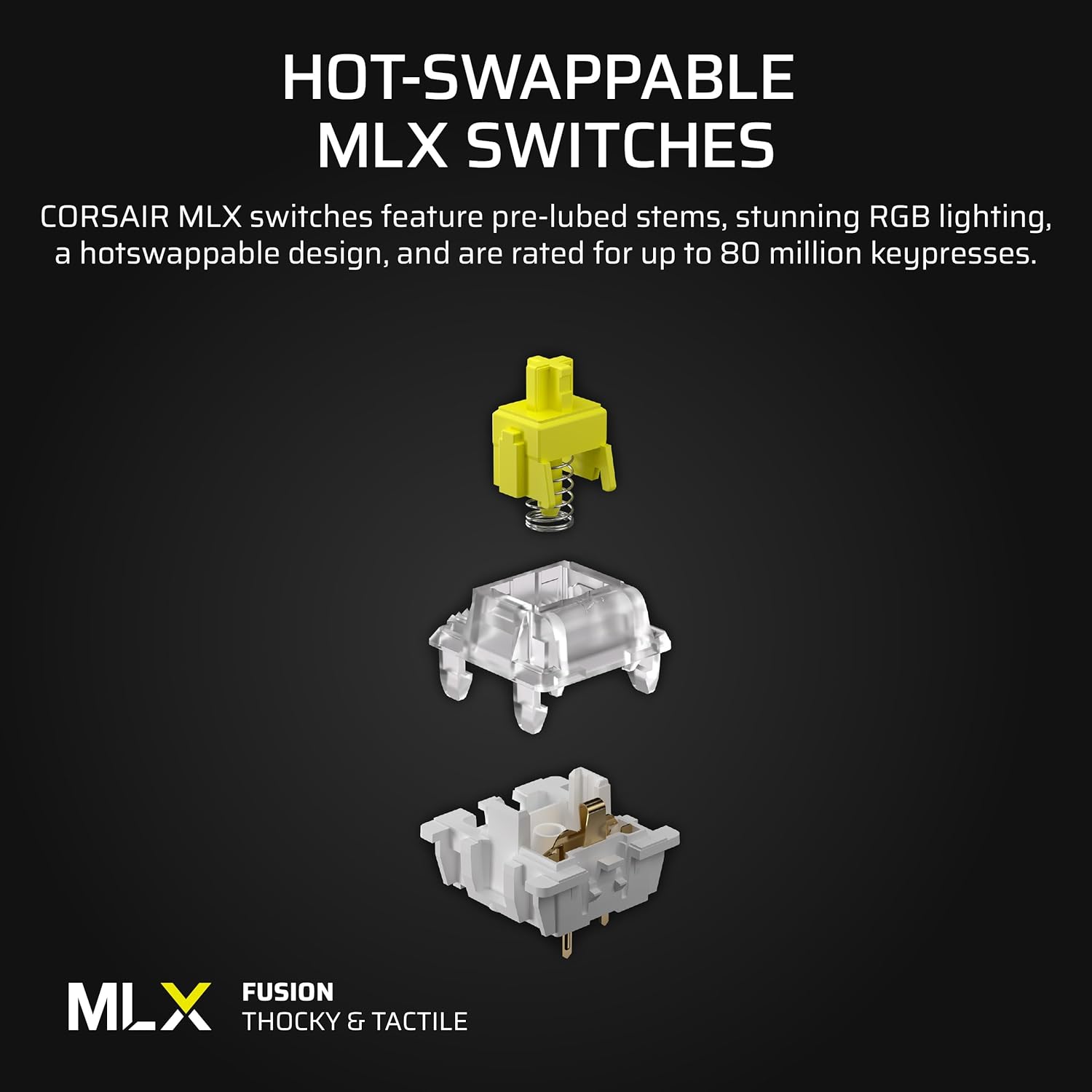


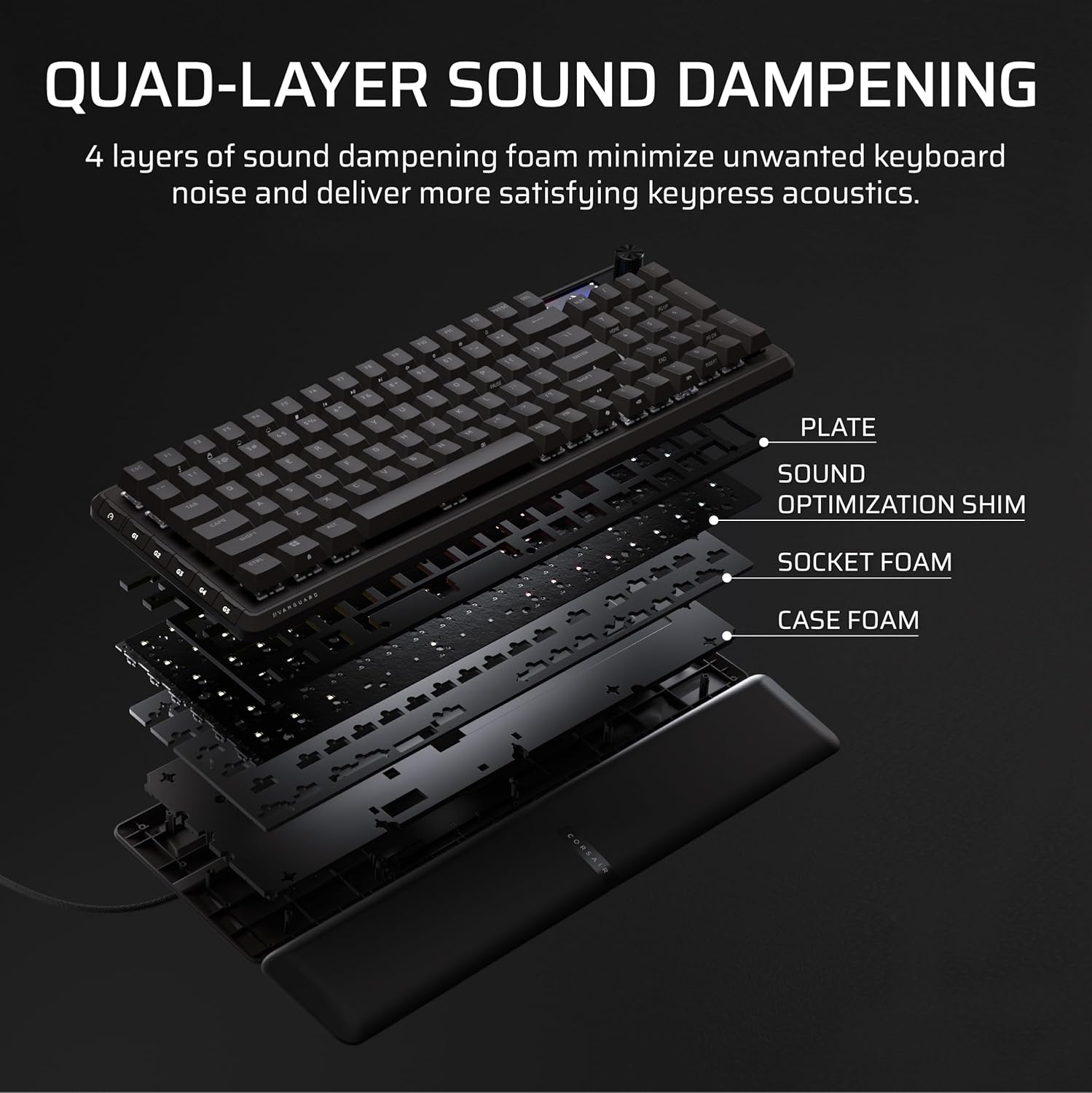

CORSAIR’s VANGUARD 96 pulls off the astonishing feat of shrinking a full keyboard with arrow keys, a tenkey pad, an LCD screen, rotary dial, and 6 programmable G-keys into a super-compact frame. Featuring wobble-free pre-lubricated CORSAIR MLX switches, it’s also hotswappable, supporting compatible 3-pin and 5-pin switches. The stunning LCD screen takes keyboard personalization to the next level with animations, stats, and game integration support. Quadlayer sound dampening provides satisfying keypress acoustics, and 8,000Hz hyper-polling delivers lightning-fast inputs. VANGUARD 96 also features Elgato Virtual Stream Deck integration, FlashTap SOCD handling, and easy customization via our web-based utility, CORSAIR Web Hub.
96% keyboard that keeps it 100: The optimized 96% layout means you’ll have full keyboard with arrow keys, a tenkey pad, an LCD screen, rotary dial, and 6 programmable G-keys, but in a super-compact frame that’s roughly the size of a TKL keyboard.
Vibrant full-color LCD screen: The keyboard of the future is here! Personalize your keyboard on a whole new level with a luminous integrated 1.9” LCD screen you can use to display custom animations, images, system specs, and more.
Maximize every millisecond: Utilize ultra-responsive 8,000Hz hyper-polling to eradicate input lag. Get the fastest response times for your in-game actions and stream commands.
Elgato Virtual Stream Deck integration: Map Stream Deck functions directly to the VANGUARD 96’s programmable G-keys and utilize Virtual Stream Deck to create clickable shortcuts. Unlock a world of new found productivity and enhanced in-game performance.
FlashTap SOCD: With CORSAIR FlashTap SOCD handling, choose how the keyboard should resolve accidental SOCD inputs so you can Move Like You Mean It.
Note: iCUE support coming soon.
13 reviews for Corsair Vanguard 96 Wired Mechanical Gaming Keyboard – 96% Layout, MLX Fusion Tactile Switches, 8000Hz Polling, LCD Display, Virtual Stream Deck, G-Keys, SOCD Flashtap, QWERTY US – Black
Add a review

$179.99
Brandon Martinez –
Amazing keyboard
It feels great, it’s responsive, and comfortable. It’s honestly one of the best keyboards I’ve gotten my hands on. It being a 96% also saves a surprising amount of desk space. Will be buying another as a gift for my partner.
J. N. Goslee –
sounds great
this keyboard sounds great, feels great and is pretty solid (not quite as solid as the old aluminum body model corsair I was replacing it with, but nice). Getting used to the key layout still (who knew I reached for right control so often?).I’m deducting a star because the gkey programming doesn’t have all the macro features that the previous one had. (notably no keyboard repeating) so I haven’t been using the gkeys at all.
Hunter VerKuilen –
Perfect Size
This is the perfect size for a gaming keyboard. The switches are so buttery and feel really comfortable.
Omar Gonzalez –
Not compatible with ICUE
While the keyboard itself is great; good quality and the switches/typing feel was great, the fact that it doesn’t sync with Icue is a dealbreaker. While not an issue for everyone, if you have a pc with mostly Corsair products, not being able to control this keyboard in corsairs own software is disappointing. I will be returning this product.
Shire23 –
Premium Feel, Flawed Software – The Corsair Vanguard 96 Impresses, but Needs Refinement
Item Reviewed: Corsair Vanguard 96 Mechanical Gaming Keyboard – 96% Layout, MLX Fusion Tactile Switches, 8000Hz Polling, LCD Display, Virtual Stream Deck, G-Keys, SOCD Flashtap, QWERTY US – Blackℹ️ SummaryI picked up the Corsair Vanguard 96 because I wanted a compact mechanical keyboard that still included a number pad and wasn’t overly clicky, and this one checks those boxes beautifully. The build quality feels excellent with a satisfying weight, soft magnetic wrist rest, and smooth “thocky” key feedback. The customizable knob and bright LCD screen add some nice flair, though the 500KB GIF limit is oddly restrictive. It performs great in games and daily use, and the 5 programmable G-keys are genuinely useful. My biggest disappointment is the Corsair Web Hub – it’s buggy and replaces iCue, which this model no longer supports. For keyboard with a MSRP of $180, I expected a more polished software experience to match the excellent hardware.✅ What I Like- Compact layout with full number pad and extra programmable keys.- Keys have a satisfying, “thocky” sound and feel.- Magnetic wrist rest is soft, sturdy, and attaches seamlessly.- Customizable knob supports multiple control modes (volume, scrolling, media, etc).- Bright, clear LCD screen (supports static images or small GIFs up to 500KB).- Detachable USB-C cable with multiple routing options.- RGB lighting looks great and is easy to adjust via hotkeys (handy since Web Hub is so buggy).❌ What Could be Better- No iCue support – replaced with teh buggy Corsair Web Hub.- Requires frequent resets when the keyboard stops responding to the Web Hub.- Have already had to do a hard reset (unplug, hold down ESC+F1, plug back up, hold keys until keyboard resets) because it became completely unresponsive.- Stream Deck integration is missing (expected in late 2025).- Can’t adjust or tilt the LCD screen angle.- 500KB GIF limit feels overly restrictive.5 ⭐️ = Completely exceeds expectations.4 ⭐️ = Works well with minor concerns.3 ⭐️ = Does the job, nothing special.2 ⭐️ = Some things work, but lots of issues.1 ⭐️ = Didn’t work well, not worth it.
Maxim Fodorov –
Awesome
Best ever
VazzCL –
No funciona el software
No se puede configurar, no es compatible con icue, para peor “se puede configurar en la web hub de Corsair” pero aun así está lleno de bugs y no se deja configurar nada.No lo compren a menos que sea el pro.Gaste una fortuna en el combo streamdeck + y no sirve de nada.
Lincoln McCurry –
The Ultimate Keyboard Upgrade
This keyboard is an absolutely awesome, and it completely modernized my desk setup without sacrificing any functionality, while complimenting my existing theme. I was reluctant about the 96% layout, but it actually delivers a full 10-key experience in a much tidier, more compact frame. It takes some getting used to I’ll admit. Specifically the zero key that is smaller and the lack of page up/down. However, I love this does not take up as much space as the old keyboard that offset my mouse to make room.The feel of the keys is insane! The MLX Fusion Tactile Switches provide a pleasant, responsive bump that’s satisfying for both gaming and typing. The sound is much quieter than my old mechanical keyboard. Surprisingly quiet. It feels solid and premium right out of the box. The adjustable feet are very sturdy and hold up to aggressive key strokes associated with gaming.Typing on this keyboard is like gliding on ice it is so smooth and easy. The ability to type much faster and smoothly and accurately by itself is worth the premium price in my book. I do a lot of coding, communicating, and a little gaming. It perfectly suits my all typing needs.For performance, the 8,000Hz polling rate is incredible. While I may not be able to notice every millisecond, it feels like the output on the screen almost appears before I have completed the key stroke. I really like the 6 programmable G-keys with the Elgato Virtual Stream Deck, but it is not intuitive to me how to program these. I do not like the lack of a physical manual in the box for the money.The ability to record and trigger macros with the touch of a key is impressive if not well deployed. The listing does say improvements are coming. I am excited that iCUE support is on the way. These extra features are critical to making this product a great value for the money.The various light effects built in are very entertaining and customizable. I love the magnetic palm rest. Much sleeker and comfortable than the usual plastic rest that clips in place. This palm rest is easy to tug off and reseat. It is also a great distraction to fidget with as I find my self pulling it back then letting the magnetism pull it back into place.The LCD screen is a surprisingly fun addition, allowing me to display simple system info or custom artwork. Paired with the excellent volume control knob, it gives the keyboard a futuristic, high-tech edge. Overall, this is a meticulously built, high-performance peripheral that achieves the perfect balance of compact size and full-size features. It is my go to input device for all my computers through KVM and Remote Desktop. Worth it!
M –
I’ve had this keyboard for five minutes and can already tell the Web Hub is by far, the dumbest thing Corsair has ever done. I’m aware they’re “planning” to bring iCUE support to these new devices but how about you make them work for your established software and “plan” to bring them into the new garbage you’re pushing?As soon as you access the Web Hub you’re told to close iCUE to manage the keyboard, so all your lighting and settings immediately stop working. You can’t import lighting profiles to the web so you now have a device that doesn’t fit in with your theme unless you want to remake it on the Web and if you’re like the majority of people who download premade profiles you’re SOL. Also the Web Hub only works in Chromium browsers, once again you’re SOL if you prefer Firefox or something else. And if none of this is sounding like a nightmare of irritation for you yet, you also have to reconnect the keyboard every time you shut off your computer because it isn’t recognized at boot up.I don’t understand why this decision was made. Corsair has somehow made a piece of software that’s even worse than iCUE and is forcing you to use it. The keyboard itself is quite nice and I’d give it a 3.5/5, the switches aren’t tingy or overly clicky and the LCD is pretty sharp though hard to see because half of it is hidden by the number pad. However multiple keys pull double duty yet don’t have a cutout on the side so their secondary function is lit up and you’re left fumbling in the dark. The palm rest could also use stronger magnets, it kind of floats back and forth on the keyboard.All of the praise means nothing though because Web Hub is such utter garbage and the keyboard is basically unusable until they patch in support for the software some people have been using for nearly a decade.
InTheAmazon –
Love love love this keyboard!The size is great, the little screen is actually really cool (though i had a logitech with a screen back in the day, so its not as amazing as it’ll seem to others), the switches feel so good, the board is solid as with nice feet and the wrist rest is fantastic (though the same as the K100 i switched from)Its hard to decide whether i like this, or the K100 better. I really like the switches in this keyboard and the smaller form factory over the full size K100 (which in mine has the really sensitive switches which can be a bit of a pain)Overall, corsair doing corsair things with keyboards again, designing a really nice top notch keyboard with great switches, great feel and pretty RGB
Tee Pain is the name –
I’ve been using this Corsair Vanguard 96 keyboard for just over a week. The setup is straightforward.I’m impressed with the build. The MLX Fusion switches have a pleasant, tactile feel without being too loud. The magnetic wrist rest is comfortable, and the small LCD screen is a nice touch for displaying information. I also like the channels on the bottom for cable management.While the keyboard performs well, the Web Hub software currently feels a bit limited compared to Corsair’s more fully featured iCUE software, as other reviewers have also noted. It’s a capable and nicely built keyboard that works well.
Kaitlyn R –
Super satisfying keyboard, one of the best gaming keyboards on the market highly recommend. Only down side is that this doesn’t currently work with corsairs ICUE software
Adam E –
So you know where I coming from – I usually prefer Gateron KS-33 low profile boards. My current main board is a Keychron K1 QMK v6, when I need the keypad I switch to a Keychron K5 QMK v2. Both are extremely well damped and have Banana (heavy tactile) switches. I have spent way too much money on keyboards since I first used a model M in the 80s…Probably I have not fully explored many off this keyboard’s features, and there are a lot. Right out of the box it is obvious this is a solid and well-damped keyboard with switches that feel almost exactly right. Each of the main keys is solid on its stem with no side-to-side wobble. They bottom out with a muted but satisfying thock that should not be annoying to those around you, almost as quiet as my Keychrons. The one exception is the space bar that makes a markedly different tone and to me appears a little loud – but it is not too bad.Ever been in a game and accidentally hit the Windows key? Game mode takes care of it – Windows key disabled when in Game mode. Why isn’t this more common?I have not yet found much use for the screen which may be a little gimmicky. The volume control knob is excellent though.Coming from a traditional tenkeyless/full-size 104 set of keyboards I don’t think 96% is really much of an improvement but everyone has different preferences. It is a little difficult to have the fingers hit the correct keys when out of the main area but after a week or so it gets easier.Backlighting is bright and even with a LED for every single key.Keycaps are a standard Cherry OEM profile. While I prefer spherical rather than cylindrical caps it must be said these are some of the best backlit caps I have seen – too many (even Topre Realforce!) have an ugly stencilled-looking font that I suppose makes the doubleshot process a little easier. I cannot find any indication of whether these caps are PBT or ABS but by feel I am going with ABS. That means that unfortunately your most-pressed keys will shine up. Unfortunately there are not a lot of quality backlit replacement keycap sets around so if this is your main board, keep an eye out and pick some up when you get the chance.The wrist rest is a really welcome addition, it fastens to the front of the keyboard with a magnetic locator (though it is not super strong, just strong enough to keep the rest attached to the keyboard when it is moved). It is very comfortable, is made in a matte squishy material and really adds to the premium feel of this keyboard.Even on the back of this keyboard there is something to appreciate – there are multiple channels to securely route the quality braided cord supplied so you get cable exit from left, rear or right, as you prefer. Also note that it is USB-C like everything should be these days. The feet are sturdy and can be slid back toward the monitor without folding in.The key switches are good – I’m generally pretty skeptical of whatever Cherry MX knockoff is the flavour of the month, have never bought into cherry lubricated graphite pandas or whatever people gush over this week. But these are good. They feel as good as Cherry MX Brown with a noticable linear curve and a similar weight. And if they are not to your taste you can swap them out for your faves, a quality keycap/switch removal tool is included.I would like to compare the “MGX Hyperdrive Hall Effect” switches in the Pro, but have not seen one.Does 8000Hz hyper-polling make any difference in competitive gaming? I can’t tell, am definitely potato.In short if you like the 96% layout with full-height keys this is definitely not going to disappoint and can be a foundation for exploring plenty of switches and caps. Someone who really knows their keyboards put this together – maybe I should continue to try and get used to 96% and make this my main!One significant downside: web-based hub for configuration. Only works under Windows, only Chrome-based browsers – Corsair should definitely hire software people that can do justice to this hardware and fix this mess. If configuration has to be browser-based, stick with standards, make it work everywhere – which is the reason for choosing browser-based software to begin with.