
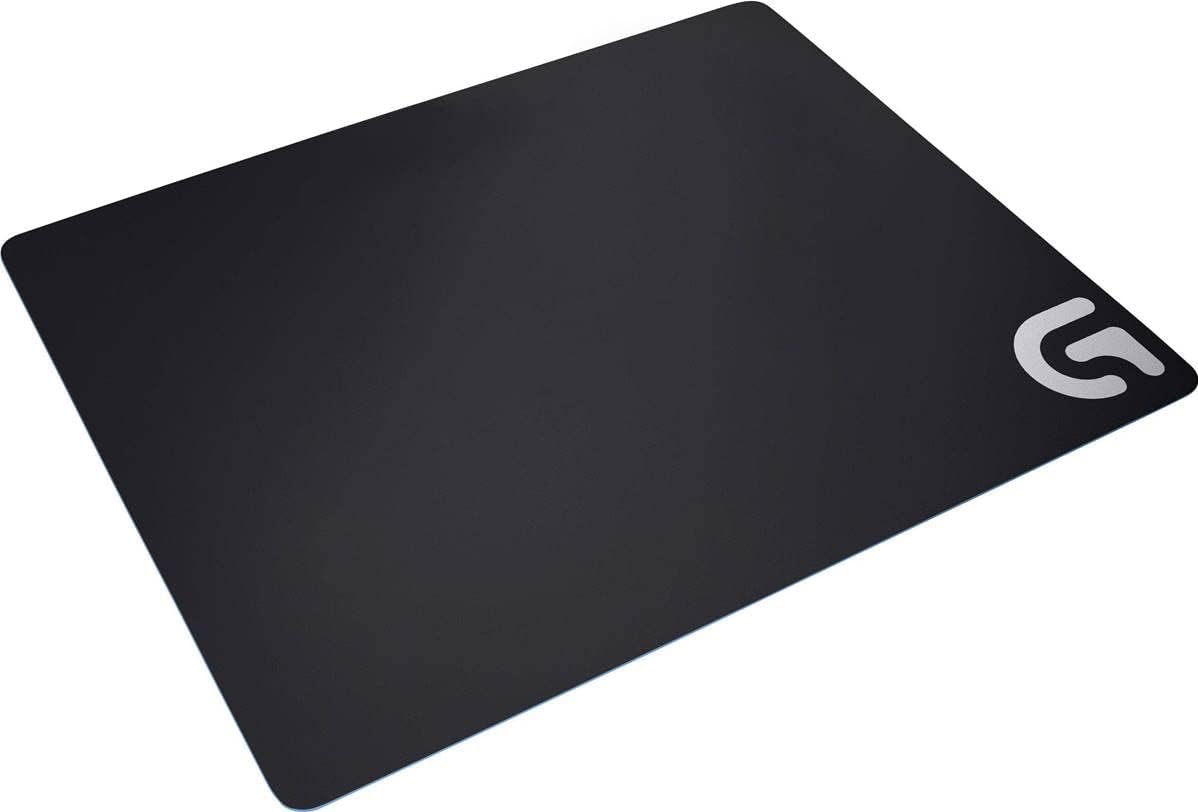
Logitech G440 Hard Gaming Mouse Pad for High DPI Gaming
$36.37
Related Products




Logitech G440 Hard Gaming Mouse Pad features a low-friction, hard polymer surface ideal for high-DPI gaming, improving mouse control and precise cursor placement. Consistent surface texture improves sensor performance, especially when used with Logitech G gaming sensors. And the multi-layer construction with a rubber base and hard polymer core give G440 a stable foundation for precise in-game mouse manoeuvres.
Low surface friction : This Logitech gaming mouse pad provides low surface friction and minimal resistance to the mouse feet when making the small movements common to high-DPI gaming, requiring less force to start or stop a movement and minimising the chance of overshooting cursor placement
Consistent surface texture : The consistent surface texture provides the sensor the optimal imagery for translating mouse movement into cursor movement, an improvement over often inconsistent or dirty table or desk surfaces
Matched to Logitech G sensors : Using a surface texture closest to the optimal testing environment, G440 gives gamers access to the fullest Logitech G mouse sensor accuracy and precision; excellent performance for both wireless mouse and wired mouse
Stable rubber base : High-DPI gamers make very subtle hand movements and even the slightest shift in the gaming surface can interfere with precise cursor control. The rubber surface ensures a stable base for RGB mouse movement
Compatibility : Ideal for any wired USB or wireless computer, Mac or laptop mouse

prchord –
Perfect for G700s and extremely low friction movement
I was looking into getting a good mouse pad since I have a triple monitor setup that I use for work (cough: and battlefield 4/crysis 3) and have a lot of screen real estate to cross. I use a Logitech g700s mouse and was originally just using it on my desk. I went out a purchased a steelseries Qck (the cheapest, highly rated gaming mouse pad out there) and didn’t actually like the added friction/resistance to my mouse movements. With the cloth Qck, I felt that I had to give more pressure to make my mouse move. After doing some research, I learned that a hard mouse pad would give me the least amount of friction.I debated between getting the Logitech G440 (plastic) or the Corsair mm600 (aluminum). My experience in the past with any technology is that the more I stick with one company, the better the result tends to be. The mm600 looks amazing, but I stuck with Logitech since on the website for the G440, it says:”MATCHED TO LOGITECH G SENSORS. Better togetherWhether using an optical or laser mouse, G440 can give gamers access to enhanced sensor accuracy and precision. G440 uses a surface texture comparable to the optimal testing environment for Logitech G mice.”I bought into their advertising and do not regret it one bit. The G440 is amazing. My mouse feels like its gliding on ice. Actually, I found that I have to consciously stop my movement than compared to how the mouse glided on my desk or one of those cheap mouse pads (the ones from staples, not the cloth qck). I think it’s cool because minimal force is required for me to move my mouse and stop it. I cannot compare it to the aluminum mm600, but I love this thing.Conclusion: If you have a logitech G series mouse and you want a low-friction performance mouse pad, you should get this. It’s awesome.I’ve added a picture of the mouse pad with the G700s and my k800 keyboard just for size comparison.
Leonardo Cuellar –
Better than Cloth | Mouse Bungee suggested
This is far more accurate and responsive than the Cloth alternative. However, keep these things in mind.The slip of this pad is very high, so you either need a Wireless Mouse (which means you should get the wireless charging version instead), or have a Mouse Bungee to go along with it (sold separately) . This is important because, if not, you will feel random resistance and unpleasant feedback from the cable tug.While talking about the Mouse Bungee, it works best if you have enough space on the North of the pad for it, that way the thicker cable of a gaming mouse won’t cause any tension or feedback. You can minimize tension, by running a Slip Test–SLIP TEST: Move the mouse in the center, briefly hold it, and softly push it away in every direction, (where you feel you might move the mouse during use). If you notice any deformation in the mouse path, re-adjust your cable and bungee position, until a minimal, comfortable, path deformation is reached.–If you’re a low-[DPI/Sensitivity] gamer, you probably don’t need to focus on this too much.Lastly, if you’re switching from Cloth, to Hard, don’t be afraid to lower your sensitivity, or DPI in games slightly to compensate for the slip.Overall, this has made a huge difference in my aim (in a good way), and the fact that it doesn’t get dirt stuck in it, is a massive plus!
Saad H. Khan –
Where have you been all my life?
I used to be a competitive gamer (back in 1999-2002) and have relied on cloth mouse pads since then. For the past 4+ years I’ve been all about League of Legends. I am a platinum elo player (nothing to brag about but not entirely a noob either). You can only gather so much information online about hard surface vs cloth, and the only way you’ll know if a hard surface mouse pad works for you is to try it in person. This mouse pad works wonders.This pad is perfect. Took me less than an hour to adjust to it. Major complaint people have about hard surfaces is the difficulty with which sudden mouse stops you may want to make because the surfaces are so smooth that mice tend to glide on them too much. On this surface the mouse glides smoothly but the surface also a grainy texture to it at the same time so if you ever want to make those twitch movements and sudden changes in direction, you can without over extending the movement.I am also an active photographer and do spend a healthy amount of time editing photos. The fact that this surface presents less friction vs cloth helps me out for extended editing or gaming sessions. My wrists and arms don’t get tired as often and the size is ideal.I really wish I had purchased this years ago. 5 stars all the way! Well worth the $30.
feeling frisky? xd –
Feels really satisfying to use!
Solid mouse pad. Tracking works prefectly with my laser mouse. Playing movement intensive games feel so much better thanks to the smooth and consistent surface of the pad. The logo is flat and blends with the mouse pad, so it doesn’t obstruct the mouse when you go over it. The rubber pad has a strong grip and does not budge. However, what I didn’t like was that the edges were quite rough and “cuts” into my wrist as I normally play osu and place my hand near the edge of the mouse pad. If you normally don’t place your hand near the edge while playing then you’ll be fine. I also noticed that you could see the blue lining of the rubber base from the side. It would look better if the lining was also black in color. Do be warned that this mouse pad is pretty big, so be prepared to have enough space on your table for that. I would personally love to see a smaller version as I don’t have a lot of space on my table and I don’t need that much space for the mouse pad due to the high DPI that I use.Overall – Excellent performance, small room for improvement, size could be smaller.
Dionatta Palmer –
Ótimo. Ótimo. Ótimo.
Sylv1 –
Aussi bien que les grandes marques ..
Kunal –
Excellent when used right. I pair this with my MX Master 3 for Mac and it works just fine, helps achieve good precision with its highly smooth surface which is easy to clean. Light weight however does not bend – solid plane. Edges are sharp so it’s best when not hanging by the table edge, I let my forearm rest with my hand on the mouse to minimise edge contact. Large size which can be set horizontally or vertically on your table, surface underneath has excellent grip.
Dani D –
Tengo unas cuantas alfombrillas porque me gusta probarlas y he de decir que esta es diferente .Es rígida , la cual hace que no tengas problemas de dobles , si estas acostumbrado a no usar alfombrilla , esta será algo así como seguir igual , pero no destrozando los pads del mouse, ya que es bastante rápida.
Client d’Amazon –
It’s been a while since I bought this so I guess I can give it a proper review.The surface itself is great and offers a decent range of motion as well as a very smooth glide.My only gripe is the lack of retention, the pad itself tends to move a lot unless your desk’s surface isn’t slippery, if it is you’ll probably want to secure the mouse pad to the desk to avoid undesired movement of the mouse pad.other than that… for the price I paid at the time, it’s a decent & long lasting option.